Disclosure: This post may contain affiliate links. As an Amazon Associate, I earn from qualifying purchases. Learn more.
Building a minimal desk setup in 2026 starts with one decision that affects everything else: the keyboard. It sits at the center of your workspace, you touch it thousands of times a day, and it either elevates or kills the aesthetic you’re going for. This guide cuts through the noise and gives you the best mechanical keyboards specifically chosen for clean, minimal desk setups — not gaming battlestations.
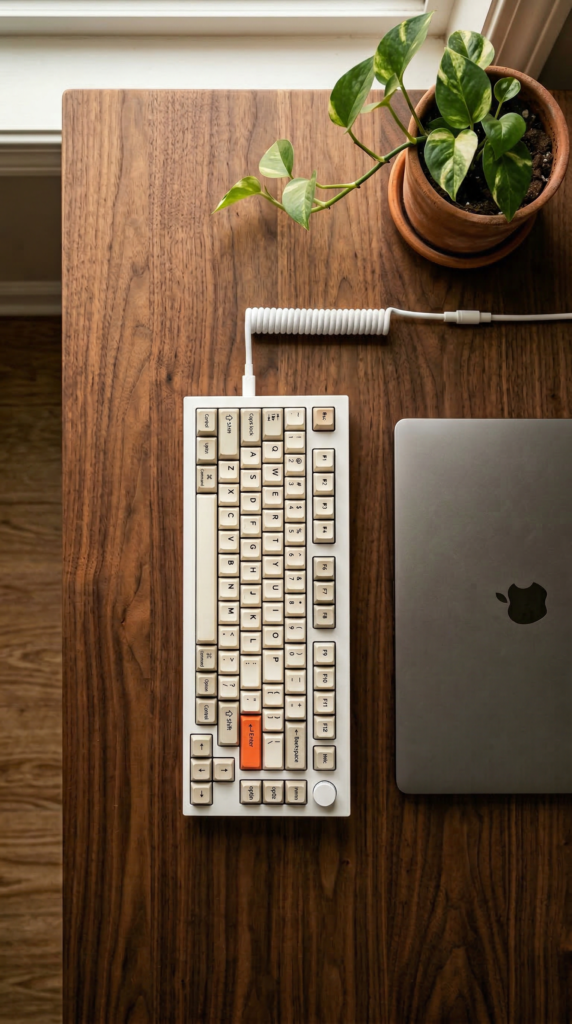
Best Picks (2026)
Quick Answer (TL;DR)
If you want one safe pick: Keychron Q1 Max.
If you want the cleanest low-profile look: Nuphy Air75 V2.
If you’re on a budget: Keychron K2 HE.
Fast path — choose one track and ignore the rest:
- Track A (best all-rounder): Keychron Q1 Max
- Track B (cleanest aesthetic): Nuphy Air75 V2
- Track C (best value): Keychron K2 HE
Start with Keychron Q1 Max on Amazon
Head-to-Head Comparison
| Model | Best For |
|---|---|
| Keychron Q1 Max | Best all-around minimal mechanical keyboard |
| Nuphy Air75 V2 | Best low-profile aesthetic keyboard |
| Keychron K2 HE | Best value for minimal setups |
| Lofree Flow | Best Mac-style retro minimal look |
| Vissles LP85 | Best ultra-budget low-profile option |
Our Top Picks
#1. Keychron Q1 Max — Best All-Around Minimal Mechanical Keyboard
Full aluminum build, QMK/VIA compatible, 2.4GHz wireless + Bluetooth + USB-C. Available in neutral colorways that suit minimal desk setups without the gaming aesthetic.
- Why it made the list: Heavy aluminum build (zero flex), full wireless, deeply customizable
- Tradeoffs: Heavy at ~1.5kg, premium price point
- Avoid if: You need portability or have a tight budget
Check price and availability for Keychron Q1 Max on Amazon
#2. Nuphy Air75 V2 — Best Low-Profile Aesthetic Keyboard
Ultra-slim profile, hot-swappable low-profile switches, wireless multi-device. Pastel and neutral colorways designed specifically for aesthetic setups.
- Why it made the list: Sits almost flat on the desk, visually the cleanest option
- Tradeoffs: Less key travel than standard mechanical — takes adjustment
- Avoid if: You game heavily or prefer deep-travel classic switches
Check price and availability for Nuphy Air75 V2 on Amazon
#3. Keychron K2 HE — Best Value for Minimal Setups
Hall Effect magnetic switches, compact 75% layout, wireless + wired. Significantly lower price than the Q1 Max with most of the same features.
- Why it made the list: Hall Effect switches outlast standard mechanical, excellent value
- Tradeoffs: Plastic chassis — not as premium feel as aluminum boards
- Best for: First-time mechanical keyboard buyers building a clean setup on a budget
Check price and availability for Keychron K2 HE on Amazon
#4. Lofree Flow — Best Mac-Style Retro Minimal Look
Round keycap design that matches modern minimal interiors. Gasket mounted for softer, quieter typing. White and gray colorways complement neutral desk setups.
Check price and availability for Lofree Flow on Amazon
#5. Vissles LP85 — Best Ultra-Budget Low-Profile Option
Low-profile slim design at a fraction of the price of Nuphy. Bluetooth multi-device, clean minimalist look for neutral desks.
Check price and availability for Vissles LP85 on Amazon
How to Choose: Key Factors for Minimal Desk Setups
Layout: 75% Is the Sweet Spot
Full-size keyboards with numpads take up 40% of your desk surface and kill the minimal look. For minimal setups, 75% or 65% layouts give you arrow keys (which 60% drops) while clearing significant desk space.
Color: Match Your Desk, Not Your Game
Most gaming keyboards come in black with aggressive RGB. For minimal aesthetics, look for white, cream, gray, or slate colorways. Disable RGB or use warm white backlight only — it’s more cohesive with neutral desk setups.
Switches: Sound Matters in a Focused Setup
Loud clicky switches break the calm atmosphere of a minimal home office. For minimal desk setups: prioritize linear silent switches (Gateron Yellow, Keychron Red) or light tactile switches (Brown, Banana). Avoid clicky Blues — too loud for the vibe.
Wired vs. Wireless: Cables Are Part of the Aesthetic
A cable running across your desk breaks the clean look. Wireless is strongly preferred for minimal setups. All top picks in this guide support wireless. If you need wired, use a coiled cable in a matching color.
FAQ
Do I need a mechanical keyboard for a minimal setup?
No — but mechanical keyboards offer better aesthetics, more colorway choices, and longer durability than membrane keyboards. For a setup you’ll look at every day, the investment is usually worth it.
Is the Keychron Q1 Max worth the price?
For a permanent desk setup, yes. The aluminum build, wireless connectivity, and QMK customization make it a long-term purchase. If budget is tight, the K2 HE delivers 80% of the experience at roughly half the price.
What color keyboard looks best on a minimal white desk?
White or cream keyboards with white or warm-white backlighting. The Keychron Q1 Max in White and the Nuphy Air75 V2 in White are the most recommended for neutral minimal setups.
Final Recommendation
The keyboard is the centerpiece of any desk setup. For a minimal aesthetic, prioritize layout size, colorway, and switch noise over specs. The Keychron Q1 Max remains the safest all-around choice for anyone building a serious minimal home office in 2026. If you want something visually lighter and flatter, the Nuphy Air75 V2 is the best low-profile option on the market. And if you’re building your first clean setup on a budget, start with the Keychron K2 HE — you won’t regret it.
Ready? Open Keychron Q1 Max on Amazon →
Related Guides
Keep reading with these related buying guides:
- Best Tablets for Students & Remote Work (2026 Buying Guide)
- Best-Selling Webcam Models on Amazon (2026): A Comprehensive Buying Guide
- Best Power Bank Under $80 in 2026: The Ultimate Buying Guide
- Top iPad Alternatives Worth Buying in 2026: Your Definitive Buying Guide
- Best Webcam for Remote Meetings & Zoom Calls (2026): A Comprehensive Buying Guide
- The Best Robot Vacuums Under $600 in 2026: Your Smart Cleaning Guide