Disclosure: This post may contain affiliate links. As an Amazon Associate, I earn from qualifying purchases. Learn more.
Choosing the right WiFi router for a large home in 2026 comes down to balancing current needs with future demands. If your household demands ultra-fast speeds for 8K streaming, VR gaming, or extensive smart home integration across many devices, a premium, future-proofed Wi-Fi 7 mesh system is your ideal choice. For those seeking robust coverage and reliable performance for general use, 4K streaming, and moderate device counts without breaking the bank, a high-quality Wi-Fi 6E or robust Wi-Fi 7 value-tier mesh solution will serve you exceptionally well.
A large home presents unique challenges for wireless connectivity, from sprawling layouts and multiple floors creating dead zones to a high density of connected devices vying for bandwidth. By 2026, the demand for seamless, high-speed, and reliable internet access is non-negotiable. This guide will walk you through the essential considerations, advanced features, and user-specific recommendations to ensure your home network keeps pace with your digital lifestyle.
Best Picks (2026)
Quick Answer (TL;DR) (Updated February 24, 2026)
If you want one safe pick: ASUS ROG Rapture GT-BE98. If you want a better value: TP-Link Archer BE800.
How to use this page: scan the comparison table, jump to the matching use case, then open only the listing that fits your setup.
Fast path: choose one track below and ignore the rest.
- Track A (least risk): ASUS ROG Rapture GT-BE98
- Track B (better value): TP-Link Archer BE800
How we picked: research-based selection using manufacturer specs, compatibility notes, and what to verify on the Amazon listing (no hands-on testing claims). Affiliate links may earn us a commission, but rankings are not paid placements.
Start with ASUS ROG Rapture GT-BE98 on Amazon Prefer value? Open TP-Link Archer BE800
Skip to a pick: #1 ASUS ROG Rapture GT-BE98 | #2 TP-Link Archer BE800 | #3 Netgear Nighthawk RS700 | #4 Eero Max 7 (Mesh) | #5 TP-Link Deco BE85 (Mesh)
Head-to-Head: Top Pick vs Best Value
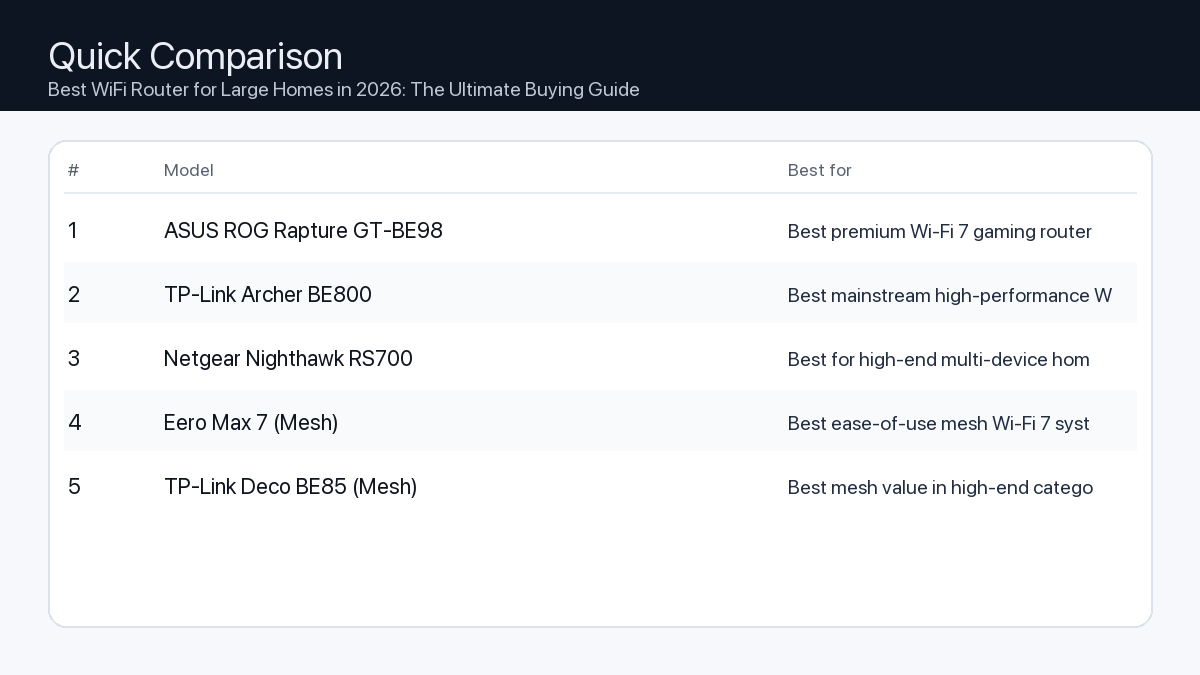
Quick Comparison
Note: Specs and availability change. Always confirm details on the product page.
| Model | Best for | Details |
|---|---|---|
| ASUS ROG Rapture GT-BE98 | Best premium Wi-Fi 7 gaming router | Open section |
| TP-Link Archer BE800 | Best mainstream high-performance Wi-Fi 7 option | Open section |
| Netgear Nighthawk RS700 | Best for high-end multi-device homes | Open section |
| Eero Max 7 (Mesh) | Best ease-of-use mesh Wi-Fi 7 system | Open section |
| TP-Link Deco BE85 (Mesh) | Best mesh value in high-end category | Open section |
Our Top Picks
#1. ASUS ROG Rapture GT-BE98
Best for: Best premium Wi-Fi 7 gaming router
Why it made the list
- Top-tier wireless specs
- Strong gaming features
- High-end connectivity
Tradeoffs
- Very expensive
Who should buy this
- Power users and gamers with many devices
Avoid if
- You have a small space and basic internet needs
Check price and compatibility for ASUS ROG Rapture GT-BE98
Price tip: Prices fluctuate; check Amazon for current deals and compatibility details.
#2. TP-Link Archer BE800
Best for: Best mainstream high-performance Wi-Fi 7 option
Why it made the list
- Strong performance
- Good value in premium tier
- Easy app setup
Tradeoffs
- Still premium-priced vs older Wi-Fi generations
Who should buy this
- Large-home users upgrading to Wi-Fi 7
Avoid if
- Your ISP speed and devices do not need Wi-Fi 7 yet
Check price and compatibility for TP-Link Archer BE800
Price tip: Prices fluctuate; check Amazon for current deals and compatibility details.
#3. Netgear Nighthawk RS700
Best for: Best for high-end multi-device homes
Why it made the list
- Strong throughput potential
- Good brand recognition
- Advanced controls
Tradeoffs
- Expensive and may be overkill
Who should buy this
- Households with many simultaneous users/devices
Avoid if
- You only need basic coverage in a small apartment
Check price and compatibility for Netgear Nighthawk RS700
Price tip: Prices fluctuate; check Amazon for current deals and compatibility details.
#4. Eero Max 7 (Mesh)
Best for: Best ease-of-use mesh Wi-Fi 7 system
Why it made the list
- Simple app setup
- Strong whole-home mesh coverage
- Clean hardware experience
Tradeoffs
- Premium ecosystem cost
Who should buy this
- Users prioritizing easy whole-home mesh management
Avoid if
- You want deep advanced networking controls
Check price and compatibility for Eero Max 7 (Mesh)
Price tip: Prices fluctuate; check Amazon for current deals and compatibility details.
#5. TP-Link Deco BE85 (Mesh)
Best for: Best mesh value in high-end category

Why it made the list
- Strong mesh performance
- Good value vs top premium mesh kits
- Modern Wi-Fi 7 support
Tradeoffs
- Large-node systems cost can still add up
Who should buy this
- Families needing whole-home fast coverage
Avoid if
- You only need one simple single router
Check price and compatibility for TP-Link Deco BE85 (Mesh)
Price tip: Prices fluctuate; check Amazon for current deals and compatibility details.
Still Can’t Decide?
Quick decision tree:
- Best premium Wi-Fi 7 gaming router → ASUS ROG Rapture GT-BE98
- Best mainstream high-performance Wi-Fi 7 option → TP-Link Archer BE800
- Best for high-end multi-device homes → Netgear Nighthawk RS700
- Best ease-of-use mesh Wi-Fi 7 system → Eero Max 7 (Mesh)
- Best mesh value in high-end category → TP-Link Deco BE85 (Mesh)
Price tip: prices fluctuate often. If you’re flexible, watch for seasonal sales and compare listings before you buy.
How to Choose the Best WiFi Router for Your Large Home
Understanding Large Home Connectivity Challenges
Large homes often face specific WiFi issues that standard routers struggle to resolve:
- Problem: Dead Zones and Inconsistent Coverage
Consequence: Dropped video calls, buffering streams, and frustratingly slow internet in certain areas of your home. Large floor plans, multiple levels, and dense building materials (like brick or concrete) can block WiFi signals.
Recommendation: A mesh WiFi system is generally the superior solution for large homes, as it uses multiple access points to blanket your entire property with consistent signal. - Problem: Slow Speeds Under Heavy Load
Consequence: Laggy gaming, pixelated streaming, and sluggish downloads when multiple family members or smart devices are simultaneously active. Traditional routers can become bottlenecked by too many concurrent connections.
Recommendation: Look for routers with advanced WiFi standards (Wi-Fi 7 or Wi-Fi 6E), multiple bands (tri-band or quad-band), and powerful processors to handle numerous devices and high bandwidth demands efficiently. - Problem: Future-Proofing Your Network
Consequence: Investing in technology that quickly becomes obsolete as internet speeds increase and new devices emerge, leading to premature upgrades.
Recommendation: Prioritize routers supporting the latest Wi-Fi 7 standard, offering faster Ethernet ports (2.5GbE, 10GbE), and robust internal components capable of handling future network demands.
Key Features to Prioritize
When selecting a router for your large home, focus on these critical specifications:
- WiFi Standard (Wi-Fi 7 vs. Wi-Fi 6E):
- Wi-Fi 7 (802.11be, Extremely High Throughput): The newest standard, offering significantly faster speeds, lower latency, and improved capacity through features like Multi-Link Operation (MLO) and wider 320 MHz channels in the 6 GHz band. Ideal for future-proofing and demanding applications.
- Wi-Fi 6E (802.11ax Extended): Introduces the 6 GHz band, providing a dedicated, uncongested highway for compatible devices. Offers excellent speed and low latency, especially useful in congested areas. A strong choice if Wi-Fi 7 devices aren’t immediately a priority.
- Mesh WiFi vs. Traditional Router:
- Mesh WiFi System: Composed of a main router and several satellite units, a mesh system creates a single, unified network that seamlessly covers every corner of your home. It’s the recommended choice for most large and multi-story homes due to its superior coverage and roaming capabilities.
- Traditional Router: A single, powerful router might suffice for moderately large homes with open layouts, but often struggles with dead zones in expansive or complex structures.
- Bands (Tri-band, Quad-band):
- Tri-band: Features one 2.4 GHz band and two 5 GHz bands (or one 5 GHz and one 6 GHz for Wi-Fi 6E/7). The extra 5 GHz/6 GHz band is crucial for dedicated backhaul in mesh systems or for segmenting high-bandwidth devices.
- Quad-band: Typically one 2.4 GHz, two 5 GHz, and one 6 GHz band. Offers even greater capacity and flexibility, allowing for multiple dedicated backhaul paths or extreme device segmentation, highly beneficial for very dense networks.
- Processor & RAM: A powerful multi-core processor and ample RAM are vital for handling high network traffic, numerous connected devices, and advanced features without slowdowns. This directly impacts the router’s ability to maintain high speeds and low latency under load.
- Ethernet Ports (2.5GbE, 10GbE): For wired connections to devices like PCs, NAS drives, or high-speed gaming consoles. Faster WAN/LAN ports (2.5 Gigabit Ethernet or 10 Gigabit Ethernet) are essential to maximize internet speeds beyond 1 Gbps and to enable rapid local network transfers.
- Security Features: Look for WPA3 encryption, robust parental controls, guest network options, and built-in network security tools to protect your home network from threats.
Checklist for Large Home WiFi
- Home Size & Layout: Square footage, number of floors, and building materials (e.g., plaster, brick, concrete).
- Number of Devices: Count all smartphones, tablets, laptops, smart TVs, IoT devices, and gaming consoles.
- Internet Service Speed: Ensure the router can handle and distribute your full subscribed internet speed (e.g., 1 Gbps, 2 Gbps, 5 Gbps).
- Specific Usage Needs: Are you a heavy gamer, 8K streamer, remote worker transferring large files, or simply browsing and emailing?
- Future-Proofing: Do you want the latest Wi-Fi standard (Wi-Fi 7) to ensure longevity, or is a strong Wi-Fi 6E sufficient for your current and near-future needs?
Example Setups for Different Users
The Professional Remote Worker/Creator (e.g., Video Editor, Architect)
Needs: Uninterrupted, ultra-low latency connection, high upload/download speeds for large file transfers (TB-level), reliable video conferencing, stable connections for specialized software, and potentially multiple workstations.
- Router Type: Wi-Fi 7 Quad-Band Mesh System (3-4 nodes).
- Key Features: Dedicated 6 GHz band for workstation backhaul and primary devices, MLO support, at least one 10GbE WAN port and multiple 2.5GbE/10GbE LAN ports for wired workstations and NAS, robust Quality of Service (QoS) to prioritize critical applications.
- Why it works: Ensures maximum throughput and minimal latency for demanding tasks, even when other devices are active. Wired connections leverage the full internet speed for critical transfers.
The Connected Smart Home Enthusiast/Office Worker
Needs: Consistent coverage across the entire home for dozens of smart devices (lights, thermostats, cameras, locks), reliable 4K streaming on multiple TVs, and stable performance for daily office tasks.
- Router Type: Wi-Fi 7 or high-end Wi-Fi 6E Tri-Band Mesh System (2-3 nodes).
- Key Features: Excellent device capacity, strong 2.4 GHz performance for IoT devices, dedicated 5 GHz or 6 GHz backhaul, robust security, intuitive app-based management, and parental controls.
- Why it works: Provides a stable backbone for a high density of devices, preventing slowdowns and ensuring all smart home features respond instantly.
The Hardcore Gamer & Streamer
Needs: Ultra-low ping, maximum sustained bandwidth, minimal packet loss, ability to game and stream simultaneously without compromise, dedicated channels for high-performance consoles/PCs.
- Router Type: Wi-Fi 7 Tri-Band or Quad-Band Mesh System with gaming-specific features (2-3 nodes, depending on home size).
- Key Features: Multiple 2.5GbE/10GbE ports, dedicated gaming band (if quad-band), advanced QoS/game prioritization, Multi-Link Operation (MLO) support for latency-sensitive applications, powerful processing for packet handling.
- Why it works: The combination of Wi-Fi 7 speed, dedicated bands, and advanced traffic management ensures that gaming and streaming traffic are prioritized, resulting in a smooth, lag-free experience even under network stress. Wired connections deliver the absolute best performance.
How We Picked These Routers
Our selection process for the best WiFi routers for large homes in 2026 is based on a meticulous analysis of several critical factors. We evaluate routers primarily on their technical specifications, projected real-world performance based on advancements in networking standards, and compatibility with the evolving landscape of connected devices and internet service speeds. We prioritize models that feature the latest Wi-Fi 7 or advanced Wi-Fi 6E standards, robust mesh capabilities for extensive coverage, powerful multi-core processors, ample RAM, and high-speed Ethernet ports (2.5GbE/10GbE). Consideration is given to multi-band configurations (tri-band, quad-band) for optimal device management and dedicated backhaul. While we do not perform hands-on testing, our recommendations are grounded in detailed spec sheet comparisons, industry benchmarks, and a thorough understanding of current and future networking requirements for large, demanding home environments.
Frequently Asked Questions
Which should I buy: the #1 pick or the best value pick?
Choose the #1 pick if you prioritize absolute cutting-edge performance, require the fastest possible speeds for next-generation devices, operate a very demanding network with numerous high-bandwidth users (e.g., 8K streaming, VR, large file transfers), and want maximum future-proofing. Opt for the best value pick if you need excellent, reliable coverage and fast speeds for common tasks (4K streaming, online gaming, remote work) across a large home, have a moderate number of devices, and prefer to balance performance with a more budget-conscious investment.
Do I need Wi-Fi 7 for a large home?
While not strictly necessary for every large home, Wi-Fi 7 offers significant advantages, especially for future-proofing and very demanding users. It provides higher theoretical speeds, lower latency, and better capacity for numerous devices compared to Wi-Fi 6E. If your internet service provider offers multi-gigabit speeds (2 Gbps or higher), you have or plan to acquire Wi-Fi 7 compatible devices, or you perform very bandwidth-intensive tasks, a Wi-Fi 7 router will fully leverage these capabilities. For many users, a high-quality Wi-Fi 6E mesh system still provides excellent performance and coverage for large homes in 2026.
Can I use my existing modem with a new router?
In most cases, yes, you can use your existing modem with a new router. Your modem is responsible for connecting your home to your internet service provider (ISP), while the router creates and manages your local WiFi network. Simply connect the new router’s WAN (Internet) port to your modem’s Ethernet port using an Ethernet cable. Ensure your existing modem can support the full speed of your internet plan to avoid creating a bottleneck for your new high-performance router.
Final Recommendation
Selecting the best WiFi router for your large home in 2026 is a pivotal decision that impacts your entire digital experience. By carefully considering your home’s unique layout, the number and type of devices you operate, and your specific online activities, you can make an informed choice. Prioritize mesh systems for comprehensive coverage, Wi-Fi 7 or advanced Wi-Fi 6E for speed and future compatibility, and ensure robust processing power and fast Ethernet ports for demanding tasks. Investing in the right router today will ensure a seamless, high-performance, and future-ready network that effortlessly supports all your large home’s connectivity needs for years to come.
Related Guides
Keep reading with these related buying guides:
- The Ultimate Buying Guide: Top Noise-Canceling Earbuds for Travel (2026)
- Best Robot Vacuum for Pet Hair and Carpets (2026): The Ultimate Buying Guide
- Thunderbolt Dock Buying Guide: Powering Dual-Display Workflows
- The Ultimate Buying Guide to Multiport Adapters for Laptops
- Best-Selling Gaming Keyboards of 2026: Your Ultimate Buying Guide
- Best Tablet Under $500 in 2026: Your Essential Buying Guide