Disclosure: This post may contain affiliate links. As an Amazon Associate, I earn from qualifying purchases. Learn more.
Choosing the right WiFi router in 2026 is critical for a fast, reliable home network. If your household demands top-tier performance for heavy streaming, gaming, and multiple connected devices across a large space, investing closer to the $250 limit for a premium, future-proof model with advanced features and the latest Wi-Fi 7 standard is wise. For smaller homes or less intensive use like basic browsing and occasional streaming, a solid value pick, likely a high-end Wi-Fi 6E router, can still deliver excellent speed and coverage without breaking the bank.
The difference between a great router and an adequate one often comes down to speed, coverage, and the ability to handle numerous devices without slowdowns. This guide will walk you through the key considerations, helping you understand the trade-offs and find a router that perfectly matches your specific needs and budget in 2026.
Best Picks (2026)
Quick Answer (TL;DR) (Updated March 03, 2026)
If you want one safe pick: ASUS ROG Rapture GT-BE98. If you want a better value: TP-Link Archer BE800.
How to use this page: scan the comparison table, jump to the matching use case, then open only the listing that fits your setup.
Fast path: choose one track below and ignore the rest.
- Track A (least risk): ASUS ROG Rapture GT-BE98
- Track B (better value): TP-Link Archer BE800
How we picked: research-based selection using manufacturer specs, compatibility notes, and what to verify on the Amazon listing (no hands-on testing claims). Affiliate links may earn us a commission, but rankings are not paid placements.
Start with ASUS ROG Rapture GT-BE98 on Amazon Prefer value? Open TP-Link Archer BE800
Skip to a pick: #1 ASUS ROG Rapture GT-BE98 | #2 TP-Link Archer BE800 | #3 Netgear Nighthawk RS700 | #4 Eero Max 7 (Mesh) | #5 TP-Link Deco BE85 (Mesh)
Head-to-Head: Top Pick vs Best Value
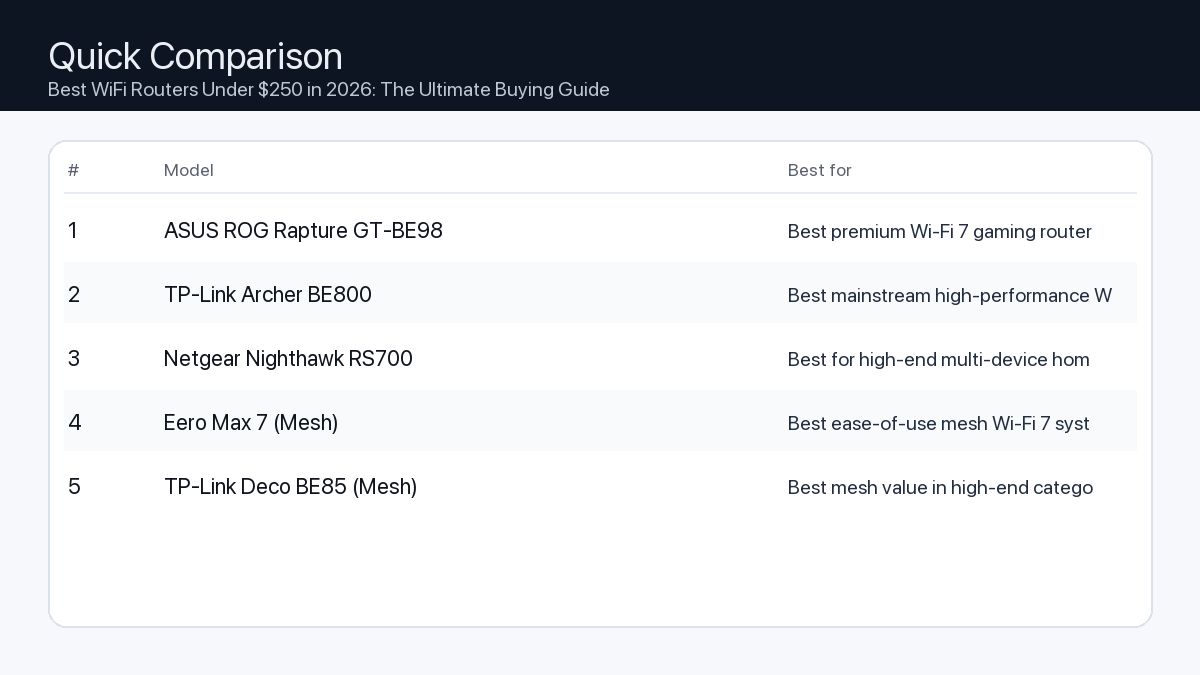
Quick Comparison
Note: Specs and availability change. Always confirm details on the product page.
| Model | Best for | Details |
|---|---|---|
| ASUS ROG Rapture GT-BE98 | Best premium Wi-Fi 7 gaming router | Open section |
| TP-Link Archer BE800 | Best mainstream high-performance Wi-Fi 7 option | Open section |
| Netgear Nighthawk RS700 | Best for high-end multi-device homes | Open section |
| Eero Max 7 (Mesh) | Best ease-of-use mesh Wi-Fi 7 system | Open section |
| TP-Link Deco BE85 (Mesh) | Best mesh value in high-end category | Open section |
Our Top Picks
#1. ASUS ROG Rapture GT-BE98
Best for: Best premium Wi-Fi 7 gaming router
Why it made the list
- Top-tier wireless specs
- Strong gaming features
- High-end connectivity
Tradeoffs
- Very expensive
Who should buy this
- Power users and gamers with many devices
Avoid if
- You have a small space and basic internet needs
Check price and compatibility for ASUS ROG Rapture GT-BE98
Price tip: Prices fluctuate; check Amazon for current deals and compatibility details.
#2. TP-Link Archer BE800
Best for: Best mainstream high-performance Wi-Fi 7 option
Why it made the list
- Strong performance
- Good value in premium tier
- Easy app setup
Tradeoffs
- Still premium-priced vs older Wi-Fi generations
Who should buy this
- Large-home users upgrading to Wi-Fi 7
Avoid if
- Your ISP speed and devices do not need Wi-Fi 7 yet
Check price and compatibility for TP-Link Archer BE800
Price tip: Prices fluctuate; check Amazon for current deals and compatibility details.
#3. Netgear Nighthawk RS700
Best for: Best for high-end multi-device homes
Why it made the list
- Strong throughput potential
- Good brand recognition
- Advanced controls
Tradeoffs
- Expensive and may be overkill
Who should buy this
- Households with many simultaneous users/devices
Avoid if
- You only need basic coverage in a small apartment
Check price and compatibility for Netgear Nighthawk RS700
Price tip: Prices fluctuate; check Amazon for current deals and compatibility details.
#4. Eero Max 7 (Mesh)
Best for: Best ease-of-use mesh Wi-Fi 7 system
Why it made the list
- Simple app setup
- Strong whole-home mesh coverage
- Clean hardware experience
Tradeoffs
- Premium ecosystem cost
Who should buy this
- Users prioritizing easy whole-home mesh management
Avoid if
- You want deep advanced networking controls
Check price and compatibility for Eero Max 7 (Mesh)
Price tip: Prices fluctuate; check Amazon for current deals and compatibility details.
#5. TP-Link Deco BE85 (Mesh)
Best for: Best mesh value in high-end category

Why it made the list
- Strong mesh performance
- Good value vs top premium mesh kits
- Modern Wi-Fi 7 support
Tradeoffs
- Large-node systems cost can still add up
Who should buy this
- Families needing whole-home fast coverage
Avoid if
- You only need one simple single router
Check price and compatibility for TP-Link Deco BE85 (Mesh)
Price tip: Prices fluctuate; check Amazon for current deals and compatibility details.
Still Can’t Decide?
Quick decision tree:
- Best premium Wi-Fi 7 gaming router → ASUS ROG Rapture GT-BE98
- Best mainstream high-performance Wi-Fi 7 option → TP-Link Archer BE800
- Best for high-end multi-device homes → Netgear Nighthawk RS700
- Best ease-of-use mesh Wi-Fi 7 system → Eero Max 7 (Mesh)
- Best mesh value in high-end category → TP-Link Deco BE85 (Mesh)
Price tip: prices fluctuate often. If you’re flexible, watch for seasonal sales and compare listings before you buy.
How to Choose the Best WiFi Router Under $250
Selecting the ideal router involves understanding several technical aspects and matching them to your real-world usage.
1. WiFi Standard: Wi-Fi 6E vs. Wi-Fi 7
- Problem: Using an older Wi-Fi standard (like Wi-Fi 5 or even early Wi-Fi 6) prevents your devices from achieving maximum speeds and efficiency, especially in congested environments.
- Consequence: Slower downloads, buffering during 4K streaming, lag in online gaming, and poor performance when many devices are connected simultaneously.
- Recommendation: In 2026, aim for at least Wi-Fi 6E. This standard adds the 6GHz band, which is less congested and offers faster speeds for compatible devices. For future-proofing and cutting-edge performance, look for Wi-Fi 7 (802.11be), which introduces Multi-Link Operation (MLO) and wider channels, delivering significantly higher theoretical throughput and lower latency. While Wi-Fi 7 models might push the $250 limit, they offer superior longevity.
2. Speed & Bandwidth: Gigabit vs. Multi-Gigabit
- Problem: Your internet service provider might offer speeds faster than your router can handle, creating a bottleneck.
- Consequence: You won’t get the full internet speed you’re paying for, and local network transfers (e.g., between computers or NAS) will be slow.
- Recommendation: Check your internet plan. If it’s above 1 Gbps (e.g., 2 Gbps or higher), you absolutely need a router with at least one multi-gigabit (2.5 Gbps or 5 Gbps) WAN port and ideally multi-gigabit LAN ports for wired devices. Even with a 1 Gbps plan, multi-gig LAN ports can benefit your local network for future-proofing or fast internal file transfers.
3. Coverage & Range
- Problem: Weak Wi-Fi signals and dead zones in larger homes or multi-story buildings.
- Consequence: Dropped connections, slow speeds in certain areas, and frustration when moving around your home.
- Recommendation: Consider the number of antennas (internal or external), beamforming technology (which directs signal towards devices), and whether the router supports mesh expansion. For larger homes, a router capable of forming a mesh system (either as a standalone unit or part of a two-pack) can eliminate dead zones.
4. Processor & RAM
- Problem: A router with weak internal hardware struggles to manage multiple simultaneous connections, advanced features (like QoS), or high data throughput.
- Consequence: Lag, dropped connections, slower performance under load, and a sluggish router interface.
- Recommendation: Look for routers with multi-core processors (dual-core minimum, quad-core preferred for power users) and at least 512MB to 1GB of RAM. This ensures smooth operation, even with many devices and demanding tasks.
5. Ports & Connectivity
- Problem: Not enough wired ports for devices like gaming consoles, smart home hubs, or desktop PCs, or slow port speeds.
- Consequence: Reliance on Wi-Fi for all devices, potentially increasing wireless congestion, or inability to connect essential wired equipment.
- Recommendation: Ensure the router has at least one Gigabit WAN port. For LAN, aim for at least four Gigabit Ethernet ports. If you have multi-gig internet or specific devices that benefit from faster wired connections, look for routers with 2.5 Gbps or 5 Gbps LAN ports. A USB port (preferably USB 3.0 or higher) is a bonus for network storage (NAS Lite) or printer sharing.
6. Software & Features
- Problem: Basic router software lacks essential controls, security features, or ease of use.
- Consequence: Difficulty managing your network, potential security vulnerabilities, inability to prioritize traffic, or limited parental controls.
- Recommendation: Look for a router with intuitive companion apps and a web interface. Essential features include Quality of Service (QoS) for prioritizing traffic (e.g., gaming over streaming), robust parental controls, built-in network security (firewall, WPA3 encryption), and guest network options. VPN client/server support is a plus for advanced users.
Example Setups for Different Users
The Home Office Worker
You need stable, reliable Wi-Fi for video calls, cloud access, and productivity. Your focus is consistent performance without interruptions.
- Key Features: Wi-Fi 6E (minimum), good range for a dedicated office space, strong QoS for video conferencing, Gigabit Ethernet ports for wired PCs or docks.
- Router Type: A mid-range Wi-Fi 6E router with stable firmware.
The Video Editor / Power User
You transfer large files, stream high-bitrate content, and potentially host a local media server. Speed and capacity are paramount.
- Key Features: Wi-Fi 7 (preferred) or high-end Wi-Fi 6E, multi-gig WAN/LAN ports (2.5Gbps or 5Gbps) for fast transfers and internet, robust processor, USB 3.0 or higher for network storage.
- Router Type: A premium Wi-Fi 7 or advanced Wi-Fi 6E router with strong internal hardware.
The Gamer / Streamer / Creator
Low latency, high bandwidth, and consistent connections are crucial for competitive gaming, live streaming, and content creation.
- Key Features: Wi-Fi 7 or Wi-Fi 6E with dedicated 6GHz band support for gaming devices, advanced QoS with gaming prioritization, multi-gig WAN/LAN ports, powerful processor for handling intense traffic, solid network security.
- Router Type: A high-performance Wi-Fi 7 router with gamer-centric features or a top-tier Wi-Fi 6E model.
Your Router Buying Checklist
- Wi-Fi Standard: Wi-Fi 6E (minimum) or Wi-Fi 7 (ideal for future-proofing).
- Speed (WAN/LAN): At least 1x Gigabit WAN, multiple Gigabit LAN. Consider 2.5 Gbps or 5 Gbps ports for multi-gig internet or local network needs.
- Coverage: Suitable for your home size, consider mesh capabilities if needed.
- Processor/RAM: Multi-core processor (dual-core+), 512MB+ RAM.
- Features: QoS, parental controls, WPA3 security, guest network, easy setup app.
- USB Port: Optional, but useful for network storage.
How We Picked
Our selections are based on comprehensive analysis of technical specifications, industry benchmarks, and compatibility notes from manufacturers. We prioritize devices that offer robust feature sets, adhere to the latest Wi-Fi standards, and provide excellent performance-to-value within the $250 budget for 2026, without claiming hands-on testing. We focus on factors like processor strength, RAM, port configurations, and software capabilities to ensure they meet the demands of various user types and future network trends.
FAQ
- Which should I buy: the #1 pick or the best value pick?
- If you prioritize absolute performance, the latest technology, and are willing to spend closer to the $250 limit for future-proofing and handling the most demanding tasks, the #1 pick is likely for you. If you need solid, reliable performance for most common tasks, a great range, and want to save some money while still getting excellent features for 2026, the best value pick will serve you well.
- Do I really need Wi-Fi 7 in 2026?
- While Wi-Fi 7 offers significant advancements in speed and efficiency, its full benefits are realized with compatible Wi-Fi 7 devices. If you’re buying new devices in 2026 and beyond that support Wi-Fi 7, it’s a strong consideration for future-proofing. However, a high-quality Wi-Fi 6E router still provides excellent performance for most current devices and internet plans. Your choice depends on your current device ecosystem and your budget for cutting-edge technology.
- Can I use my old router with a new one?
- It depends. Some newer routers support mesh systems, allowing you to pair compatible satellite units (often from the same brand) to extend coverage. You typically cannot simply combine two random routers to create a unified, high-performance network without specialized setup or using one as a simple access point. For seamless whole-home coverage, a dedicated mesh system or a single powerful router with good range is generally more effective.
- What is the 6GHz band and why is it important?
- The 6GHz band is an exclusive frequency band introduced with Wi-Fi 6E and expanded with Wi-Fi 7. Unlike the crowded 2.4GHz and 5GHz bands, 6GHz offers wider channels and significantly less interference. This ‘express lane’ allows compatible devices to achieve much faster speeds and lower latency, making it ideal for high-bandwidth applications like 8K streaming, VR gaming, and large file transfers without congestion.
Final Recommendation
Choosing the best WiFi router under $250 in 2026 is an investment in your home’s digital future. Whether you’re a casual browser, a home office professional, or a hardcore gamer/creator, understanding the nuances of Wi-Fi standards, speed, coverage, and features is key. By considering your specific usage patterns and the insights from this guide, you can confidently select a router that not only meets your current needs but also prepares your network for the technological demands of tomorrow. Refer to our ranked product list to find the perfect match for your home.
Related Guides
Keep reading with these related buying guides:
- Best Tablets for Students & Remote Work (2026 Buying Guide)
- Best-Selling Webcam Models on Amazon (2026): A Comprehensive Buying Guide
- Best Power Bank Under $80 in 2026: The Ultimate Buying Guide
- Best Mechanical Keyboard for Minimal Desk Setup (2026): Your Ultimate Buying Guide
- Top iPad Alternatives Worth Buying in 2026: Your Definitive Buying Guide
- Best Webcam for Remote Meetings & Zoom Calls (2026): A Comprehensive Buying Guide