Disclosure: This post may contain affiliate links. As an Amazon Associate, I earn from qualifying purchases. Learn more.
In the evolving landscape of remote work and virtual collaboration, a high-quality webcam is more than a luxury—it’s an essential tool. While many laptops include integrated cameras, dedicated webcams offer superior image clarity, better low-light performance, and advanced features crucial for making a strong impression in 2026. This guide will help you understand the core aspects of webcam technology so you can make an informed decision.
For those who frequently engage in client meetings, virtual presentations, or content creation, investing in a premium webcam is often justified by its enhanced professional presence and robust feature set. These users benefit from superior resolution, advanced low-light capabilities, and precise control over their video output. Conversely, if your primary use involves casual team check-ins or occasional family calls, a value-oriented webcam offering solid 1080p performance in well-lit conditions can comfortably meet your needs without overspending.
Best Picks (2026)
Quick Answer (TL;DR) (Updated March 08, 2026)
If you want one safe pick: Logitech MX Brio. If you want a better value: Logitech Brio 4K.
How to use this page: scan the comparison table, jump to the matching use case, then open only the listing that fits your setup.
Fast path: choose one track below and ignore the rest.
- Track A (least risk): Logitech MX Brio
- Track B (better value): Logitech Brio 4K
How we picked: research-based selection using manufacturer specs, compatibility notes, and what to verify on the Amazon listing (no hands-on testing claims). Affiliate links may earn us a commission, but rankings are not paid placements.
Start with Logitech MX Brio on Amazon Prefer value? Open Logitech Brio 4K
Skip to a pick: #1 Logitech MX Brio | #2 Logitech Brio 4K | #3 Razer Kiyo Pro Ultra | #4 Elgato Facecam Pro | #5 Anker PowerConf C200
Head-to-Head: Top Pick vs Best Value
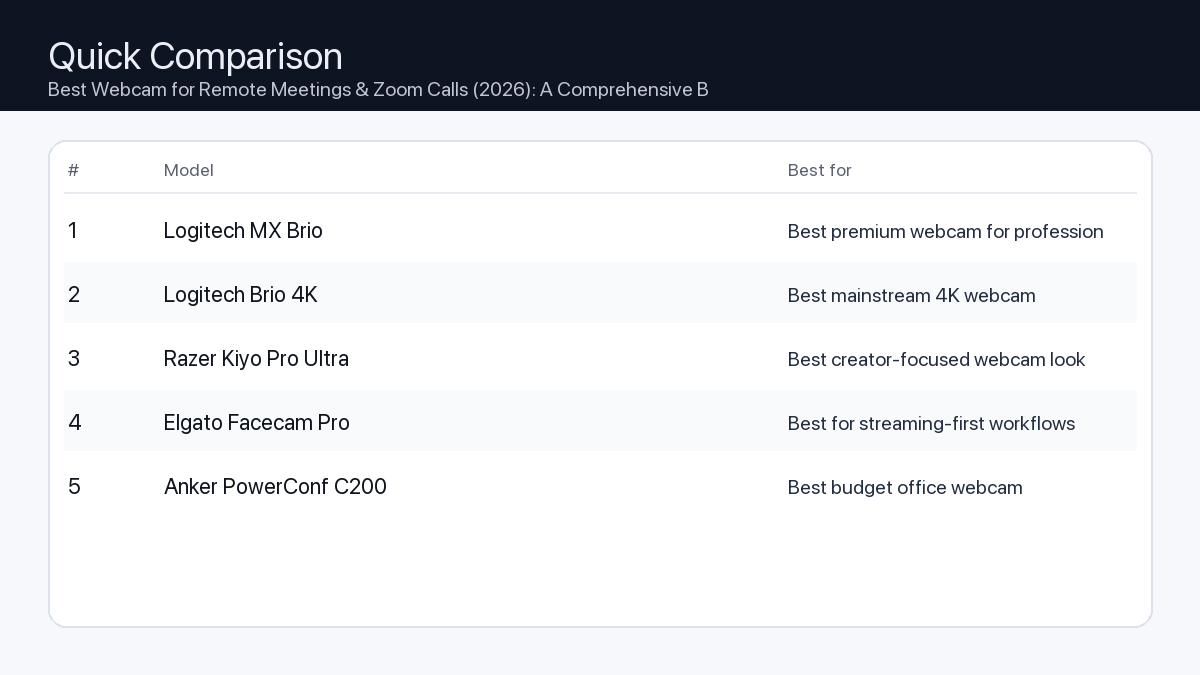
Quick Comparison
Note: Specs and availability change. Always confirm details on the product page.
| Model | Best for | Details |
|---|---|---|
| Logitech MX Brio | Best premium webcam for professionals | Open section |
| Logitech Brio 4K | Best mainstream 4K webcam | Open section |
| Razer Kiyo Pro Ultra | Best creator-focused webcam look | Open section |
| Elgato Facecam Pro | Best for streaming-first workflows | Open section |
| Anker PowerConf C200 | Best budget office webcam | Open section |
Our Top Picks
#1. Logitech MX Brio
Best for: Best premium webcam for professionals

Why it made the list
- Excellent image quality
- Strong low-light handling
- Reliable software controls
Tradeoffs
- Premium price
Who should buy this
- Remote professionals and creators
- Users prioritizing image quality
Avoid if
- You need a basic budget webcam only
Check price and compatibility for Logitech MX Brio
Price tip: Prices fluctuate; check Amazon for current deals and compatibility details.
#2. Logitech Brio 4K
Best for: Best mainstream 4K webcam
Why it made the list
- 4K capability
- Widely available
- Good call quality
Tradeoffs
- Can require tuning for best results
Who should buy this
- Users wanting a known 4K webcam option
Avoid if
- You are happy with simple 1080p quality
Check price and compatibility for Logitech Brio 4K
Price tip: Prices fluctuate; check Amazon for current deals and compatibility details.
#3. Razer Kiyo Pro Ultra
Best for: Best creator-focused webcam look

Why it made the list
- Large sensor style output
- Great for streaming setups
- Strong detail
Tradeoffs
- Costly vs mainstream webcams
Who should buy this
- Streamers and content creators
Avoid if
- You want low-cost business meeting camera
Check price and compatibility for Razer Kiyo Pro Ultra
Price tip: Prices fluctuate; check Amazon for current deals and compatibility details.
#4. Elgato Facecam Pro
Best for: Best for streaming-first workflows
Why it made the list
- Creator software ecosystem
- Strong video detail
- Stable desktop setup use
Tradeoffs
- Premium niche pricing
Who should buy this
- Creators already using Elgato tools
Avoid if
- You do only occasional video calls
Check price and compatibility for Elgato Facecam Pro
Price tip: Prices fluctuate; check Amazon for current deals and compatibility details.
#5. Anker PowerConf C200
Best for: Best budget office webcam
Why it made the list
- Strong value
- Good for meetings
- Simple setup
Tradeoffs
- Not a premium creator camera
Who should buy this
- Remote workers on a budget
Avoid if
- You need pro-level creator quality
Check price and compatibility for Anker PowerConf C200
Price tip: Prices fluctuate; check Amazon for current deals and compatibility details.
Still Can’t Decide?
Quick decision tree:
- Best premium webcam for professionals → Logitech MX Brio
- Best mainstream 4K webcam → Logitech Brio 4K
- Best creator-focused webcam look → Razer Kiyo Pro Ultra
- Best for streaming-first workflows → Elgato Facecam Pro
- Best budget office webcam → Anker PowerConf C200
Price tip: prices fluctuate often. If you’re flexible, watch for seasonal sales and compare listings before you buy.
How to Choose Your Webcam
Selecting the right webcam involves balancing your specific use case with key technical specifications. Here’s what to consider:
Resolution & Frame Rate
Problem: Blurry, pixelated video or choppy motion can create a poor impression during important calls.
Consequence: Your professionalism may be undermined, and subtle visual cues can be missed, leading to communication breakdowns.
Recommendation: For crisp, clear video, prioritize 1080p (Full HD) as a minimum standard. If you require exceptional detail for presentations or large screen viewing, consider 4K (Ultra HD) webcams. Frame rate dictates smoothness; 30 frames per second (fps) is standard and adequate for most meetings, while 60fps offers noticeably fluid motion, ideal for dynamic presentations or streaming.
- 1080p Full HD resolution (minimum)
- 4K Ultra HD resolution (for maximum detail)
- 30fps frame rate (standard smoothness)
- 60fps frame rate (smoother motion for dynamic use)
Low-Light Performance
Problem: Appearing dark, grainy, or poorly lit, especially in dimly lit rooms or late-day meetings.
Consequence: Your face might be obscured, making it harder for others to engage with you visually and potentially affecting how you’re perceived.
Recommendation: Look for webcams with larger sensors and advanced auto-exposure features. These cameras can capture more light, reducing graininess and producing a brighter, more natural image even without perfect lighting. Some models include AI-powered light correction.
- Automatic low-light correction
- Larger image sensor (implies better light gathering)
Field of View (FOV)
Problem: Your camera captures too little (cutting off your head) or too much (showing clutter in your room).
Consequence: An awkward frame can distract from your message or reveal unwanted background elements.
Recommendation: A field of view between 78 and 90 degrees is suitable for most individual users, capturing you and a small portion of your immediate surroundings. Some webcams offer adjustable FOV, allowing you to switch between a narrow view for solo calls and a wider view for whiteboarding or group discussions. Ensure the FOV matches how much of your background you intend to show.
- Adjustable Field of View
- Fixed FOV appropriate for your setup (e.g., 78-90 degrees for single person)
Autofocus vs. Fixed Focus
Problem: Constantly appearing out of focus, especially if you move even slightly during a call.
Consequence: Viewers might perceive you as unprofessional, and your image can become distracting.
Recommendation: Autofocus webcams continuously adjust to keep you sharp, even if you lean in or move around. This is ideal for dynamic presenters. Fixed-focus cameras, while simpler, are suitable if you remain relatively stationary and are positioned within the camera’s fixed focal plane.
- Reliable autofocus (for movement)
- Fixed focus (if you stay still within optimal distance)
Microphone Quality
Problem: Your voice sounds muffled, distorted, or is overridden by background noise.
Consequence: Colleagues or clients struggle to hear you, leading to repeated questions, frustration, and a less productive meeting.
Recommendation: While a dedicated external microphone is always superior, many webcams include dual stereo microphones with noise-reduction technology. These can be perfectly adequate for general meeting use. However, if audio clarity is paramount, consider using an external USB microphone or headset.
- Dual stereo microphones
- Noise-reducing technology
- Considered external microphone for critical audio
Mounting & Portability
Problem: Inability to position the webcam optimally, leading to awkward angles or instability.
Consequence: You might appear less engaged or present a less professional visual.
Recommendation: Most webcams come with an integrated clip for monitor mounting. Ensure it’s sturdy and compatible with your display thickness. For more flexible placement, look for models with a standard tripod thread (1/4-inch), allowing use with tripods or desk stands. If you travel frequently, a compact and durable design is a plus.
- Secure monitor clip
- Standard tripod mounting thread
- Compact design (if portability is key)
Privacy Features
Problem: Concerns about the camera being inadvertently active when not in use.
Consequence: A feeling of unease or a breach of personal privacy.
Recommendation: Many webcams now include a physical privacy shutter that slides over the lens. This provides absolute visual security. An LED indicator light that clearly signals when the camera is active is also a valuable feature.
- Physical privacy shutter
- Clear activity LED indicator
Software & Compatibility
Problem: The webcam isn’t recognized by your operating system, or you lack control over its settings.
Consequence: Frustration during setup and inability to optimize your video feed.
Recommendation: Ensure the webcam is compatible with your operating system (Windows, macOS, Linux, ChromeOS). Many manufacturers offer companion software that allows you to adjust settings like brightness, contrast, white balance, and FOV, often saving profiles for different scenarios. Check for UVC (USB Video Class) compliance for broad plug-and-play support.
- Broad OS compatibility (Windows, macOS)
- User-friendly customization software
- UVC compliant for plug-and-play
Webcam Setups for Different Users
The Remote Office Worker
Needs: Reliable, clear video for daily team meetings, client calls, and virtual presentations. Good low-light performance is a plus for varied working hours.
Recommended Features:
- 1080p resolution at 30fps (minimum)
- Good auto-exposure and light correction
- Fixed or adjustable FOV (78-90 degrees)
- Physical privacy shutter
- Sturdy monitor mount
The Professional Video Editor / Online Coach
Needs: Exceptional video quality for high-stakes virtual sessions, recording tutorials, or one-on-one coaching where image clarity directly impacts perceived value. Requires fine control over image settings.
Recommended Features:
- 4K resolution at 30fps or 1080p at 60fps
- Excellent low-light performance with advanced image processing
- Accurate autofocus
- Adjustable FOV and granular software controls
- Tripod mounting option for flexible setup
- Consider pairing with an external microphone and dedicated lighting
The Gamer / Content Creator
Needs: Smooth, high-fidelity video for live streaming, recording gameplay, or creating engaging video content. May require background removal features and strong integration with streaming software.
Recommended Features:
- 1080p at 60fps (minimum) or 4K at 30fps
- Wide or adjustable FOV to capture more of the environment or guest
- Fast and reliable autofocus
- Integration with streaming platforms (e.g., OBS Studio)
- Software for background removal/blur (if green screen not used)
- Tripod mount essential for varied setups
How We Picked
Our selection process for identifying top webcams focuses on a thorough analysis of technical specifications and reported user experiences. We meticulously review product spec sheets for key features such as sensor size, lens aperture, native resolution and frame rates, autofocus capabilities, and microphone arrays. Compatibility with major operating systems (Windows and macOS) and popular video conferencing platforms is a primary consideration. We also evaluate privacy features like physical shutters and activity LEDs, as well as mounting flexibility. While we do not conduct hands-on testing, our recommendations are informed by compiling verifiable product data, assessing general market trends for 2026, and noting common user feedback patterns regarding reliability and performance across diverse usage scenarios.
FAQ
- Which should I buy: the #1 pick or the best value pick?
-
Choose the #1 pick if you demand the absolute best in video quality, advanced features (like superior low-light handling or precise software controls), and are willing to invest for an uncompromising professional presence. Opt for the best value pick if you need reliable, clear video for everyday remote meetings and Zoom calls, perform well in standard lighting conditions, and seek excellent performance without exceeding a moderate budget.
Final Recommendation
Choosing the right webcam for your remote meetings and Zoom calls in 2026 is a pivotal decision that impacts your professional image and communication effectiveness. By understanding the core features—from resolution and low-light performance to field of view and microphone quality—you can confidently select a model that aligns with your specific needs and usage patterns. Whether you prioritize cutting-edge performance or excellent value, a well-chosen webcam will significantly enhance your virtual interactions, ensuring you look and sound your best every time.
Related Guides
Keep reading with these related buying guides:
- Best Tablets for Students & Remote Work (2026 Buying Guide)
- Best-Selling Webcam Models on Amazon (2026): A Comprehensive Buying Guide
- Best Power Bank Under $80 in 2026: The Ultimate Buying Guide
- Best Mechanical Keyboard for Minimal Desk Setup (2026): Your Ultimate Buying Guide
- Top iPad Alternatives Worth Buying in 2026: Your Definitive Buying Guide
- The Best Robot Vacuums Under $600 in 2026: Your Smart Cleaning Guide