Disclosure: This post may contain affiliate links. As an Amazon Associate, I earn from qualifying purchases. Learn more.
In 2026, the MacBook continues to be a powerhouse for professionals and creatives alike. However, the pursuit of sleek design often means fewer built-in ports, leading to a common bottleneck for external peripherals, displays, and networking. This is where a high-quality Thunderbolt dock becomes indispensable, transforming your single Thunderbolt port into a command center for your entire desktop setup.
A well-chosen Thunderbolt dock isn’t just an accessory; it’s an essential upgrade that simplifies your workspace, enhances productivity, and ensures seamless connectivity for all your devices. From charging your MacBook with a single cable to driving multiple high-resolution monitors and connecting high-speed storage, the right dock future-proofs your setup. This comprehensive buying guide will walk you through the critical factors to consider when selecting the best Thunderbolt dock for your MacBook in 2026, ensuring you make an informed decision that perfectly matches your workflow.
Best Picks (2026)
Quick Answer (TL;DR) (Updated February 23, 2026)
If you want one safe pick: CalDigit TS4 Thunderbolt Dock. If you want a better value: Anker 777 Thunderbolt Docking Station.
How to use this page: scan the comparison table, jump to the matching use case, then open only the listing that fits your setup.
Fast path: choose one track below and ignore the rest.
- Track A (least risk): CalDigit TS4 Thunderbolt Dock
- Track B (better value): Anker 777 Thunderbolt Docking Station
How we picked: research-based selection using manufacturer specs, compatibility notes, and what to verify on the Amazon listing (no hands-on testing claims). Affiliate links may earn us a commission, but rankings are not paid placements.
Start with CalDigit TS4 Thunderbolt Dock on Amazon Prefer value? Open Anker 777 Thunderbolt Docking Station
Skip to a pick: #1 CalDigit TS4 Thunderbolt Dock | #2 Anker 777 Thunderbolt Docking Station | #3 OWC Thunderbolt Dock | #4 Plugable Thunderbolt 4 Dock | #5 Kensington SD5560T Thunderbolt Dock
Head-to-Head: Top Pick vs Best Value
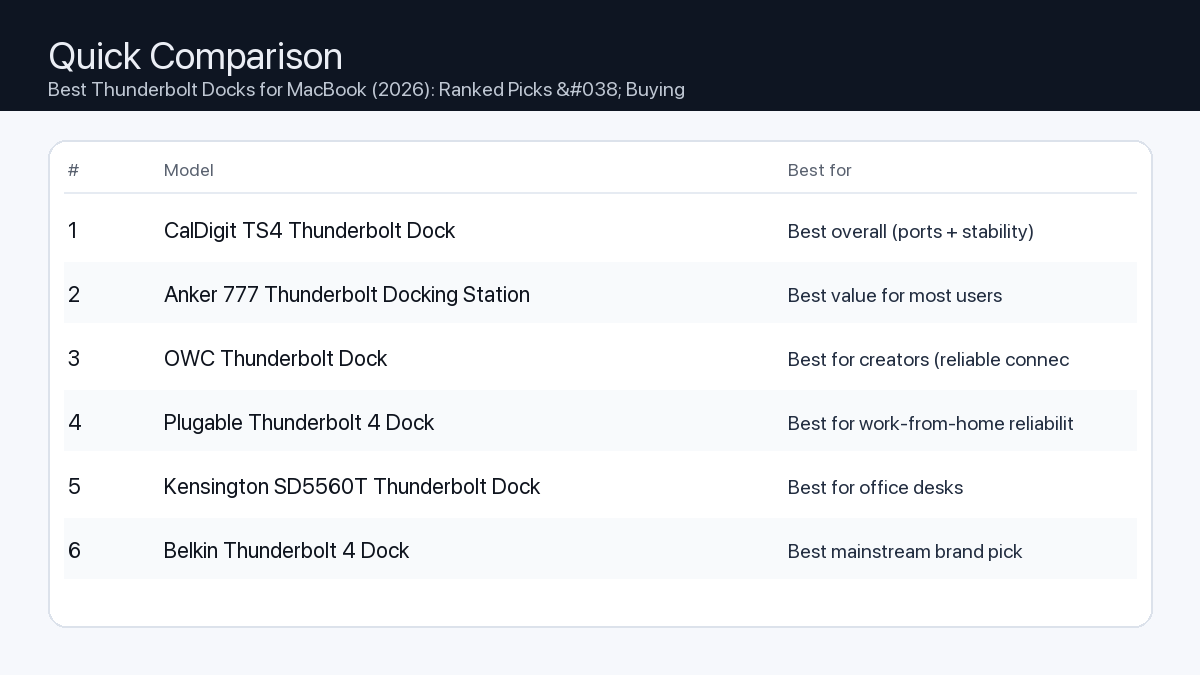
Quick Comparison
Note: Specs and availability change. Always confirm details on the product page.
| Model | Ports | Power | Display | Best for | Details |
|---|---|---|---|---|---|
| CalDigit TS4 Thunderbolt Dock | 18 | 98W | Dual 4K (host-dependent) | Best overall (ports + stability) | Open section |
| Anker 777 Thunderbolt Docking Station | 12 | 90W | Dual 4K (host-dependent) | Best value for most users | Open section |
| OWC Thunderbolt Dock | 11 | 90W | Dual 4K (host-dependent) | Best for creators (reliable connectivity) | Open section |
| Plugable Thunderbolt 4 Dock | 13 | 96W | 8K / dual 4K (host-dependent) | Best for work-from-home reliability | Open section |
| Kensington SD5560T Thunderbolt Dock | 10 | 96W | Dual 4K (host-dependent) | Best for office desks | Open section |
| Belkin Thunderbolt 4 Dock | 12 | 90W | 8K / dual 4K (host-dependent) | Best mainstream brand pick | Open section |
| Razer Thunderbolt 4 Dock Chroma | 10 | 90W | 8K / dual 4K (host-dependent) | Best for gaming setups | Open section |
Our Top Picks
#1. CalDigit TS4 Thunderbolt Dock
Best for: Best overall (ports + stability)

Why it made the list
- Premium build
- Very port-rich
- Great for pro setups
Tradeoffs
- Higher price
- Overkill for simple setups
Key specs (verify on the listing)
| Ports (total) | 18 |
| Host charging | Up to 98W |
| Ethernet | 2.5GbE |
| Card readers | SD UHS-II + microSD UHS-II |
| Display output | DisplayPort 1.4 (display support varies by host) |
Who should buy this
- Video editors and creators running multiple peripherals daily
- Users who want one-cable reliability for a desk setup
- People who need lots of ports and hate dongle chains
Avoid if
- You only need basic ports for one monitor and a couple USB devices
- Your budget is tight and you want the cheapest working option
- You prefer an ultra-compact travel hub (a dock is bigger)
Check price and compatibility for CalDigit TS4 Thunderbolt Dock
Price tip: Prices fluctuate; check Amazon for current deals and compatibility details.
#2. Anker 777 Thunderbolt Docking Station
Best for: Best value for most users

Why it made the list
- Solid everyday dock
- Good port mix
Tradeoffs
- Not the most ports vs premium docks
- May lack niche ports some pros want
Key specs (verify on the listing)
| Ports (total) | 12 |
| Host charging | Up to 90W (dynamic allocation) |
| Display output | 2x HDMI 2.0 (up to 4K@60Hz, host-dependent) |
| Ethernet | Gigabit |
| Card reader | SD (UHS-II) |
Who should buy this
- Most home-office users with a typical dual-monitor + accessories setup
- Budget-conscious buyers who still want a proper dock (not a tiny hub)
- People who want a well-known brand with easy availability
Avoid if
- You need maximum port count for a complex workstation
- You want niche pro features (specialty readers/extra downstream TB ports)
- You only need a small travel adapter (a dock is bigger)
Check price and compatibility for Anker 777 Thunderbolt Docking Station
Price tip: Prices fluctuate; check Amazon for current deals and compatibility details.
#3. OWC Thunderbolt Dock
Best for: Best for creators (reliable connectivity)

Why it made the list
- Strong Mac compatibility
- Creator-friendly ports
Tradeoffs
- Pricing varies by model
- Model lineup can be confusing
Key specs (verify on the listing)
| Ports (total) | 11 |
| Host charging | Up to 90W |
| Thunderbolt | 4x Thunderbolt 4 total (1 upstream + 3 downstream) |
| Ethernet | Gigabit |
| Card reader | SD (UHS-II) |
| USB-A | 3x USB-A (10Gbps) + 1x USB-A (USB 2.0) |
Who should buy this
- Mac-first buyers who value compatibility and support
- Creators who want a balanced dock without going ultra-premium
- People who prefer established pro accessory brands
Avoid if
- You want the simplest buying decision (OWC has multiple similar models)
- You want the cheapest option possible
- You only need a basic hub for travel
Check price and compatibility for OWC Thunderbolt Dock
Price tip: Prices fluctuate; check Amazon for current deals and compatibility details.
#4. Plugable Thunderbolt 4 Dock
Best for: Best for work-from-home reliability

Why it made the list
- Practical port selection
- Good support reputation
Tradeoffs
- Design is more utilitarian
- Less “premium” feel vs aluminum docks
Key specs (verify on the listing)
| Ports (total) | 13 |
| Host charging | 96W certified (100W PD) |
| Display output | 2x HDMI (dual 4K@60Hz, host-dependent) |
| Ethernet | Gigabit |
| Card readers | SD + microSD |
Who should buy this
- Remote workers who just need things to work day after day
- People who value support docs and troubleshooting help
- Users building a stable desk setup for calls, files, and monitors
Avoid if
- You want a luxury look on the desk
- You want a tiny travel adapter
- You want the most ports possible regardless of price
Check price and compatibility for Plugable Thunderbolt 4 Dock
Price tip: Prices fluctuate; check Amazon for current deals and compatibility details.
#5. Kensington SD5560T Thunderbolt Dock
Best for: Best for office desks
Why it made the list
- Desk-friendly
- Good port options
Tradeoffs
- Model lineup can be confusing
- Often priced at a premium for the brand
Key specs (verify on the listing)
| Ports (total) | 10 |
| Host charging | Up to 96W |
| Display output | HDMI 2.0 + Thunderbolt (dual 4K@60Hz on Thunderbolt hosts) |
| Ethernet | Gigabit |
| Card reader | None |
Who should buy this
- Office environments and shared desks
- People who want an established office-accessories brand
- Users who prefer “set it and forget it” desk hardware
Avoid if
- You want the best price-to-ports ratio
- You want a gaming/creator aesthetic
- You want a travel-friendly hub
Check price and compatibility for Kensington SD5560T Thunderbolt Dock
Price tip: Prices fluctuate; check Amazon for current deals and compatibility details.
#6. Belkin Thunderbolt 4 Dock
Best for: Best mainstream brand pick

Why it made the list
- Widely available
- Solid build
Tradeoffs
- Often priced at a premium
- Not always the best value on paper
Key specs (verify on the listing)
| Ports (total) | 12 |
| Host charging | Up to 90W |
| Display output | 2x HDMI 2.0 (plus Thunderbolt ports; host-dependent) |
| Ethernet | Gigabit |
| Card reader | SD |
Who should buy this
- Mainstream buyers who want easy purchasing and returns
- People who prefer big-name accessories
- Users who value availability over min-maxing specs
Avoid if
- You want the absolute best bang-for-buck
- You need specialized ports for a pro workflow
- You only need a small hub
Check price and compatibility for Belkin Thunderbolt 4 Dock
Price tip: Prices fluctuate; check Amazon for current deals and compatibility details.
#7. Razer Thunderbolt 4 Dock Chroma
Best for: Best for gaming setups

Why it made the list
- Desk aesthetic
- Good for multi-peripheral setups
Tradeoffs
- Not the best value
- You may pay extra for the look
Key specs (verify on the listing)
| Ports (total) | 10 |
| Host charging | Up to 90W |
| Thunderbolt | 4x Thunderbolt 4 total (1 upstream + 3 downstream) |
| Ethernet | Gigabit |
| Card reader | SD (UHS-II) |
| Display output | Via Thunderbolt/USB-C display (no built-in HDMI/DP) |
Who should buy this
- RGB / gaming desk setups with many peripherals
- People who care about desk aesthetics as much as function
- Users who want a dock that matches other gaming gear
Avoid if
- You want maximum value per dollar
- You don’t care about aesthetics
- You want a compact travel hub
Check price and compatibility for Razer Thunderbolt 4 Dock Chroma
Price tip: Prices fluctuate; check Amazon for current deals and compatibility details.
Still Can’t Decide?
Quick decision tree:
- Best overall (ports + stability) → CalDigit TS4 Thunderbolt Dock
- Best value for most users → Anker 777 Thunderbolt Docking Station
- Best for creators (reliable connectivity) → OWC Thunderbolt Dock
- Best for work-from-home reliability → Plugable Thunderbolt 4 Dock
- Best for office desks → Kensington SD5560T Thunderbolt Dock
- Best mainstream brand pick → Belkin Thunderbolt 4 Dock
Price tip: prices fluctuate often. If you’re flexible, watch for seasonal sales and compare listings before you buy.
Final Recommendation
Selecting the best Thunderbolt dock for your MacBook in 2026 is a crucial decision that can significantly impact your productivity and desktop experience. By carefully considering your specific workflow, desired port selection, display requirements, and power delivery needs, you can identify a dock that perfectly complements your MacBook and future-proofs your setup.
We strongly recommend prioritizing Thunderbolt 4 docks for their superior compatibility, performance guarantees, and longevity. Review our ranked picks to find the ideal Thunderbolt dock that transforms your MacBook into the ultimate workstation, ensuring seamless connectivity for all your devices for years to come.
Related Guides
Keep reading with these related buying guides:
- Best WiFi 7 Routers for Unrivaled Speed & Coverage in 2026: The Ultimate Buying Guide
- Best Mechanical Keyboard for Work and Gaming (2026) – A Comprehensive Buying Guide
- The Ultimate Android Tablet Buying Guide for Streaming & Productivity
- The Ultimate Buyer’s Guide: Self-Emptying Robot Vacuums for a Smarter Home
- Best Gaming Laptop Under $1500 in 2026: Your Ultimate Buying Guide
- Trending Tablet Picks for Note-Taking and Study: Your Ultimate Buying Guide