Etiket: Power Delivery

  • Best Docking Station for MacBook in 2026: The Ultimate Buying Guide

    Best Docking Station for MacBook in 2026: The Ultimate Buying Guide

    Disclosure: This post may contain affiliate links. As an Amazon Associate, I earn from qualifying purchases. Learn more.

    Best Docking Station for MacBook in 2026: The Ultimate Buying Guide

    Choosing the best docking station for your MacBook setup in 2026 can significantly enhance productivity and declutter your workspace. For demanding professionals like video editors, graphic designers, or developers who require multiple high-resolution displays, lightning-fast data transfer, and ample power delivery for their MacBook Pro, investing in a premium Thunderbolt 4 docking station is the optimal choice for future-proofing and performance. If your needs are more modest – perhaps a single external monitor, essential peripherals, and occasional data transfers for a MacBook Air or standard MacBook Pro – a well-chosen USB-C or Thunderbolt 3 dock offers excellent value without compromising core functionality.

    A high-quality docking station transforms your MacBook into a powerful desktop workstation. It centralizes connectivity, allowing you to connect external monitors, hard drives, keyboards, mice, Ethernet, and charge your laptop all through a single cable. This guide will walk you through the critical factors to consider, ensuring you select a dock that perfectly matches your workflow, budget, and future expansion needs.

    Best Picks (2026)

    Quick Answer (TL;DR) (Updated March 02, 2026)

    If you want one safe pick: CalDigit TS4 Thunderbolt Dock. If you want a better value: Anker 777 Thunderbolt Docking Station.

    How to use this page: scan the comparison table, jump to the matching use case, then open only the listing that fits your setup.

    Fast path: choose one track below and ignore the rest.

    • Track A (least risk): CalDigit TS4 Thunderbolt Dock
    • Track B (better value): Anker 777 Thunderbolt Docking Station

    How we picked: research-based selection using manufacturer specs, compatibility notes, and what to verify on the Amazon listing (no hands-on testing claims). Affiliate links may earn us a commission, but rankings are not paid placements.

    Start with CalDigit TS4 Thunderbolt Dock on Amazon Prefer value? Open Anker 777 Thunderbolt Docking Station

    Skip to a pick: #1 CalDigit TS4 Thunderbolt Dock | #2 Anker 777 Thunderbolt Docking Station | #3 OWC Thunderbolt Dock | #4 Plugable Thunderbolt 4 Dock | #5 Kensington SD5560T Thunderbolt Dock

    Head-to-Head: Top Pick vs Best Value

    CalDigit TS4 Thunderbolt Dock
    Best overall (ports + stability)

    Read full #1 breakdown

    Go to Amazon: CalDigit TS4 Thunderbolt Dock

    Anker 777 Thunderbolt Docking Station
    Best value for most users

    Read full best-value breakdown

    Go to Amazon: Anker 777 Thunderbolt Docking Station

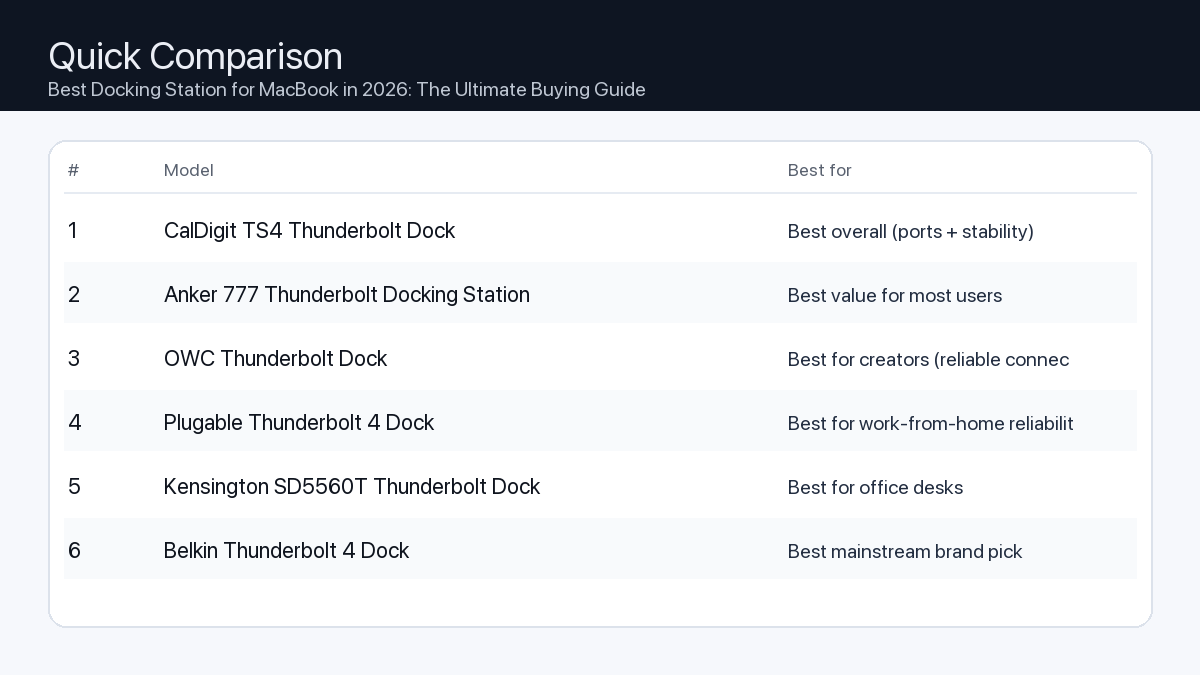
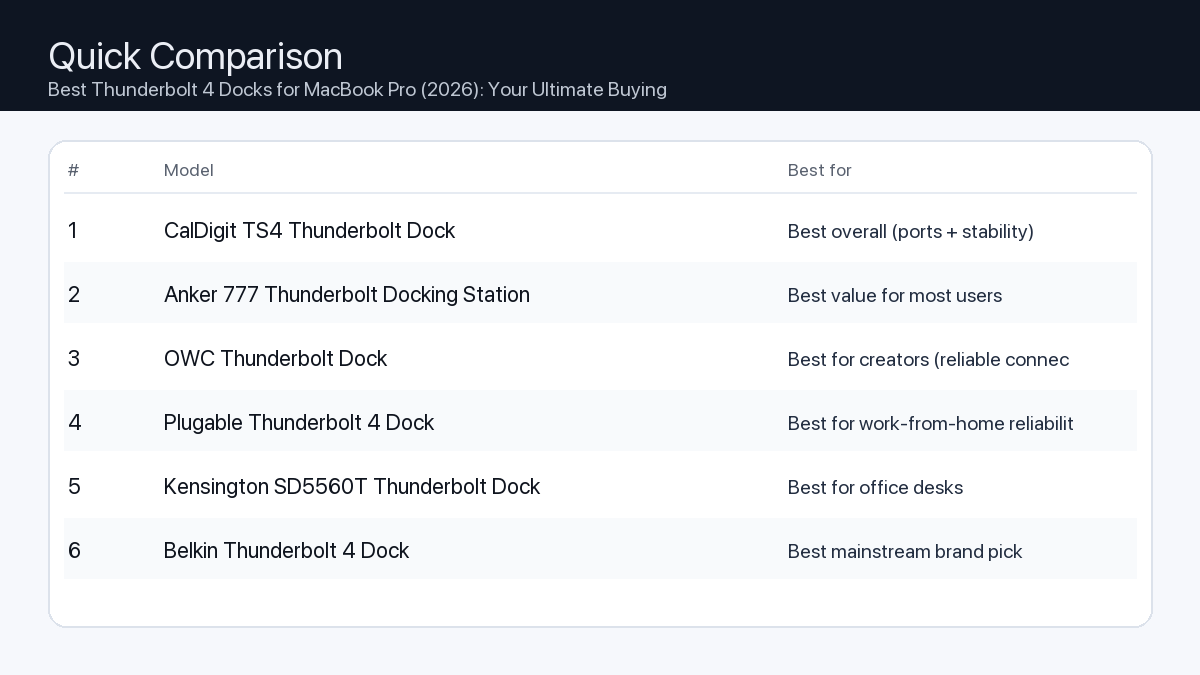
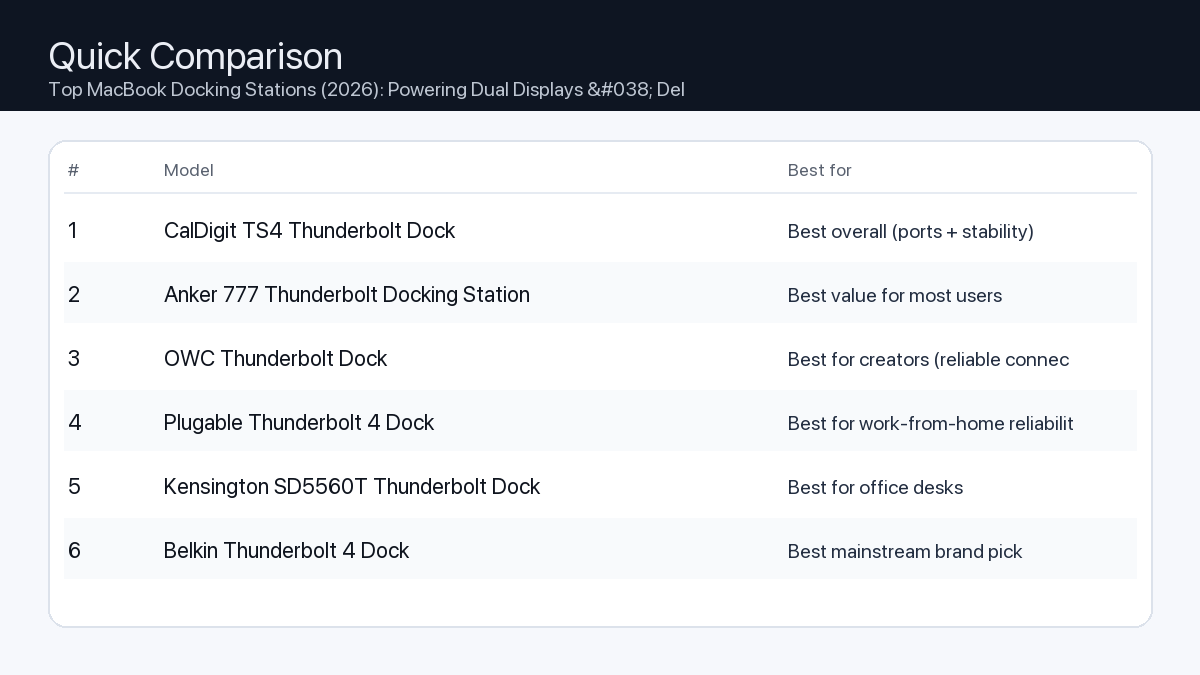
    Quick Comparison

    Note: Specs and availability change. Always confirm details on the product page.

    Model Ports Power Display Best for Details
    CalDigit TS4 Thunderbolt Dock 18 98W Dual 4K (host-dependent) Best overall (ports + stability) Open section
    Anker 777 Thunderbolt Docking Station 12 90W Dual 4K (host-dependent) Best value for most users Open section
    OWC Thunderbolt Dock 11 90W Dual 4K (host-dependent) Best for creators (reliable connectivity) Open section
    Plugable Thunderbolt 4 Dock 13 96W 8K / dual 4K (host-dependent) Best for work-from-home reliability Open section
    Kensington SD5560T Thunderbolt Dock 10 96W Dual 4K (host-dependent) Best for office desks Open section
    Belkin Thunderbolt 4 Dock 12 90W 8K / dual 4K (host-dependent) Best mainstream brand pick Open section
    Razer Thunderbolt 4 Dock Chroma 10 90W 8K / dual 4K (host-dependent) Best for gaming setups Open section
    Comparison: Best Docking Station for MacBook in 2026: The Ultimate Buying Guide
    At-a-glance comparison of our picks.

    Our Top Picks

    #1. CalDigit TS4 Thunderbolt Dock

    Best for: Best overall (ports + stability)

    CalDigit TS4 Thunderbolt Dock

    Why it made the list

    • Premium build
    • Very port-rich
    • Great for pro setups

    Tradeoffs

    • Higher price
    • Overkill for simple setups

    Key specs (verify on the listing)

    Ports (total) 18
    Host charging Up to 98W
    Ethernet 2.5GbE
    Card readers SD UHS-II + microSD UHS-II
    Display output DisplayPort 1.4 (display support varies by host)

    Who should buy this

    • Video editors and creators running multiple peripherals daily
    • Users who want one-cable reliability for a desk setup
    • People who need lots of ports and hate dongle chains

    Avoid if

    • You only need basic ports for one monitor and a couple USB devices
    • Your budget is tight and you want the cheapest working option
    • You prefer an ultra-compact travel hub (a dock is bigger)

    Check price and compatibility for CalDigit TS4 Thunderbolt Dock

    Price tip: Prices fluctuate; check Amazon for current deals and compatibility details.

    #2. Anker 777 Thunderbolt Docking Station

    Best for: Best value for most users

    Anker 777 Thunderbolt Docking Station

    Why it made the list

    • Solid everyday dock
    • Good port mix

    Tradeoffs

    • Not the most ports vs premium docks
    • May lack niche ports some pros want

    Key specs (verify on the listing)

    Ports (total) 12
    Host charging Up to 90W (dynamic allocation)
    Display output 2x HDMI 2.0 (up to 4K@60Hz, host-dependent)
    Ethernet Gigabit
    Card reader SD (UHS-II)

    Who should buy this

    • Most home-office users with a typical dual-monitor + accessories setup
    • Budget-conscious buyers who still want a proper dock (not a tiny hub)
    • People who want a well-known brand with easy availability

    Avoid if

    • You need maximum port count for a complex workstation
    • You want niche pro features (specialty readers/extra downstream TB ports)
    • You only need a small travel adapter (a dock is bigger)

    Check price and compatibility for Anker 777 Thunderbolt Docking Station

    Price tip: Prices fluctuate; check Amazon for current deals and compatibility details.

    #3. OWC Thunderbolt Dock

    Best for: Best for creators (reliable connectivity)

    OWC Thunderbolt Dock

    Why it made the list

    • Strong Mac compatibility
    • Creator-friendly ports

    Tradeoffs

    • Pricing varies by model
    • Model lineup can be confusing

    Key specs (verify on the listing)

    Ports (total) 11
    Host charging Up to 90W
    Thunderbolt 4x Thunderbolt 4 total (1 upstream + 3 downstream)
    Ethernet Gigabit
    Card reader SD (UHS-II)
    USB-A 3x USB-A (10Gbps) + 1x USB-A (USB 2.0)

    Who should buy this

    • Mac-first buyers who value compatibility and support
    • Creators who want a balanced dock without going ultra-premium
    • People who prefer established pro accessory brands

    Avoid if

    • You want the simplest buying decision (OWC has multiple similar models)
    • You want the cheapest option possible
    • You only need a basic hub for travel

    Check price and compatibility for OWC Thunderbolt Dock

    Price tip: Prices fluctuate; check Amazon for current deals and compatibility details.

    #4. Plugable Thunderbolt 4 Dock

    Best for: Best for work-from-home reliability

    Plugable Thunderbolt 4 Dock

    Why it made the list

    • Practical port selection
    • Good support reputation

    Tradeoffs

    • Design is more utilitarian
    • Less “premium” feel vs aluminum docks

    Key specs (verify on the listing)

    Ports (total) 13
    Host charging 96W certified (100W PD)
    Display output 2x HDMI (dual 4K@60Hz, host-dependent)
    Ethernet Gigabit
    Card readers SD + microSD

    Who should buy this

    • Remote workers who just need things to work day after day
    • People who value support docs and troubleshooting help
    • Users building a stable desk setup for calls, files, and monitors

    Avoid if

    • You want a luxury look on the desk
    • You want a tiny travel adapter
    • You want the most ports possible regardless of price

    Check price and compatibility for Plugable Thunderbolt 4 Dock

    Price tip: Prices fluctuate; check Amazon for current deals and compatibility details.

    #5. Kensington SD5560T Thunderbolt Dock

    Best for: Best for office desks
    Kensington SD5560T Thunderbolt Dock

    Why it made the list

    • Desk-friendly
    • Good port options

    Tradeoffs

    • Model lineup can be confusing
    • Often priced at a premium for the brand

    Key specs (verify on the listing)

    Ports (total) 10
    Host charging Up to 96W
    Display output HDMI 2.0 + Thunderbolt (dual 4K@60Hz on Thunderbolt hosts)
    Ethernet Gigabit
    Card reader None

    Who should buy this

    • Office environments and shared desks
    • People who want an established office-accessories brand
    • Users who prefer “set it and forget it” desk hardware

    Avoid if

    • You want the best price-to-ports ratio
    • You want a gaming/creator aesthetic
    • You want a travel-friendly hub

    Check price and compatibility for Kensington SD5560T Thunderbolt Dock

    Price tip: Prices fluctuate; check Amazon for current deals and compatibility details.

    #6. Belkin Thunderbolt 4 Dock

    Best for: Best mainstream brand pick

    Belkin Thunderbolt 4 Dock

    Why it made the list

    • Widely available
    • Solid build

    Tradeoffs

    • Often priced at a premium
    • Not always the best value on paper

    Key specs (verify on the listing)

    Ports (total) 12
    Host charging Up to 90W
    Display output 2x HDMI 2.0 (plus Thunderbolt ports; host-dependent)
    Ethernet Gigabit
    Card reader SD

    Who should buy this

    • Mainstream buyers who want easy purchasing and returns
    • People who prefer big-name accessories
    • Users who value availability over min-maxing specs

    Avoid if

    • You want the absolute best bang-for-buck
    • You need specialized ports for a pro workflow
    • You only need a small hub

    Check price and compatibility for Belkin Thunderbolt 4 Dock

    Price tip: Prices fluctuate; check Amazon for current deals and compatibility details.

    #7. Razer Thunderbolt 4 Dock Chroma

    Best for: Best for gaming setups

    Razer Thunderbolt 4 Dock Chroma

    Why it made the list

    • Desk aesthetic
    • Good for multi-peripheral setups

    Tradeoffs

    • Not the best value
    • You may pay extra for the look

    Key specs (verify on the listing)

    Ports (total) 10
    Host charging Up to 90W
    Thunderbolt 4x Thunderbolt 4 total (1 upstream + 3 downstream)
    Ethernet Gigabit
    Card reader SD (UHS-II)
    Display output Via Thunderbolt/USB-C display (no built-in HDMI/DP)

    Who should buy this

    • RGB / gaming desk setups with many peripherals
    • People who care about desk aesthetics as much as function
    • Users who want a dock that matches other gaming gear

    Avoid if

    • You want maximum value per dollar
    • You don’t care about aesthetics
    • You want a compact travel hub

    Check price and compatibility for Razer Thunderbolt 4 Dock Chroma

    Price tip: Prices fluctuate; check Amazon for current deals and compatibility details.

    Still Can’t Decide?

    Quick decision tree:

    Price tip: prices fluctuate often. If you’re flexible, watch for seasonal sales and compare listings before you buy.

    Ready? Open CalDigit TS4 Thunderbolt Dock on Amazon

    How to Choose the Best MacBook Docking Station in 2026

    Selecting the ideal docking station involves understanding your specific requirements for connectivity, power, and display capabilities. Here’s a breakdown of the key considerations:

    1. Connectivity & Port Selection

    Problem: Your MacBook has limited built-in ports, forcing you to constantly plug and unplug peripherals or rely on multiple dongles, leading to a cluttered and inefficient workspace.

    Consequence: Reduced productivity, increased wear and tear on ports, and a frustrating user experience when switching between devices or locations.

    Recommendation: Assess your current and future peripheral needs. Look for a dock that offers a comprehensive array of ports relevant to your setup. Prioritize docks with:

    • USB-A Ports (USB 3.0/3.2 Gen 2): For keyboards, mice, external hard drives, webcams, and other legacy devices. Aim for at least 2-4.
    • USB-C Ports (USB 3.2 Gen 2/Thunderbolt): For modern peripherals, external SSDs, or connecting additional hubs. Look for both data-only and Power Delivery-enabled ports.
    • Display Outputs (HDMI, DisplayPort): To connect external monitors. Ensure compatibility with your monitor’s resolution and refresh rate.
    • Ethernet Port (Gigabit): For a stable and fast wired internet connection, crucial for large file transfers, streaming, or video conferencing.
    • SD/microSD Card Slots: Essential for photographers and videographers for quick media transfer.
    • 3.5mm Audio Jack: For headphones, microphones, or external speakers.

    Checklist for Port Needs:

    • Do I need to connect multiple monitors? (Yes/No)
    • How many USB-A devices do I use (keyboard, mouse, printer, webcam)?
    • Do I use USB-C external storage or accessories?
    • Is a wired Ethernet connection important for my work?
    • Do I regularly transfer photos/videos from SD cards?
    • Do I need a dedicated audio jack?

    2. Power Delivery (PD) Capabilities

    Problem: Your docking station doesn’t provide enough power to charge your MacBook efficiently, requiring you to keep your MacBook’s original charger plugged in separately.

    Consequence: A less streamlined setup, additional power outlets consumed, and potentially slow charging, especially under heavy load.

    Recommendation: Ensure the dock’s upstream Power Delivery (PD) output matches or exceeds your MacBook’s charging requirements. For example:

    • MacBook Air (M1/M2/M3): Typically 30W-67W. A dock providing 60W-70W PD is usually sufficient.
    • 13/14-inch MacBook Pro: Requires 67W-96W. Look for docks with at least 85W-96W PD.
    • 16-inch MacBook Pro: Requires 96W-140W. Opt for docks offering 96W-100W PD to maintain charge under most workloads, though the fastest charging might still require the dedicated charger.

    Always check the ‘Upstream Power Delivery’ specification of the dock to confirm it can charge your specific MacBook model effectively.

    3. Display Output & Resolution Support

    Problem: Your dock limits the resolution, refresh rate, or number of external displays you can use, hindering your visual workspace or demanding applications.

    Consequence: Pixelated text, choppy animations, or the inability to create an expansive multi-monitor setup crucial for multitasking.

    Recommendation: Consider your display requirements:

    • Single Monitor: Most USB-C docks can drive a single 4K display at 60Hz.
    • Dual Monitors: Thunderbolt 3/4 docks are typically required for dual 4K displays at 60Hz or higher. Some advanced USB-C docks may support dual 1080p or a single 4K and a single 1080p.
    • Higher Resolutions/Refresh Rates: For 5K, 6K, or 8K displays, or high refresh rate gaming monitors (120Hz+), a Thunderbolt 4 dock is almost always necessary due to its superior bandwidth.

    Verify the dock’s specifications for the exact display configurations it supports with your specific MacBook model (especially for Apple Silicon Macs).

    4. Data Transfer Speed

    Problem: Transferring large files to external storage devices takes an excessively long time, impacting productivity for tasks like video editing or data backups.

    Consequence: Wasted time waiting for files, frustration during critical workflows.

    Recommendation: Choose a dock with appropriate data transfer speeds:

    • Thunderbolt 4/3: Offers up to 40Gbps, ideal for external NVMe SSDs, high-speed RAID arrays, and connecting multiple bandwidth-intensive devices.
    • USB 3.2 Gen 2 (USB-C/A): Provides 10Gbps, suitable for most external SSDs and fast flash drives.
    • USB 3.2 Gen 1 (USB-A): Provides 5Gbps, adequate for standard external hard drives, keyboards, and mice.

    For professionals handling large media files, Thunderbolt is a clear advantage.

    5. Compatibility (MacBook Model & macOS)

    Problem: You purchase a docking station only to find it doesn’t fully work with your specific MacBook model or macOS version.

    Consequence: Wasted money, compatibility headaches, and an unusable accessory.

    Recommendation: Always verify the dock’s compatibility with:

    • Your MacBook Model: Ensure it supports your M-series (M1, M2, M3) or Intel-based MacBook.
    • macOS Version: Some docks may require specific macOS versions for full functionality or driver installation.
    • Connectivity Type: Confirm your MacBook has a Thunderbolt 3/4 port (USB-C shaped) or a standard USB-C port, and choose a dock that matches. Thunderbolt docks are backward compatible with USB-C for basic functions but offer full performance only with Thunderbolt MacBooks.

    6. Ergonomics & Design

    Problem: A poorly designed dock can add to desk clutter, have inconvenient port placement, or contribute to overheating.

    Consequence: Untidy workspace, difficulty connecting/disconnecting devices, potential reliability issues due to heat.

    Recommendation: Consider:

    • Size and Footprint: How much desk space can you allocate?
    • Port Placement: Are frequently accessed ports (e.g., USB-A, SD card) on the front, while less frequently accessed ports (e.g., display outputs, Ethernet) are on the rear?
    • Build Quality: A robust aluminum enclosure often aids in heat dissipation and durability.
    • Cable Management: Some docks offer features to help organize cables.

    7. Future-Proofing

    Problem: Your chosen dock quickly becomes outdated as new MacBook models or peripherals emerge, requiring another costly upgrade soon.

    Consequence: Higher long-term expenditure and a less capable setup.

    Recommendation: If budget allows, investing in a Thunderbolt 4 docking station offers the best future-proofing. Thunderbolt 4 provides consistent performance, guaranteed 40Gbps bandwidth, robust multi-display support, and broad compatibility with both Thunderbolt and USB-C devices, ensuring it remains relevant for years to come.

    Practical Setup Examples

    To help illustrate these considerations, here are example scenarios:

    Scenario 1: The Demanding Video Editor / Graphic Designer

    You work with large 4K/8K video files, high-resolution images, and often require multiple external drives and displays.

    • Problem: Limited bandwidth and port availability lead to slow file transfers, laggy timelines, and restricted screen real estate.
    • Consequence: Missed deadlines, inefficient workflow, and a constant struggle with data bottlenecks.
    • Recommendation: A high-end Thunderbolt 4 docking station. Look for:
      • At least 96W-100W Power Delivery.
      • Support for dual 4K 60Hz displays (or a single 5K/6K display).
      • Multiple Thunderbolt downstream ports for daisy-chaining external NVMe SSDs or RAID enclosures.
      • Several USB 3.2 Gen 2 (10Gbps) ports for other fast peripherals.
      • Gigabit Ethernet for reliable network access.
      • Front-facing SD/microSD card slots for quick media ingestion.

    Scenario 2: The Efficient Office Worker / Hybrid Remote Professional

    You need to connect a single or dual external monitor, a keyboard, mouse, webcam, and ensure stable internet for video calls and daily tasks.

    • Problem: Constant plugging/unplugging, unreliable Wi-Fi during calls, and a desire for a clean desk setup.
    • Consequence: Downtime setting up your workspace, interrupted meetings, and a cluttered environment.
    • Recommendation: A versatile USB-C or Thunderbolt 3 docking station. Look for:
      • 60W-90W Power Delivery.
      • Support for a single 4K 60Hz display or dual 1080p/1440p displays.
      • Multiple USB-A ports for essential peripherals.
      • Gigabit Ethernet.
      • Compact design for easy placement or portability.

    Scenario 3: The Dedicated Gamer / Content Creator (Streaming)

    You use your MacBook for high-refresh-rate gaming, streaming, or content creation with multiple peripherals like capture cards, microphones, and high-speed storage.

    • Problem: Insufficient bandwidth for high refresh rate monitors, laggy streaming, and not enough ports for all your gaming/streaming gear.
    • Consequence: Suboptimal gaming experience, dropped frames during streams, and input latency.
    • Recommendation: A robust Thunderbolt 4 docking station. Look for:
      • 96W+ Power Delivery to keep your MacBook charged during intense sessions.
      • DisplayPort 1.4 or HDMI 2.1 outputs supporting high refresh rates (120Hz, 144Hz+) at 4K resolution.
      • Several USB 3.2 Gen 2 ports for a capture card, external SSDs, and gaming peripherals.
      • Multiple Thunderbolt downstream ports for connecting additional high-speed devices.
      • Reliable Gigabit Ethernet.
      • Adequate cooling for sustained performance.

    How We Picked

    Our selection process for the best MacBook docking stations in 2026 focuses on a thorough analysis of product specifications and industry standards. We meticulously review key features such as upstream power delivery, total available port types and quantities, display output capabilities (including resolution, refresh rate, and multi-monitor support), and data transfer speeds (Thunderbolt 4, USB 3.2 Gen 2). We prioritize docks that demonstrate strong compatibility with the latest MacBook models (both Apple Silicon M-series and Intel-based) and macOS versions, often noting manufacturer-reported compatibility charts. Our evaluation considers adherence to official Thunderbolt and USB standards, ensuring consistent performance and reliability. We assess build quality, thermal management, and practical design elements like port placement, without conducting hands-on testing. The aim is to identify solutions that offer a balanced combination of performance, comprehensive connectivity, and robust power delivery, catering to a range of professional and personal use cases.

    FAQ

    Do I need a Thunderbolt or USB-C docking station?
    It depends on your MacBook model and needs. If your MacBook has Thunderbolt ports (USB-C shaped with a small lightning bolt icon), a Thunderbolt dock will offer superior performance, especially for multiple high-resolution displays, high-speed external storage, and daisy-chaining devices. If your MacBook only has standard USB-C ports or if your needs are simpler (e.g., a single monitor, basic peripherals), a USB-C dock can be a more cost-effective solution.
    Will a docking station charge my MacBook?
    Yes, most modern docking stations designed for MacBooks include Power Delivery (PD) functionality. However, it’s crucial to check the dock’s ‘upstream PD’ wattage. Ensure this wattage meets or exceeds your MacBook’s charging requirements (e.g., 60W for a MacBook Air, 96W for a 14-inch MacBook Pro) to ensure efficient charging through the single USB-C/Thunderbolt cable.
    Can I use a docking station with multiple monitors?
    Yes, many docking stations support multiple external monitors, but capabilities vary significantly. Thunderbolt 4 docks typically offer the best multi-monitor support, often driving dual 4K displays at 60Hz or a single 5K/6K display. USB-C docks may be limited to one 4K display or dual 1080p displays, depending on the dock’s internal chip and your MacBook’s capabilities. Always check the specific display output specifications for the dock and your MacBook model.
    Which should I buy: the #1 pick or the best value pick?
    Choose the #1 pick if your workflow demands maximum performance, extensive port options, future-proofing, and support for high-resolution, multi-monitor setups (e.g., professional video editor, demanding developer). Opt for the best value pick if you need reliable core functionality, a solid selection of essential ports, and adequate power delivery for a single or dual standard monitor setup, without requiring the absolute highest data transfer speeds or bleeding-edge display capabilities.

    Final Recommendation

    The best docking station for your MacBook setup in 2026 isn’t a one-size-fits-all solution; it’s the one that perfectly aligns with your specific needs and workflow. By carefully considering factors like power delivery, display requirements, port selection, and compatibility, you can select a dock that transforms your MacBook into a truly powerful and organized workstation. Whether you’re a creative professional demanding peak performance or an office worker seeking streamlined connectivity, a well-chosen docking station is an invaluable investment for enhancing productivity and decluttering your digital life.

    Related Guides

    Keep reading with these related buying guides:

  • The Ultimate Buying Guide to Multiport Adapters for Laptops

    The Ultimate Buying Guide to Multiport Adapters for Laptops

    Disclosure: This post may contain affiliate links. As an Amazon Associate, I earn from qualifying purchases. Learn more.

    The Ultimate Buying Guide to Multiport Adapters for Laptops

    Modern laptops, especially ultrabooks, frequently sacrifice traditional ports for sleek designs, leading to a common challenge: limited connectivity. A high-quality multiport adapter is no longer just an accessory; it’s an essential hub that expands your laptop’s capabilities, allowing you to connect external monitors, peripherals, storage, and networks with a single, convenient connection.

    This guide will walk you through the key considerations to ensure you choose an adapter that perfectly complements your workflow and maximizes your productivity, whether you’re a demanding creative, an efficient office worker, or a dedicated gamer.

    Best Picks (2026)

    Quick Answer (TL;DR) (Updated February 28, 2026)

    If you want one safe pick: Anker USB-C Hub (Multiport Adapter). If you want a better value: UGREEN USB-C Hub.

    How to use this page: scan the comparison table, jump to the matching use case, then open only the listing that fits your setup.

    Fast path: choose one track below and ignore the rest.

    • Track A (least risk): Anker USB-C Hub (Multiport Adapter)
    • Track B (better value): UGREEN USB-C Hub

    How we picked: research-based selection using manufacturer specs, compatibility notes, and what to verify on the Amazon listing (no hands-on testing claims). Affiliate links may earn us a commission, but rankings are not paid placements.

    Start with Anker USB-C Hub (Multiport Adapter) on Amazon Prefer value? Open UGREEN USB-C Hub

    Skip to a pick: #1 Anker USB-C Hub (Multiport Adapter) | #2 UGREEN USB-C Hub | #3 Satechi USB-C Multiport Adapter | #4 HyperDrive USB-C Hub | #5 Belkin USB-C Hub

    Head-to-Head: Top Pick vs Best Value

    Anker USB-C Hub (Multiport Adapter)
    Best budget-friendly hub

    Read full #1 breakdown

    Go to Amazon: Anker USB-C Hub (Multiport Adapter)

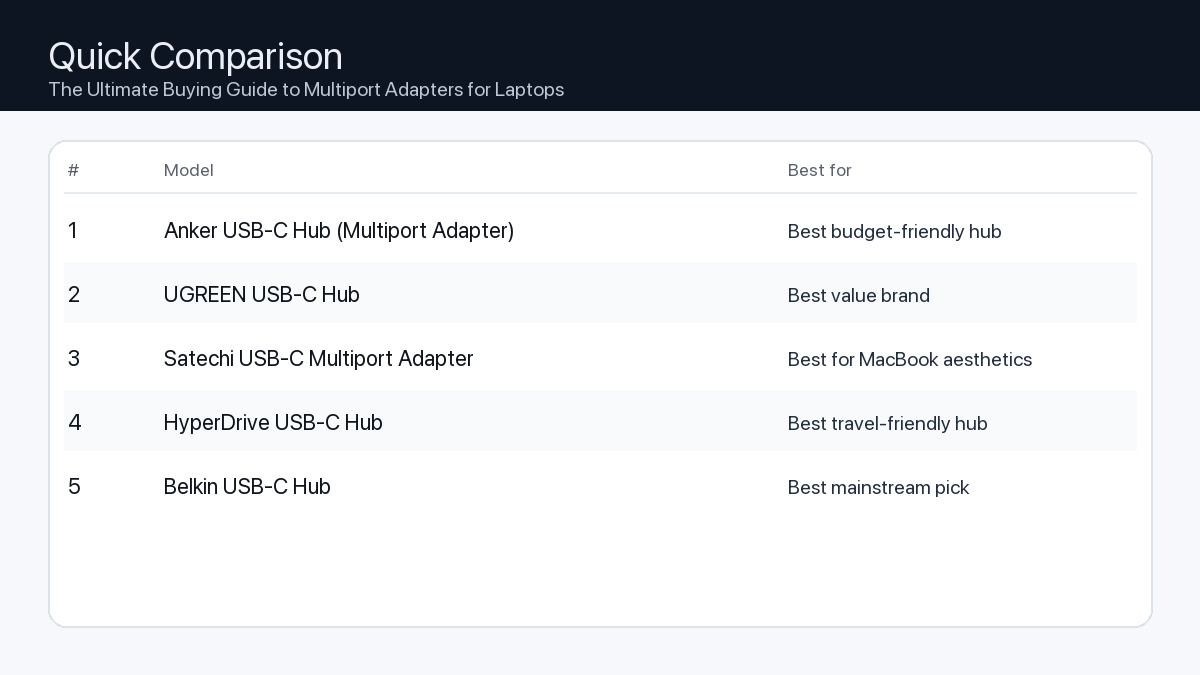
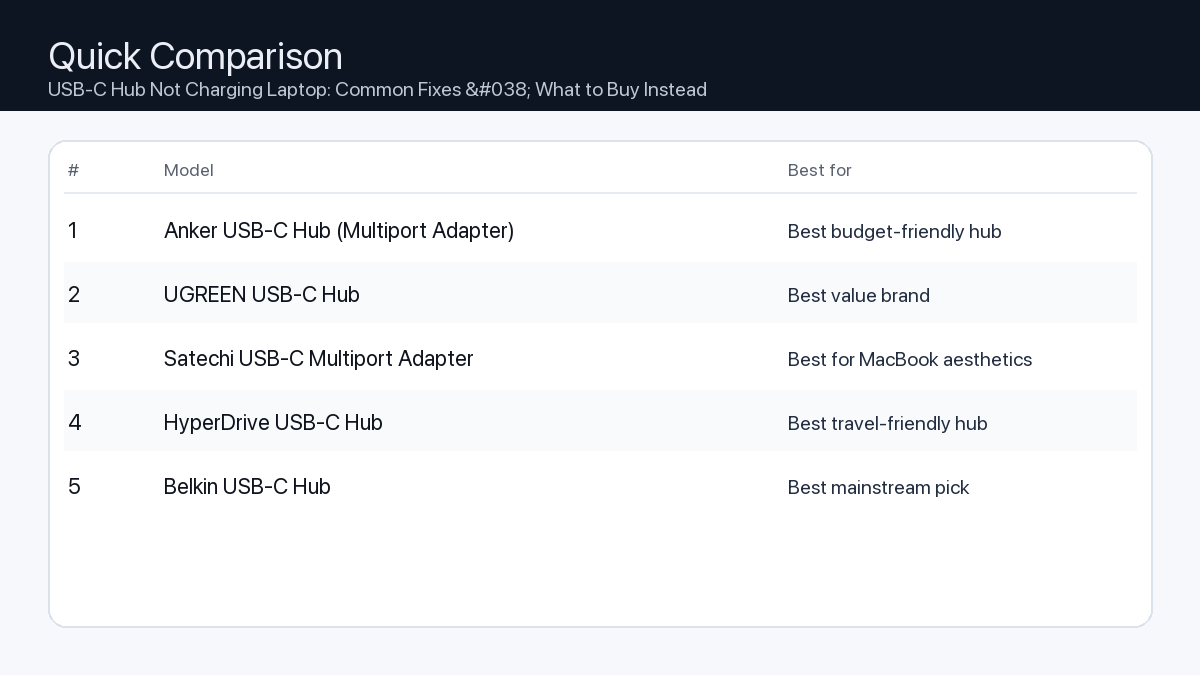
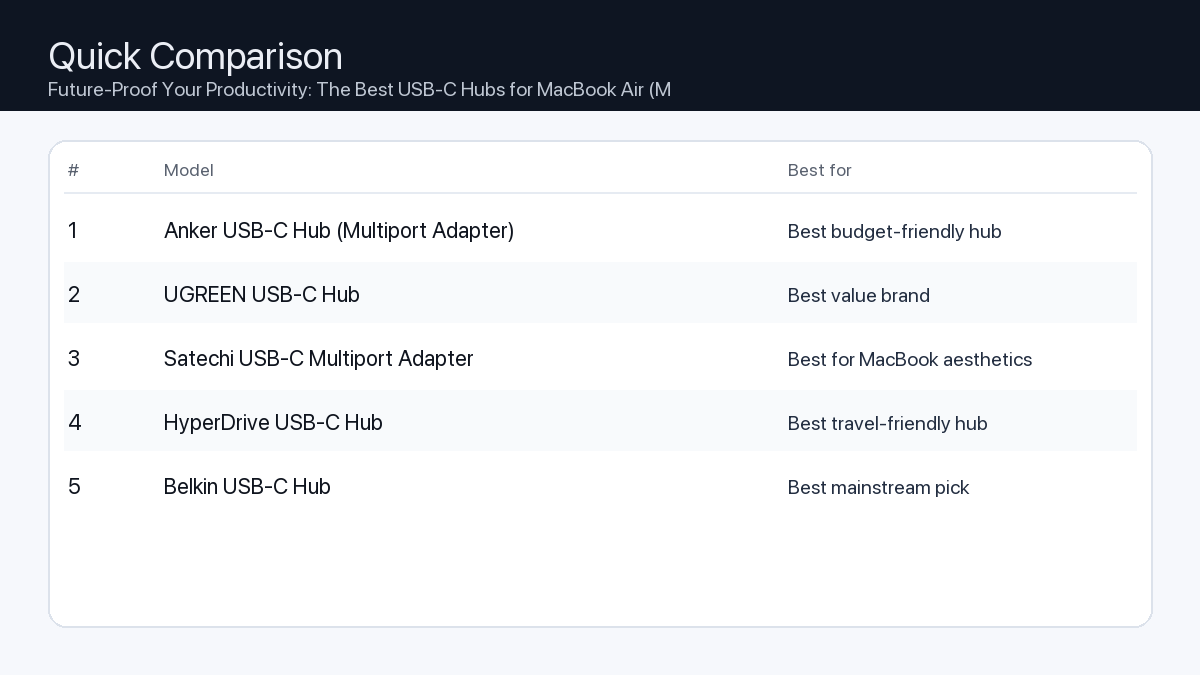
    Quick Comparison

    Note: Specs and availability change. Always confirm details on the product page.

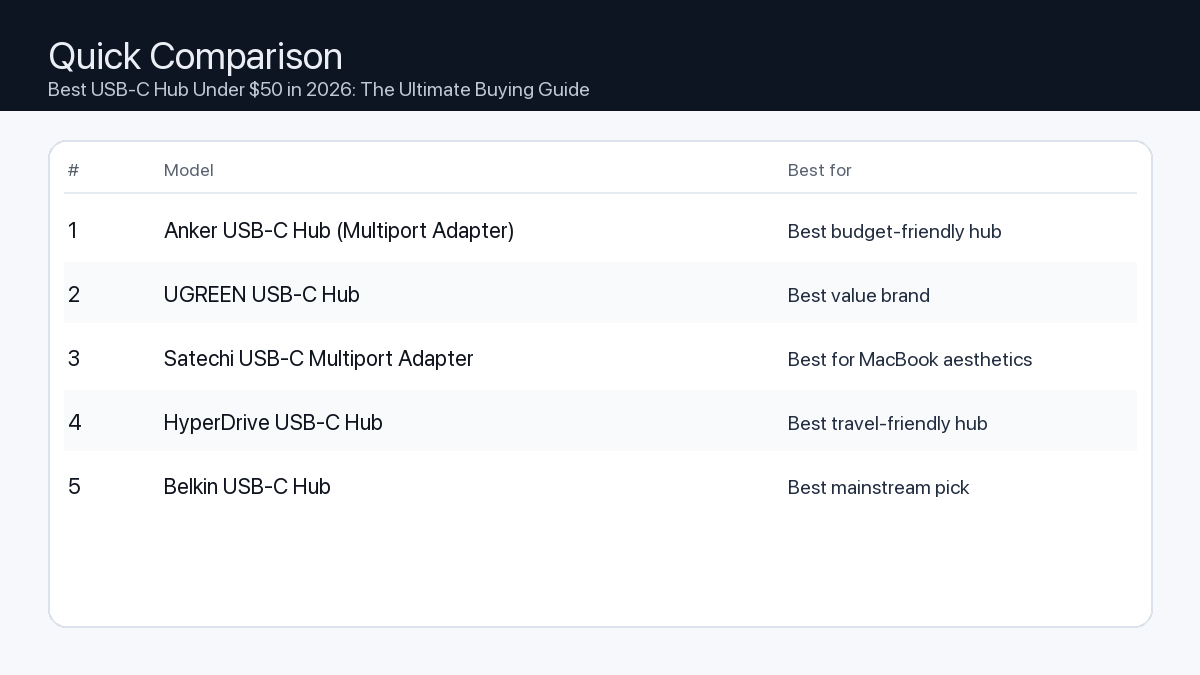
    Model Ports Power Display Best for Details
    Anker USB-C Hub (Multiport Adapter) Varies Varies Host-dependent Best budget-friendly hub Open section
    UGREEN USB-C Hub Varies Varies Host-dependent Best value brand Open section
    Satechi USB-C Multiport Adapter Varies Varies Host-dependent Best for MacBook aesthetics Open section
    HyperDrive USB-C Hub Varies Varies Host-dependent Best travel-friendly hub Open section
    Belkin USB-C Hub Varies Varies Host-dependent Best mainstream pick Open section
    Comparison: The Ultimate Buying Guide to Multiport Adapters for Laptops
    At-a-glance comparison of our picks.

    Our Top Picks

    #1. Anker USB-C Hub (Multiport Adapter)

    Best for: Best budget-friendly hub

    Anker USB-C Hub (Multiport Adapter)

    Why it made the list

    • Easy to find
    • Good starter option

    Tradeoffs

    • Specs vary by version
    • Not ideal for heavy desk setups

    Who should buy this

    • Travel and lightweight setups
    • MacBook users who just need HDMI + a couple USB ports
    • Buyers who want a well-known brand at a low price

    Avoid if

    • You need a rock-solid one-cable workstation (get a dock)
    • You need many ports and long-term desk stability
    • You rely on high-speed storage and want maximum bandwidth

    Check price and compatibility for Anker USB-C Hub (Multiport Adapter)

    Price tip: Prices fluctuate; check Amazon for current deals and compatibility details.

    #2. UGREEN USB-C Hub

    Best for: Best value brand

    UGREEN USB-C Hub

    Why it made the list

    • Good price/performance
    • Many variants

    Tradeoffs

    • Need to pick the right variant
    • Model naming can be confusing

    Who should buy this

    • Value seekers comfortable choosing the right version
    • Users who want better features than the cheapest hubs
    • People who want a hub for occasional desk use + travel

    Avoid if

    • You want the simplest one-click decision with one exact model
    • You need pro-grade stability for all-day dock use
    • You want guaranteed maximum display support for every Mac (confirm first)

    Check price and compatibility for UGREEN USB-C Hub

    Price tip: Prices fluctuate; check Amazon for current deals and compatibility details.

    #3. Satechi USB-C Multiport Adapter

    Best for: Best for MacBook aesthetics

    Satechi USB-C Multiport Adapter

    Why it made the list

    • Matches Mac design
    • Common pick for Mac users

    Tradeoffs

    • Pricier than budget hubs
    • Still a hub (not a full dock)

    Who should buy this

    • Mac users who care about a clean, matching look
    • People who want a simple hub for meetings/travel
    • Users who want a popular, proven style of adapter

    Avoid if

    • You want the lowest price possible
    • You need a full docking station replacement
    • You want lots of ports for a complex workstation

    Check price and compatibility for Satechi USB-C Multiport Adapter

    Price tip: Prices fluctuate; check Amazon for current deals and compatibility details.

    #4. HyperDrive USB-C Hub

    Best for: Best travel-friendly hub

    HyperDrive USB-C Hub

    Why it made the list

    • Compact
    • Popular among travelers

    Tradeoffs

    • Port layout varies
    • Performance depends on the exact model

    Who should buy this

    • Frequent travelers who want a compact adapter
    • Minimal setups: one display + a couple accessories
    • People who want a brand known for travel hubs

    Avoid if

    • You want maximum stability for an all-day desk dock
    • You need many ports and maximum bandwidth
    • You don’t want to think about model variants

    Check price and compatibility for HyperDrive USB-C Hub

    Price tip: Prices fluctuate; check Amazon for current deals and compatibility details.

    #5. Belkin USB-C Hub

    Best for: Best mainstream pick

    Belkin USB-C Hub

    Why it made the list

    • Easy returns
    • Brand support

    Tradeoffs

    • Often more expensive
    • Not always best value on paper

    Who should buy this

    • Mainstream buyers who want an easy purchase + returns
    • People who prefer established accessory brands
    • Users who want a simple adapter for common ports

    Avoid if

    • You want maximum value per dollar
    • You need a full dock replacement
    • You need very high-speed storage workflows (confirm specs first)

    Check price and compatibility for Belkin USB-C Hub

    Price tip: Prices fluctuate; check Amazon for current deals and compatibility details.

    Still Can’t Decide?

    Quick decision tree:

    Price tip: prices fluctuate often. If you’re flexible, watch for seasonal sales and compare listings before you buy.

    Ready? Open Anker USB-C Hub (Multiport Adapter) on Amazon

    How to Choose Your Ideal Multiport Adapter

    Understanding Your Connectivity Needs

    When selecting a multiport adapter, your choice should hinge on your laptop’s capabilities and your daily workflow. For users seeking uncompromising performance, high-resolution multi-monitor support, and robust power delivery for demanding tasks like video editing or high-end gaming, prioritizing a premium adapter with Thunderbolt 3/4 compatibility and advanced features is often the wisest choice. Conversely, if your needs revolve around essential connectivity—such as connecting a mouse, keyboard, single external display, and occasional data transfer—a value-focused multiport adapter will likely offer excellent utility without the higher investment.

    Key Factors to Consider

    1. Port Selection & Versatility

    Problem: Your laptop has limited or incorrect port types, preventing you from connecting essential peripherals like external hard drives, keyboards, or projectors.

    Consequence: You’re constantly swapping devices, unable to use all your tools simultaneously, or forced to buy multiple single-function dongles.

    Recommendation: Create a list of all devices you regularly connect. Look for adapters with a balanced mix of USB-A (for older peripherals), USB-C (for modern accessories and data transfer), HDMI/DisplayPort (for monitors), Ethernet (for stable internet), and SD/microSD card readers (for photographers/videographers).

    Checklist:

    • ✓ 2-3 USB-A ports (USB 3.0 or higher)
    • ✓ At least 1 USB-C data port (USB 3.2 Gen 2 for 10Gbps)
    • ✓ 1+ HDMI/DisplayPort (4K@60Hz or higher)
    • ✓ Ethernet port (Gigabit recommended)
    • ✓ SD and/or microSD card slots
    • ✓ 3.5mm audio jack (if needed)

    2. Power Delivery (PD) Capabilities

    Problem: Your laptop requires charging, but the adapter either doesn’t support passthrough charging or provides insufficient wattage.

    Consequence: Your laptop battery drains even when connected to power, or you need to carry an extra charger, negating the adapter’s convenience.

    Recommendation: Check your laptop’s power adapter for its wattage (e.g., 60W, 90W, 100W). Select a multiport adapter that supports at least that much Power Delivery (PD) via its USB-C input port. Remember that some wattage will be consumed by the adapter and connected peripherals, so aim for a slightly higher PD rating if possible.

    Checklist:

    • ✓ PD input matches or exceeds laptop’s required wattage (e.g., 60W, 85W, 100W)
    • ✓ Clear indication of “passthrough charging” support

    3. Display Output Quality & Configuration

    Problem: Your external monitor displays at a low resolution or refresh rate, flickers, or you can’t connect multiple displays.

    Consequence: Poor visual experience, reduced productivity for tasks requiring screen real estate, or inability to use your desired monitor setup.

    Recommendation: For a single 4K monitor, ensure the adapter specifies 4K@60Hz support via HDMI 2.0 or DisplayPort 1.2/1.4. For dual monitors, look for adapters explicitly stating “dual display” or “MST (Multi-Stream Transport)” capabilities, and verify the maximum resolution/refresh rate for each connected display.

    Checklist:

    • ✓ HDMI 2.0+ or DisplayPort 1.2+ for 4K@60Hz
    • ✓ Support for multiple displays (if needed)
    • ✓ Verify specific resolution/refresh rate for dual monitor setups

    4. Data Transfer Speeds

    Problem: Moving large files from external drives or cameras takes excessively long, or high-bandwidth peripherals (like high-res webcams) experience lag.

    Consequence: Wasted time, frustration, and a bottleneck in your workflow.

    Recommendation: Prioritize adapters with USB 3.2 Gen 2 (10Gbps) ports for high-speed external SSDs or storage. If you use older USB 3.0 (5Gbps) devices, ensure adequate ports are available. For extremely demanding tasks like multi-monitor 8K displays or eGPUs, a Thunderbolt 3 or 4 adapter is essential due to its 40Gbps bandwidth.

    Checklist:

    • ✓ USB-A ports are at least USB 3.0 (5Gbps)
    • ✓ USB-C data ports are USB 3.2 Gen 2 (10Gbps) or Thunderbolt (40Gbps)

    5. Build Quality & Portability

    Problem: The adapter feels flimsy, overheats, is too bulky for travel, or has a cable that’s too short/long for your setup.

    Consequence: Premature failure, inconvenience, or an untidy workspace.

    Recommendation: Look for adapters with durable materials like aluminum alloy, which aids in heat dissipation. Consider its size and weight if you travel frequently. Pay attention to the length and flexibility of the integrated USB-C cable to ensure it fits comfortably with your laptop and desk setup.

    Checklist:

    • ✓ Durable material (e.g., aluminum casing)
    • ✓ Compact and lightweight for travel
    • ✓ Appropriate integrated cable length

    6. Host Compatibility: USB-C vs. Thunderbolt

    Problem: You buy an adapter with advanced features, but your laptop doesn’t support them, leading to limited functionality.

    Consequence: Wasted money on an underutilized adapter, frustration with unfulfilled promises.

    Recommendation: Understand your laptop’s USB-C port capabilities. Not all USB-C ports are created equal. Some support only USB 3.0 data, others support DisplayPort Alternate Mode (video out) and Power Delivery, and only specific ports also support Thunderbolt 3 or 4. If your laptop has a Thunderbolt port, a Thunderbolt adapter will offer the highest performance and versatility. Otherwise, a high-quality USB-C adapter will suffice.

    Checklist:

    • ✓ Confirm if your laptop’s USB-C port supports DisplayPort Alt Mode
    • ✓ Confirm if your laptop’s USB-C port is also a Thunderbolt port (look for the lightning bolt icon)

    Example User Setups

    1. The Video Editor / Creative Professional

    Needs: High-bandwidth data transfer, multiple high-resolution displays, fast memory card access, robust power delivery.

    Ideal Adapter Features: Thunderbolt 3/4 compatibility (40Gbps), dual 4K@60Hz display outputs (HDMI 2.0 or DisplayPort 1.4), multiple USB 3.2 Gen 2 (10Gbps) ports for external SSDs, UHS-II SD/microSD card readers, 100W+ Power Delivery passthrough, Gigabit Ethernet.

    Why: Ensures smooth playback of high-res footage, quick transfer of large files, and stable, high-performance peripheral connectivity, all while keeping the laptop charged.

    2. The Office Worker / Remote Professional

    Needs: Reliable single external display, essential peripheral connections (mouse, keyboard, webcam), stable network connection, moderate power delivery.

    Ideal Adapter Features: USB-C connectivity, 4K@60Hz HDMI 2.0 or DisplayPort 1.2 output, 2-3 USB-A 3.0 ports, Gigabit Ethernet, 60-85W Power Delivery passthrough.

    Why: Provides all necessary connections for a productive workstation setup, ensuring consistent display output and network stability for video calls and data access.

    3. The Gamer / Creator (Hybrid Use)

    Needs: High refresh rate display, fast and stable wired internet, quick access for game clips/assets, low-latency peripheral support, adequate power.

    Ideal Adapter Features: USB-C or Thunderbolt compatibility, HDMI 2.0 (4K@60Hz or 1440p@120Hz+) or DisplayPort 1.4, Gigabit Ethernet, at least 2 USB 3.2 Gen 2 (10Gbps) ports for external storage/peripherals, UHS-I/II SD card reader, 85W+ Power Delivery passthrough.

    Why: Supports high-performance gaming monitors, ensures minimal latency for competitive gaming via wired Ethernet, and facilitates quick access to captured footage and game assets.

    How We Identified Top Multiport Adapter Options

    Our selection process focuses on objective technical specifications, documented compatibility, and user-reported performance trends. We meticulously analyze product spec sheets to verify claims regarding port types, data transfer speeds (e.g., USB 3.2 Gen 2, Thunderbolt 4), Power Delivery wattage, and display output capabilities (resolution and refresh rate). We prioritize adapters from reputable manufacturers known for adherence to industry standards.

    Key considerations include:

    • Advertised Port Performance: Verifying specified speeds for USB, Ethernet, and memory card readers.
    • Display Output Specifications: Confirming supported resolutions and refresh rates for single and multi-monitor setups.
    • Power Delivery Ratings: Ensuring adapters offer sufficient passthrough charging for various laptop models.
    • Compatibility Notes: Reviewing manufacturer-provided compatibility lists and addressing reported issues with specific laptop brands or operating systems.
    • Build Materials: Assessing the use of durable materials like aluminum for heat dissipation and longevity.

    This data-driven approach allows us to recommend options based on their potential to deliver on their technical promises, without relying on hands-on product testing which can introduce variability based on individual setup configurations.

    FAQ

    Which should I buy: the #1 pick or the best value pick?

    Choose the #1 pick if your workflow demands the absolute highest performance, reliability, and future-proofing—especially if you frequently use multiple high-resolution monitors, transfer very large files, or require extensive power delivery for a high-end laptop. Opt for the best value pick if your needs are more moderate, focusing on essential connectivity (a single external monitor, standard peripherals, and occasional data transfer) and you want to achieve solid performance without the premium investment. Always match the adapter’s capabilities to your specific, current, and anticipated needs.

    What’s the difference between a USB-C hub and a Thunderbolt dock/adapter?

    While both use a USB-C connector, Thunderbolt adapters leverage Intel’s Thunderbolt technology, offering significantly higher bandwidth (up to 40Gbps for Thunderbolt 3/4) compared to standard USB-C hubs (typically 5-10Gbps). This extra bandwidth allows Thunderbolt adapters to support more demanding setups, such as multiple 4K displays, external GPUs, and faster data transfer simultaneously without compromise. A USB-C hub is excellent for basic expansion, while a Thunderbolt adapter is designed for maximum performance and versatility on Thunderbolt-enabled laptops.

    Will a multiport adapter slow down my laptop?

    A well-designed multiport adapter, when connected to a compatible USB-C or Thunderbolt port, generally won’t “slow down” your laptop’s core performance. However, if you overload the adapter with many high-bandwidth devices (e.g., multiple 4K monitors, fast external SSDs, and Ethernet all running simultaneously on a standard USB-C adapter), you might experience performance limitations in those connected devices due to shared bandwidth. This is particularly noticeable with non-Thunderbolt hubs. Choosing an adapter with sufficient bandwidth for your specific connected devices is key to avoiding bottlenecks.

    Final Recommendation

    Choosing the right multiport adapter is a strategic decision that significantly impacts your laptop’s versatility and your daily productivity. By carefully assessing your current and future needs regarding port types, power delivery, display capabilities, and data transfer speeds, you can select an adapter that not only solves your connectivity challenges but also enhances your overall computing experience. Remember to prioritize compatibility with your laptop’s USB-C or Thunderbolt port to unlock the full potential of your chosen hub.

    Related Guides

    Keep reading with these related buying guides:

  • Best USB-C Hub Under $50 in 2026: The Ultimate Buying Guide

    Best USB-C Hub Under $50 in 2026: The Ultimate Buying Guide

    Disclosure: This post may contain affiliate links. As an Amazon Associate, I earn from qualifying purchases. Learn more.

    Best USB-C Hub Under $50 in 2026: The Ultimate Buying Guide

    Choosing the best USB-C hub can transform your workflow, especially when juggling multiple peripherals and a single USB-C port on your laptop or tablet. For under $50 in 2026, you can find a hub that significantly expands your device’s capabilities, but understanding the tradeoffs is key.

    If you’re a demanding user – a video editor needing high-speed storage access, a content creator requiring 4K@60Hz video output, or someone who frequently docks their laptop – focus on hubs that maximize essential features like Power Delivery and specific port speeds within this budget. For general office tasks, occasional external display use, or connecting basic accessories, a value-oriented hub offering a solid selection of common ports and reliable performance will serve you well without stretching your budget to its limit. Prioritize your most critical connections to make the smartest choice.

    Best Picks (2026)

    Quick Answer (TL;DR) (Updated February 25, 2026)

    If you want one safe pick: Anker USB-C Hub (Multiport Adapter). If you want a better value: UGREEN USB-C Hub.

    How to use this page: scan the comparison table, jump to the matching use case, then open only the listing that fits your setup.

    Fast path: choose one track below and ignore the rest.

    • Track A (least risk): Anker USB-C Hub (Multiport Adapter)
    • Track B (better value): UGREEN USB-C Hub

    How we picked: research-based selection using manufacturer specs, compatibility notes, and what to verify on the Amazon listing (no hands-on testing claims). Affiliate links may earn us a commission, but rankings are not paid placements.

    Start with Anker USB-C Hub (Multiport Adapter) on Amazon Prefer value? Open UGREEN USB-C Hub

    Skip to a pick: #1 Anker USB-C Hub (Multiport Adapter) | #2 UGREEN USB-C Hub | #3 Satechi USB-C Multiport Adapter | #4 HyperDrive USB-C Hub | #5 Belkin USB-C Hub

    Head-to-Head: Top Pick vs Best Value

    Anker USB-C Hub (Multiport Adapter)
    Best budget-friendly hub

    Read full #1 breakdown

    Go to Amazon: Anker USB-C Hub (Multiport Adapter)

    Quick Comparison

    Note: Specs and availability change. Always confirm details on the product page.

    Model Ports Power Display Best for Details
    Anker USB-C Hub (Multiport Adapter) Varies Varies Host-dependent Best budget-friendly hub Open section
    UGREEN USB-C Hub Varies Varies Host-dependent Best value brand Open section
    Satechi USB-C Multiport Adapter Varies Varies Host-dependent Best for MacBook aesthetics Open section
    HyperDrive USB-C Hub Varies Varies Host-dependent Best travel-friendly hub Open section
    Belkin USB-C Hub Varies Varies Host-dependent Best mainstream pick Open section
    Comparison: Best USB-C Hub Under $50 in 2026: The Ultimate Buying Guide
    At-a-glance comparison of our picks.

    Our Top Picks

    #1. Anker USB-C Hub (Multiport Adapter)

    Best for: Best budget-friendly hub

    Anker USB-C Hub (Multiport Adapter)

    Why it made the list

    • Easy to find
    • Good starter option

    Tradeoffs

    • Specs vary by version
    • Not ideal for heavy desk setups

    Who should buy this

    • Travel and lightweight setups
    • MacBook users who just need HDMI + a couple USB ports
    • Buyers who want a well-known brand at a low price

    Avoid if

    • You need a rock-solid one-cable workstation (get a dock)
    • You need many ports and long-term desk stability
    • You rely on high-speed storage and want maximum bandwidth

    Check price and compatibility for Anker USB-C Hub (Multiport Adapter)

    Price tip: Prices fluctuate; check Amazon for current deals and compatibility details.

    #2. UGREEN USB-C Hub

    Best for: Best value brand

    UGREEN USB-C Hub

    Why it made the list

    • Good price/performance
    • Many variants

    Tradeoffs

    • Need to pick the right variant
    • Model naming can be confusing

    Who should buy this

    • Value seekers comfortable choosing the right version
    • Users who want better features than the cheapest hubs
    • People who want a hub for occasional desk use + travel

    Avoid if

    • You want the simplest one-click decision with one exact model
    • You need pro-grade stability for all-day dock use
    • You want guaranteed maximum display support for every Mac (confirm first)

    Check price and compatibility for UGREEN USB-C Hub

    Price tip: Prices fluctuate; check Amazon for current deals and compatibility details.

    #3. Satechi USB-C Multiport Adapter

    Best for: Best for MacBook aesthetics

    Satechi USB-C Multiport Adapter

    Why it made the list

    • Matches Mac design
    • Common pick for Mac users

    Tradeoffs

    • Pricier than budget hubs
    • Still a hub (not a full dock)

    Who should buy this

    • Mac users who care about a clean, matching look
    • People who want a simple hub for meetings/travel
    • Users who want a popular, proven style of adapter

    Avoid if

    • You want the lowest price possible
    • You need a full docking station replacement
    • You want lots of ports for a complex workstation

    Check price and compatibility for Satechi USB-C Multiport Adapter

    Price tip: Prices fluctuate; check Amazon for current deals and compatibility details.

    #4. HyperDrive USB-C Hub

    Best for: Best travel-friendly hub

    HyperDrive USB-C Hub

    Why it made the list

    • Compact
    • Popular among travelers

    Tradeoffs

    • Port layout varies
    • Performance depends on the exact model

    Who should buy this

    • Frequent travelers who want a compact adapter
    • Minimal setups: one display + a couple accessories
    • People who want a brand known for travel hubs

    Avoid if

    • You want maximum stability for an all-day desk dock
    • You need many ports and maximum bandwidth
    • You don’t want to think about model variants

    Check price and compatibility for HyperDrive USB-C Hub

    Price tip: Prices fluctuate; check Amazon for current deals and compatibility details.

    #5. Belkin USB-C Hub

    Best for: Best mainstream pick

    Belkin USB-C Hub

    Why it made the list

    • Easy returns
    • Brand support

    Tradeoffs

    • Often more expensive
    • Not always best value on paper

    Who should buy this

    • Mainstream buyers who want an easy purchase + returns
    • People who prefer established accessory brands
    • Users who want a simple adapter for common ports

    Avoid if

    • You want maximum value per dollar
    • You need a full dock replacement
    • You need very high-speed storage workflows (confirm specs first)

    Check price and compatibility for Belkin USB-C Hub

    Price tip: Prices fluctuate; check Amazon for current deals and compatibility details.

    Still Can’t Decide?

    Quick decision tree:

    Price tip: prices fluctuate often. If you’re flexible, watch for seasonal sales and compare listings before you buy.

    Ready? Open Anker USB-C Hub (Multiport Adapter) on Amazon

    How to Choose the Right USB-C Hub Under $50

    Navigating the options for USB-C hubs within a $50 budget in 2026 means making informed decisions about which features matter most for your daily use. Here’s what to look for:

    Port Selection: Connecting Your Essentials

    Problem: Your laptop has limited ports, or the wrong types, preventing you from connecting vital peripherals like external drives, monitors, or Ethernet cables simultaneously.

    Consequence: You end up constantly swapping cables, relying on slower Wi-Fi, or cannot fully utilize your workspace, leading to productivity bottlenecks.

    Recommendation: Identify the exact ports you use daily. A $50 hub might not offer every port imaginable, so prioritize.

    Your Port Needs Checklist:

    • USB-A Ports: How many do you need for mice, keyboards, flash drives, or external SSDs? Look for USB 3.0 (5Gbps) or faster for decent transfer speeds.
    • HDMI/DisplayPort: Do you need to connect an external monitor? Check the maximum resolution and refresh rate (e.g., 4K@30Hz vs. 4K@60Hz).
    • SD/microSD Card Readers: Essential for photographers or videographers for quick media offloading. Look for UHS-I or UHS-II compatibility for faster transfers.
    • Ethernet Port: For a stable, high-speed wired internet connection, especially if your Wi-Fi is unreliable. Gigabit Ethernet (1Gbps) is the standard to aim for.
    • USB-C Data Port: Some hubs include an additional USB-C port for data transfer, useful for connecting modern peripherals.

    Power Delivery (PD) Passthrough: Keeping Your Device Charged

    Problem: Many hubs consume power, and without Power Delivery (PD) passthrough, your laptop might drain even while connected to its charger, or you’d need a separate charger for your laptop.

    Consequence: Your device’s battery depletes during use, interrupting your work, or forcing you to carry an additional power adapter.

    Recommendation: If you plan to charge your laptop through the hub, ensure it supports Power Delivery passthrough (e.g., 60W, 85W, or 100W). Remember, the hub itself uses some power, so a 100W PD input might provide around 85W to your laptop.

    Video Output Quality: Clear and Smooth Displays

    Problem: A hub with insufficient video capabilities results in blurry text, choppy video, or an inability to use your high-resolution monitor at its full potential.

    Consequence: Eye strain, poor experience with multimedia, and wasted investment in a high-quality display.

    Recommendation: For most users, HDMI 4K@30Hz is acceptable for static content or general office work. For smoother video playback, gaming, or productivity, aim for 4K@60Hz. Verify the hub’s specifications match your monitor’s capabilities.

    Data Transfer Speed: Efficient File Management

    Problem: Slow USB ports or card readers turn simple file transfers into frustrating waits, especially with large files.

    Consequence: Significant time loss when moving photos, videos, or backups to external storage.

    Recommendation: Look for USB 3.0 (also known as USB 3.2 Gen 1) or USB 3.1 (USB 3.2 Gen 2) ports for your USB-A connections. These offer 5Gbps and 10Gbps respectively, a significant upgrade over older USB 2.0 (480Mbps). For SD/microSD card readers, check for standards like UHS-I or UHS-II for faster read/write speeds.

    Build Quality & Portability: Durability and Convenience

    Within the under $50 segment, you can expect decent build quality. Look for hubs made with aluminum alloys, which help dissipate heat and offer better durability than plastic. Consider the hub’s size and cable length if you plan to travel frequently or have specific desk setup requirements.

    Example Setups for USB-C Hubs Under $50

    The Mobile Video Editor/Content Creator

    You’re constantly moving large files, editing on the go, and presenting work on external displays.

    • Essential Ports: At least two high-speed USB-A ports (5Gbps or 10Gbps) for external SSDs or flash drives.
    • Media Access: Fast SD and microSD card readers (UHS-I or better).
    • Display: HDMI port supporting 4K@60Hz for smooth previewing.
    • Power: Strong Power Delivery passthrough (85W+ recommended) to keep your laptop charged during intensive tasks.

    The Hybrid Office Worker

    Your work involves connecting to a monitor, using standard peripherals, and needing a stable internet connection.

    • Essential Ports: One or two USB-A ports for mouse, keyboard, or flash drive.
    • Display: HDMI port supporting at least 4K@30Hz or 1080p@60Hz.
    • Network: Gigabit Ethernet port for reliable wired internet.
    • Power: Power Delivery passthrough (60W recommended) to charge your laptop at your desk.

    The Casual Gamer/Streamer (on Laptop)

    You need stable internet, an external monitor, and connections for controllers or streaming accessories.

    • Essential Ports: Multiple USB-A ports for game controllers, external drives, or a webcam.
    • Network: Dedicated Gigabit Ethernet port for minimal latency.
    • Display: HDMI port supporting at least 4K@30Hz or 1080p@60Hz for an external gaming monitor.
    • Power: Power Delivery passthrough (60W+ recommended) to keep your gaming laptop powered.

    How We Picked the Best USB-C Hubs Under $50

    Our selection process for the top USB-C hubs under $50 in 2026 focuses on maximizing value and functionality based on readily available specifications and user requirements. We analyzed manufacturer product specifications, prioritizing hubs that offered a strong combination of:

    • Diverse and useful port selections (e.g., multiple USB-A, HDMI, SD card, Ethernet).
    • Robust Power Delivery (PD) passthrough capabilities sufficient for modern laptops.
    • Adequate video output resolutions and refresh rates (e.g., 4K@30Hz or 60Hz).
    • Reliable data transfer speeds for USB ports and card readers.
    • Positive compatibility notes across common operating systems like Windows, macOS, and ChromeOS, ensuring broad usability.
    • Construction materials that suggest durability and effective heat management.

    Our aim is to highlight products that deliver the most essential features and reliable performance without exceeding the $50 budget, ensuring you get the best possible expansion for your USB-C device.

    FAQ

    Which should I buy: the #1 pick or the best value pick?

    The choice between the #1 pick and the best value pick hinges on your specific needs and usage patterns:

    • Choose the #1 Pick if: You are a demanding user who requires the absolute best performance, a broader range of high-speed ports, or higher Power Delivery capabilities available within the $50 budget. The #1 pick is designed for those who need a comprehensive solution and want to future-proof their setup as much as possible for intensive tasks like video editing, professional presentations, or multi-device connectivity.
    • Choose the Best Value Pick if: You have more common connectivity needs, such as connecting a single external monitor, a few USB-A peripherals, and a stable internet connection. The best value pick offers reliable core functionality and a practical set of features at a lower price point within the $50 budget, making it ideal for everyday office work, casual use, or those who simply want essential port expansion without extra bells and whistles.

    Final Recommendation

    Finding the best USB-C hub under $50 in 2026 doesn’t mean compromising on essential features or reliability. By carefully considering your specific needs for ports, power, and performance, you can select a hub that significantly enhances your device’s versatility. Whether you’re a content creator, a dedicated office worker, or someone who simply needs more connectivity, a well-chosen USB-C hub is a small investment that delivers substantial returns in productivity and convenience. Review your personal workflow and the criteria outlined above to make an informed decision that perfectly fits your digital life.

    Related Guides

    Keep reading with these related buying guides:

  • Top USB-C Hubs Under $50 for 2026

    Top USB-C Hubs Under $50 for 2026

    Disclosure: This post may contain affiliate links. As an Amazon Associate, I earn from qualifying purchases. Learn more.

    Top USB-C Hubs Under $50 for 2026

    Navigating the world of USB-C accessories can be daunting, but finding a reliable hub that won’t break the bank is essential for many users. As we look towards 2026, the demand for versatile and affordable connectivity solutions continues to grow, driven by an ever-expanding ecosystem of USB-C devices.

    This guide dives into the best USB-C hubs available for under $50, focusing on devices that offer a strong balance of performance, port selection, and future-readiness. Whether you’re connecting an external monitor, transferring large files, or charging your devices, these budget-friendly options prove that you don’t need to spend a fortune to enhance your workflow.

    Best Picks (2026)

    Quick Answer (TL;DR) (Updated February 23, 2026)

    If you want one safe pick: Anker USB-C Hub (Multiport Adapter). If you want a better value: UGREEN USB-C Hub.

    How to use this page: scan the comparison table, jump to the matching use case, then open only the listing that fits your setup.

    Fast path: choose one track below and ignore the rest.

    • Track A (least risk): Anker USB-C Hub (Multiport Adapter)
    • Track B (better value): UGREEN USB-C Hub

    How we picked: research-based selection using manufacturer specs, compatibility notes, and what to verify on the Amazon listing (no hands-on testing claims). Affiliate links may earn us a commission, but rankings are not paid placements.

    Start with Anker USB-C Hub (Multiport Adapter) on Amazon Prefer value? Open UGREEN USB-C Hub

    Skip to a pick: #1 Anker USB-C Hub (Multiport Adapter) | #2 UGREEN USB-C Hub | #3 Satechi USB-C Multiport Adapter | #4 HyperDrive USB-C Hub | #5 Belkin USB-C Hub

    Head-to-Head: Top Pick vs Best Value

    Anker USB-C Hub (Multiport Adapter)
    Best budget-friendly hub

    Read full #1 breakdown

    Go to Amazon: Anker USB-C Hub (Multiport Adapter)

    Quick Comparison

    Note: Specs and availability change. Always confirm details on the product page.

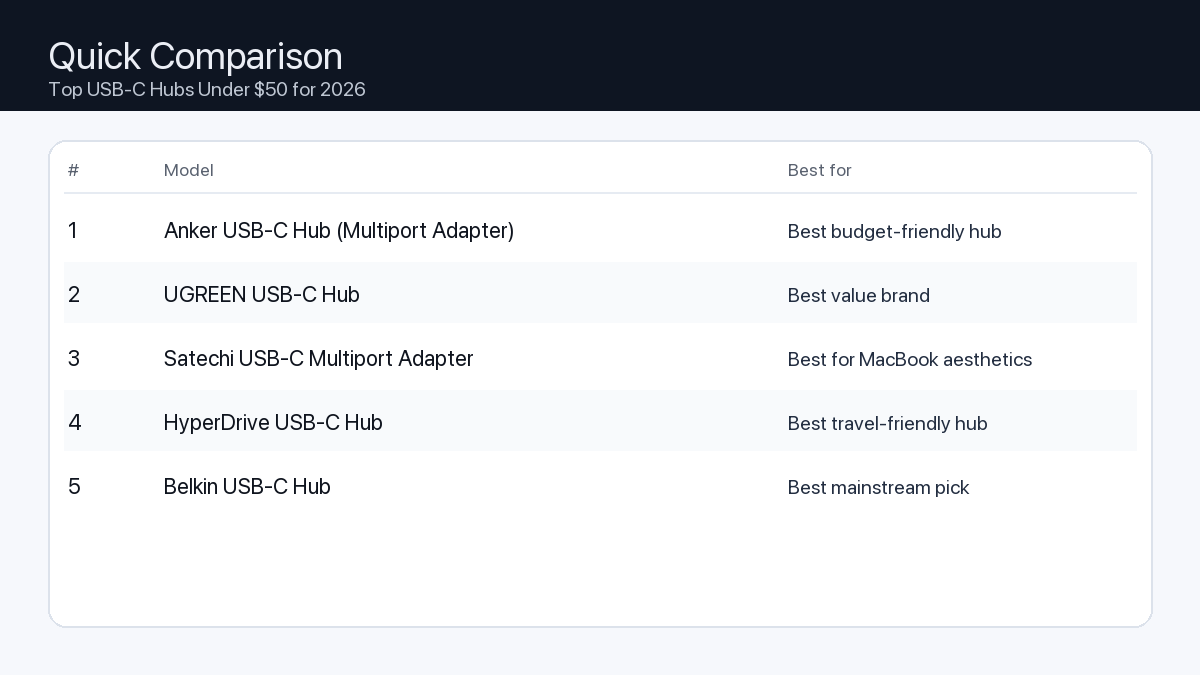
    Model Ports Power Display Best for Details
    Anker USB-C Hub (Multiport Adapter) Varies Varies Host-dependent Best budget-friendly hub Open section
    UGREEN USB-C Hub Varies Varies Host-dependent Best value brand Open section
    Satechi USB-C Multiport Adapter Varies Varies Host-dependent Best for MacBook aesthetics Open section
    HyperDrive USB-C Hub Varies Varies Host-dependent Best travel-friendly hub Open section
    Belkin USB-C Hub Varies Varies Host-dependent Best mainstream pick Open section
    Comparison: Top USB-C Hubs Under $50 for 2026
    At-a-glance comparison of our picks.

    Our Top Picks

    #1. Anker USB-C Hub (Multiport Adapter)

    Best for: Best budget-friendly hub

    Anker USB-C Hub (Multiport Adapter)

    Why it made the list

    • Easy to find
    • Good starter option

    Tradeoffs

    • Specs vary by version
    • Not ideal for heavy desk setups

    Who should buy this

    • Travel and lightweight setups
    • MacBook users who just need HDMI + a couple USB ports
    • Buyers who want a well-known brand at a low price

    Avoid if

    • You need a rock-solid one-cable workstation (get a dock)
    • You need many ports and long-term desk stability
    • You rely on high-speed storage and want maximum bandwidth

    Check price and compatibility for Anker USB-C Hub (Multiport Adapter)

    Price tip: Prices fluctuate; check Amazon for current deals and compatibility details.

    #2. UGREEN USB-C Hub

    Best for: Best value brand

    UGREEN USB-C Hub

    Why it made the list

    • Good price/performance
    • Many variants

    Tradeoffs

    • Need to pick the right variant
    • Model naming can be confusing

    Who should buy this

    • Value seekers comfortable choosing the right version
    • Users who want better features than the cheapest hubs
    • People who want a hub for occasional desk use + travel

    Avoid if

    • You want the simplest one-click decision with one exact model
    • You need pro-grade stability for all-day dock use
    • You want guaranteed maximum display support for every Mac (confirm first)

    Check price and compatibility for UGREEN USB-C Hub

    Price tip: Prices fluctuate; check Amazon for current deals and compatibility details.

    #3. Satechi USB-C Multiport Adapter

    Best for: Best for MacBook aesthetics

    Satechi USB-C Multiport Adapter

    Why it made the list

    • Matches Mac design
    • Common pick for Mac users

    Tradeoffs

    • Pricier than budget hubs
    • Still a hub (not a full dock)

    Who should buy this

    • Mac users who care about a clean, matching look
    • People who want a simple hub for meetings/travel
    • Users who want a popular, proven style of adapter

    Avoid if

    • You want the lowest price possible
    • You need a full docking station replacement
    • You want lots of ports for a complex workstation

    Check price and compatibility for Satechi USB-C Multiport Adapter

    Price tip: Prices fluctuate; check Amazon for current deals and compatibility details.

    #4. HyperDrive USB-C Hub

    Best for: Best travel-friendly hub

    HyperDrive USB-C Hub

    Why it made the list

    • Compact
    • Popular among travelers

    Tradeoffs

    • Port layout varies
    • Performance depends on the exact model

    Who should buy this

    • Frequent travelers who want a compact adapter
    • Minimal setups: one display + a couple accessories
    • People who want a brand known for travel hubs

    Avoid if

    • You want maximum stability for an all-day desk dock
    • You need many ports and maximum bandwidth
    • You don’t want to think about model variants

    Check price and compatibility for HyperDrive USB-C Hub

    Price tip: Prices fluctuate; check Amazon for current deals and compatibility details.

    #5. Belkin USB-C Hub

    Best for: Best mainstream pick

    Belkin USB-C Hub

    Why it made the list

    • Easy returns
    • Brand support

    Tradeoffs

    • Often more expensive
    • Not always best value on paper

    Who should buy this

    • Mainstream buyers who want an easy purchase + returns
    • People who prefer established accessory brands
    • Users who want a simple adapter for common ports

    Avoid if

    • You want maximum value per dollar
    • You need a full dock replacement
    • You need very high-speed storage workflows (confirm specs first)

    Check price and compatibility for Belkin USB-C Hub

    Price tip: Prices fluctuate; check Amazon for current deals and compatibility details.

    Still Can’t Decide?

    Quick decision tree:

    Price tip: prices fluctuate often. If you’re flexible, watch for seasonal sales and compare listings before you buy.

    Ready? Open Anker USB-C Hub (Multiport Adapter) on Amazon

    Related Guides

    Keep reading with these related buying guides:

  • The Truth About Cheap USB-C Hubs: Protecting Your Laptop from Damage

    The Truth About Cheap USB-C Hubs: Protecting Your Laptop from Damage

    Disclosure: This post may contain affiliate links. As an Amazon Associate, I earn from qualifying purchases. Learn more.

    The Truth About Cheap USB-C Hubs: Protecting Your Laptop from Damage

    USB-C hubs have become essential accessories, expanding the connectivity of modern laptops with sleek, compact designs. They’re incredibly convenient, allowing you to connect external monitors, USB drives, Ethernet cables, and charge your device all through a single port.

    However, the market is flooded with options, from premium brands to incredibly low-priced generics. This raises a critical question: Can opting for a cheap USB-C hub actually damage your expensive laptop? The short answer is yes, under certain circumstances, but it’s not a universal guarantee of destruction. Understanding the potential risks and how to mitigate them is key to protecting your investment and ensuring a seamless experience.

    Recommended Picks (2026)

    Quick Answer (TL;DR) (Updated February 23, 2026)

    If you want one safe pick: Anker USB-C Hub (Multiport Adapter). If you want a better value: UGREEN USB-C Hub.

    How to use this page: scan the comparison table, jump to the matching use case, then open only the listing that fits your setup.

    Fast path: choose one track below and ignore the rest.

    • Track A (least risk): Anker USB-C Hub (Multiport Adapter)
    • Track B (better value): UGREEN USB-C Hub

    How we picked: research-based selection using manufacturer specs, compatibility notes, and what to verify on the Amazon listing (no hands-on testing claims). Affiliate links may earn us a commission, but rankings are not paid placements.

    Start with Anker USB-C Hub (Multiport Adapter) on Amazon Prefer value? Open UGREEN USB-C Hub

    Skip to a pick: #1 Anker USB-C Hub (Multiport Adapter) | #2 UGREEN USB-C Hub | #3 Satechi USB-C Multiport Adapter | #4 HyperDrive USB-C Hub | #5 Belkin USB-C Hub

    Head-to-Head: Top Pick vs Best Value

    Anker USB-C Hub (Multiport Adapter)
    Best budget-friendly hub

    Read full #1 breakdown

    Go to Amazon: Anker USB-C Hub (Multiport Adapter)

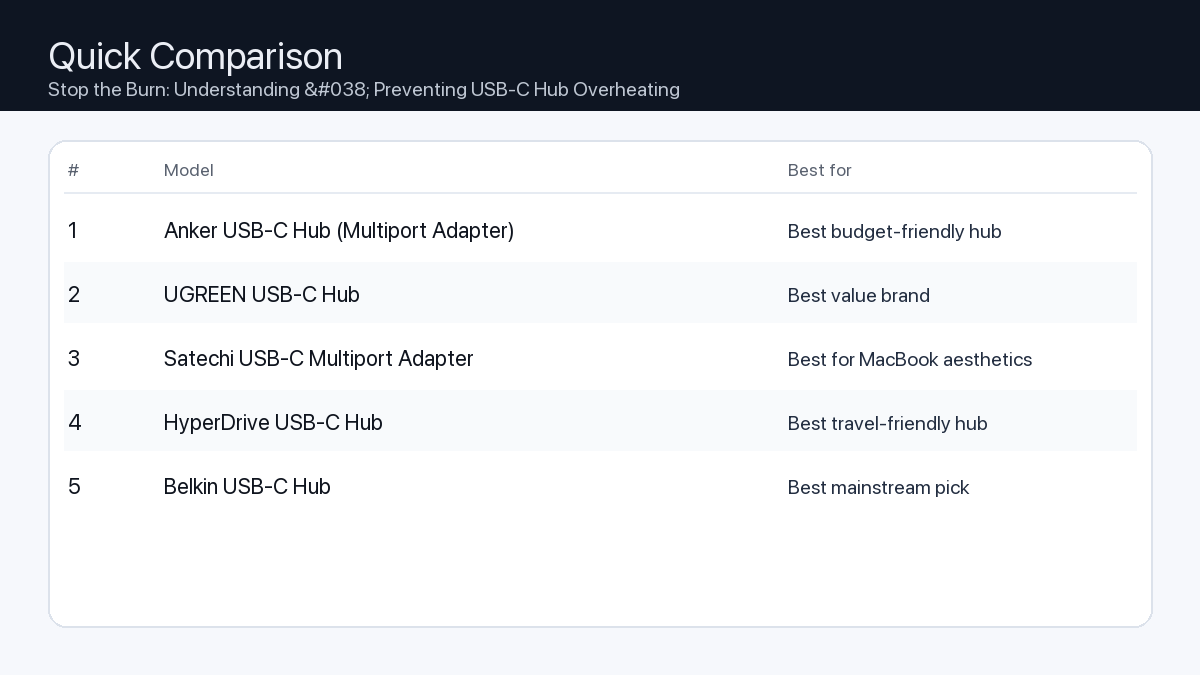
    Quick Comparison

    Note: Specs and availability change. Always confirm details on the product page.

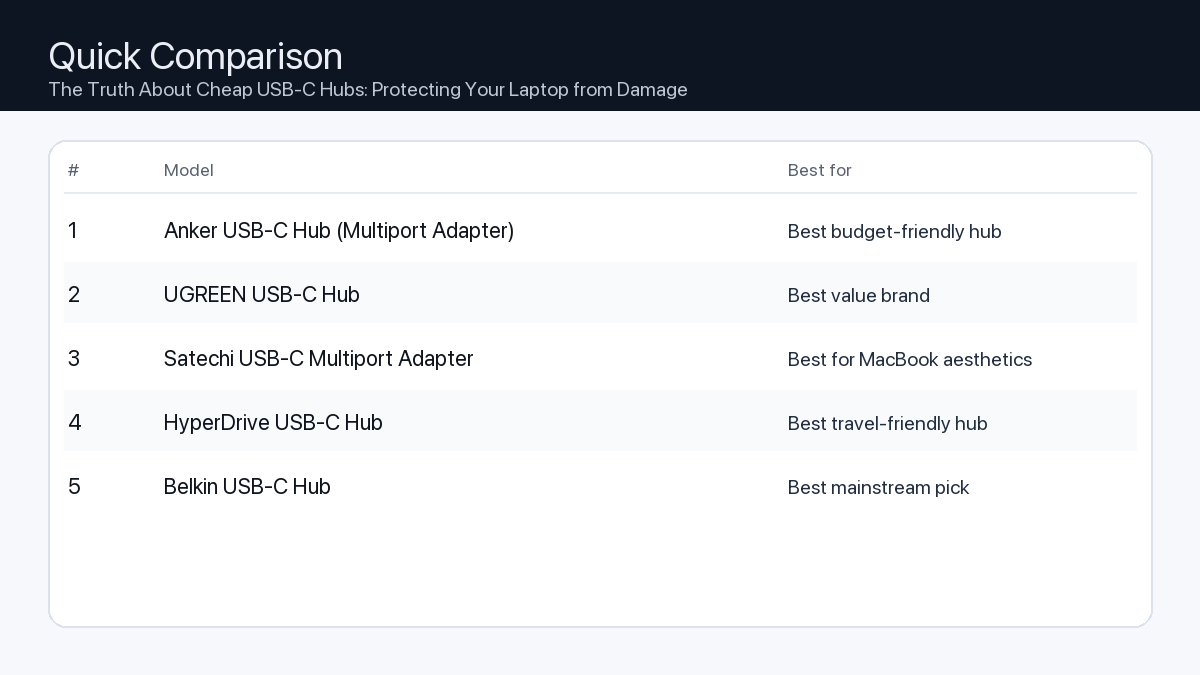
    Model Ports Power Display Best for Details
    Anker USB-C Hub (Multiport Adapter) Varies Varies Host-dependent Best budget-friendly hub Open section
    UGREEN USB-C Hub Varies Varies Host-dependent Best value brand Open section
    Satechi USB-C Multiport Adapter Varies Varies Host-dependent Best for MacBook aesthetics Open section
    HyperDrive USB-C Hub Varies Varies Host-dependent Best travel-friendly hub Open section
    Belkin USB-C Hub Varies Varies Host-dependent Best mainstream pick Open section
    Comparison: The Truth About Cheap USB-C Hubs: Protecting Your Laptop from Damage
    At-a-glance comparison of our picks.

    Our Top Picks

    #1. Anker USB-C Hub (Multiport Adapter)

    Best for: Best budget-friendly hub

    Anker USB-C Hub (Multiport Adapter)

    Why it made the list

    • Easy to find
    • Good starter option

    Tradeoffs

    • Specs vary by version
    • Not ideal for heavy desk setups

    Who should buy this

    • Travel and lightweight setups
    • MacBook users who just need HDMI + a couple USB ports
    • Buyers who want a well-known brand at a low price

    Avoid if

    • You need a rock-solid one-cable workstation (get a dock)
    • You need many ports and long-term desk stability
    • You rely on high-speed storage and want maximum bandwidth

    Check price and compatibility for Anker USB-C Hub (Multiport Adapter)

    Price tip: Prices fluctuate; check Amazon for current deals and compatibility details.

    #2. UGREEN USB-C Hub

    Best for: Best value brand

    UGREEN USB-C Hub

    Why it made the list

    • Good price/performance
    • Many variants

    Tradeoffs

    • Need to pick the right variant
    • Model naming can be confusing

    Who should buy this

    • Value seekers comfortable choosing the right version
    • Users who want better features than the cheapest hubs
    • People who want a hub for occasional desk use + travel

    Avoid if

    • You want the simplest one-click decision with one exact model
    • You need pro-grade stability for all-day dock use
    • You want guaranteed maximum display support for every Mac (confirm first)

    Check price and compatibility for UGREEN USB-C Hub

    Price tip: Prices fluctuate; check Amazon for current deals and compatibility details.

    #3. Satechi USB-C Multiport Adapter

    Best for: Best for MacBook aesthetics

    Satechi USB-C Multiport Adapter

    Why it made the list

    • Matches Mac design
    • Common pick for Mac users

    Tradeoffs

    • Pricier than budget hubs
    • Still a hub (not a full dock)

    Who should buy this

    • Mac users who care about a clean, matching look
    • People who want a simple hub for meetings/travel
    • Users who want a popular, proven style of adapter

    Avoid if

    • You want the lowest price possible
    • You need a full docking station replacement
    • You want lots of ports for a complex workstation

    Check price and compatibility for Satechi USB-C Multiport Adapter

    Price tip: Prices fluctuate; check Amazon for current deals and compatibility details.

    #4. HyperDrive USB-C Hub

    Best for: Best travel-friendly hub

    HyperDrive USB-C Hub

    Why it made the list

    • Compact
    • Popular among travelers

    Tradeoffs

    • Port layout varies
    • Performance depends on the exact model

    Who should buy this

    • Frequent travelers who want a compact adapter
    • Minimal setups: one display + a couple accessories
    • People who want a brand known for travel hubs

    Avoid if

    • You want maximum stability for an all-day desk dock
    • You need many ports and maximum bandwidth
    • You don’t want to think about model variants

    Check price and compatibility for HyperDrive USB-C Hub

    Price tip: Prices fluctuate; check Amazon for current deals and compatibility details.

    #5. Belkin USB-C Hub

    Best for: Best mainstream pick

    Belkin USB-C Hub

    Why it made the list

    • Easy returns
    • Brand support

    Tradeoffs

    • Often more expensive
    • Not always best value on paper

    Who should buy this

    • Mainstream buyers who want an easy purchase + returns
    • People who prefer established accessory brands
    • Users who want a simple adapter for common ports

    Avoid if

    • You want maximum value per dollar
    • You need a full dock replacement
    • You need very high-speed storage workflows (confirm specs first)

    Check price and compatibility for Belkin USB-C Hub

    Price tip: Prices fluctuate; check Amazon for current deals and compatibility details.

    Still Can’t Decide?

    Quick decision tree:

    Price tip: prices fluctuate often. If you’re flexible, watch for seasonal sales and compare listings before you buy.

    Ready? Open Anker USB-C Hub (Multiport Adapter) on Amazon

    Related Guides

    Keep reading with these related buying guides:

  • USB-C Hub Not Charging Laptop: Common Fixes & What to Buy Instead

    USB-C Hub Not Charging Laptop: Common Fixes & What to Buy Instead

    Disclosure: This post may contain affiliate links. As an Amazon Associate, I earn from qualifying purchases. Learn more.

    USB-C Hub Not Charging Laptop: Common Fixes & What to Buy Instead

    You’ve plugged in your sleek new USB-C hub, connected your charger, and… nothing. Your laptop’s battery icon remains stubbornly uncharged. It’s a frustratingly common scenario, but it doesn’t mean your hub is broken or your laptop is faulty. Often, the issue lies in a simple compatibility mismatch or an overlooked detail in the complex world of USB-C Power Delivery (PD).

    This comprehensive buying guide will help you troubleshoot why your USB-C hub isn’t charging your laptop and, more importantly, empower you to choose a new hub that will reliably keep your device powered up while expanding your connectivity options. We’ll cover essential considerations, practical checklists for different user types, and an honest look at how to pick the right hub for your needs.

    Recommended Picks (2026)

    Quick Answer (TL;DR) (Updated February 23, 2026)

    If you want one safe pick: Anker USB-C Hub (Multiport Adapter). If you want a better value: UGREEN USB-C Hub.

    How to use this page: scan the comparison table, jump to the matching use case, then open only the listing that fits your setup.

    Fast path: choose one track below and ignore the rest.

    • Track A (least risk): Anker USB-C Hub (Multiport Adapter)
    • Track B (better value): UGREEN USB-C Hub

    How we picked: research-based selection using manufacturer specs, compatibility notes, and what to verify on the Amazon listing (no hands-on testing claims). Affiliate links may earn us a commission, but rankings are not paid placements.

    Start with Anker USB-C Hub (Multiport Adapter) on Amazon Prefer value? Open UGREEN USB-C Hub

    Skip to a pick: #1 Anker USB-C Hub (Multiport Adapter) | #2 UGREEN USB-C Hub | #3 Satechi USB-C Multiport Adapter | #4 HyperDrive USB-C Hub | #5 Belkin USB-C Hub

    Head-to-Head: Top Pick vs Best Value

    Anker USB-C Hub (Multiport Adapter)
    Best budget-friendly hub

    Read full #1 breakdown

    Go to Amazon: Anker USB-C Hub (Multiport Adapter)

    Quick Comparison

    Note: Specs and availability change. Always confirm details on the product page.

    Model Ports Power Display Best for Details
    Anker USB-C Hub (Multiport Adapter) Varies Varies Host-dependent Best budget-friendly hub Open section
    UGREEN USB-C Hub Varies Varies Host-dependent Best value brand Open section
    Satechi USB-C Multiport Adapter Varies Varies Host-dependent Best for MacBook aesthetics Open section
    HyperDrive USB-C Hub Varies Varies Host-dependent Best travel-friendly hub Open section
    Belkin USB-C Hub Varies Varies Host-dependent Best mainstream pick Open section
    Comparison: USB-C Hub Not Charging Laptop: Common Fixes & What to Buy Instead
    At-a-glance comparison of our picks.

    Our Top Picks

    #1. Anker USB-C Hub (Multiport Adapter)

    Best for: Best budget-friendly hub

    Anker USB-C Hub (Multiport Adapter)

    Why it made the list

    • Easy to find
    • Good starter option

    Tradeoffs

    • Specs vary by version
    • Not ideal for heavy desk setups

    Who should buy this

    • Travel and lightweight setups
    • MacBook users who just need HDMI + a couple USB ports
    • Buyers who want a well-known brand at a low price

    Avoid if

    • You need a rock-solid one-cable workstation (get a dock)
    • You need many ports and long-term desk stability
    • You rely on high-speed storage and want maximum bandwidth

    Check price and compatibility for Anker USB-C Hub (Multiport Adapter)

    Price tip: Prices fluctuate; check Amazon for current deals and compatibility details.

    #2. UGREEN USB-C Hub

    Best for: Best value brand

    UGREEN USB-C Hub

    Why it made the list

    • Good price/performance
    • Many variants

    Tradeoffs

    • Need to pick the right variant
    • Model naming can be confusing

    Who should buy this

    • Value seekers comfortable choosing the right version
    • Users who want better features than the cheapest hubs
    • People who want a hub for occasional desk use + travel

    Avoid if

    • You want the simplest one-click decision with one exact model
    • You need pro-grade stability for all-day dock use
    • You want guaranteed maximum display support for every Mac (confirm first)

    Check price and compatibility for UGREEN USB-C Hub

    Price tip: Prices fluctuate; check Amazon for current deals and compatibility details.

    #3. Satechi USB-C Multiport Adapter

    Best for: Best for MacBook aesthetics

    Satechi USB-C Multiport Adapter

    Why it made the list

    • Matches Mac design
    • Common pick for Mac users

    Tradeoffs

    • Pricier than budget hubs
    • Still a hub (not a full dock)

    Who should buy this

    • Mac users who care about a clean, matching look
    • People who want a simple hub for meetings/travel
    • Users who want a popular, proven style of adapter

    Avoid if

    • You want the lowest price possible
    • You need a full docking station replacement
    • You want lots of ports for a complex workstation

    Check price and compatibility for Satechi USB-C Multiport Adapter

    Price tip: Prices fluctuate; check Amazon for current deals and compatibility details.

    #4. HyperDrive USB-C Hub

    Best for: Best travel-friendly hub

    HyperDrive USB-C Hub

    Why it made the list

    • Compact
    • Popular among travelers

    Tradeoffs

    • Port layout varies
    • Performance depends on the exact model

    Who should buy this

    • Frequent travelers who want a compact adapter
    • Minimal setups: one display + a couple accessories
    • People who want a brand known for travel hubs

    Avoid if

    • You want maximum stability for an all-day desk dock
    • You need many ports and maximum bandwidth
    • You don’t want to think about model variants

    Check price and compatibility for HyperDrive USB-C Hub

    Price tip: Prices fluctuate; check Amazon for current deals and compatibility details.

    #5. Belkin USB-C Hub

    Best for: Best mainstream pick

    Belkin USB-C Hub

    Why it made the list

    • Easy returns
    • Brand support

    Tradeoffs

    • Often more expensive
    • Not always best value on paper

    Who should buy this

    • Mainstream buyers who want an easy purchase + returns
    • People who prefer established accessory brands
    • Users who want a simple adapter for common ports

    Avoid if

    • You want maximum value per dollar
    • You need a full dock replacement
    • You need very high-speed storage workflows (confirm specs first)

    Check price and compatibility for Belkin USB-C Hub

    Price tip: Prices fluctuate; check Amazon for current deals and compatibility details.

    Still Can’t Decide?

    Quick decision tree:

    Price tip: prices fluctuate often. If you’re flexible, watch for seasonal sales and compare listings before you buy.

    Ready? Open Anker USB-C Hub (Multiport Adapter) on Amazon

    FAQ

    My laptop’s original charger is 90W. Can I use a 60W PD hub?

    It’s generally not recommended. A 60W PD hub might charge your 90W laptop very slowly, especially if you’re actively using it or running power-intensive applications. In some cases, it might not charge at all or even cause your battery to slowly discharge while plugged in. For optimal performance and battery health, the hub’s PD output should meet or exceed your laptop’s original charger wattage.

    Do all USB-C ports support charging?

    No, not all USB-C ports support Power Delivery (charging). While the USB-C connector is versatile, its capabilities depend on the specific implementation by the device manufacturer. Some USB-C ports are data-only, some are display-only (DisplayPort Alt Mode), and others support a combination. Always check your laptop’s specifications or look for a small lightning bolt or battery icon next to the port to confirm PD support.

    Why does my hub get hot? Is that normal?

    Some warmth is normal, especially when your USB-C hub is actively charging your laptop, driving a high-resolution display, and transferring data simultaneously. The power conversion and data processing generate heat. Hubs with aluminum housings are designed to dissipate this heat efficiently. However, if the hub becomes excessively hot to the touch, or you notice performance issues, it could indicate an overload or a potential issue, and you should discontinue use.

    Which should I buy: the #1 pick or the best value pick?

    The choice between the #1 pick and the best value pick depends entirely on your specific needs and budget:

    • Choose the #1 pick if: You prioritize maximum power delivery, the widest range of high-speed ports, superior build quality, and future-proofing your setup. This is ideal for users with demanding workflows (e.g., video editing, multi-monitor setups, heavy data transfer) who require top-tier performance, extensive connectivity, and robust reliability without compromise.
    • Choose the best value pick if: You need a reliable, essential set of ports and sufficient power delivery for everyday tasks (e.g., office work, general browsing, single external display, basic peripherals) without needing the absolute highest specifications or an extensive port array. It offers a great balance of necessary features, solid performance, and affordability for most standard users.

    Final Recommendation

    Choosing the right USB-C hub can transform your laptop experience, turning a single port into a versatile powerhouse. By understanding your laptop’s power requirements and carefully matching them with a hub’s Power Delivery capabilities, you can ensure reliable charging and expand your connectivity without frustration. Whether you’re a demanding creative professional or an everyday office user, there’s a USB-C hub designed to meet your needs. Invest wisely, and enjoy the seamless connectivity you deserve.

    Related Guides

    Keep reading with these related buying guides:

  • Best Thunderbolt 4 Docks for MacBook Pro (2026): Your Ultimate Buying Guide

    Best Thunderbolt 4 Docks for MacBook Pro (2026): Your Ultimate Buying Guide

    Disclosure: This post may contain affiliate links. As an Amazon Associate, I earn from qualifying purchases. Learn more.

    Best Thunderbolt 4 Docks for MacBook Pro (2026): Your Ultimate Buying Guide

    The MacBook Pro remains a powerhouse for creative professionals and demanding users, and as we look ahead to 2026, maximizing its potential with the right accessories is paramount. A Thunderbolt 4 dock stands out as an indispensable hub, transforming your single Thunderbolt port into a versatile array of connections for all your peripherals.

    This comprehensive buying guide is designed to help you navigate the landscape of Thunderbolt 4 docks, ensuring you choose an option that perfectly complements your 2026 MacBook Pro setup, enhances your workflow, and future-proofs your desk. Discover how a premium dock can declutter your workspace, expand your display options, and provide lightning-fast data transfer with a single cable.

    Recommended Picks (2026)

    Quick Answer (TL;DR) (Updated February 23, 2026)

    If you want one safe pick: CalDigit TS4 Thunderbolt Dock. If you want a better value: Anker 777 Thunderbolt Docking Station.

    How to use this page: scan the comparison table, jump to the matching use case, then open only the listing that fits your setup.

    Fast path: choose one track below and ignore the rest.

    • Track A (least risk): CalDigit TS4 Thunderbolt Dock
    • Track B (better value): Anker 777 Thunderbolt Docking Station

    How we picked: research-based selection using manufacturer specs, compatibility notes, and what to verify on the Amazon listing (no hands-on testing claims). Affiliate links may earn us a commission, but rankings are not paid placements.

    Start with CalDigit TS4 Thunderbolt Dock on Amazon Prefer value? Open Anker 777 Thunderbolt Docking Station

    Skip to a pick: #1 CalDigit TS4 Thunderbolt Dock | #2 Anker 777 Thunderbolt Docking Station | #3 OWC Thunderbolt Dock | #4 Plugable Thunderbolt 4 Dock | #5 Kensington SD5560T Thunderbolt Dock

    Head-to-Head: Top Pick vs Best Value

    CalDigit TS4 Thunderbolt Dock
    Best overall (ports + stability)

    Read full #1 breakdown

    Go to Amazon: CalDigit TS4 Thunderbolt Dock

    Anker 777 Thunderbolt Docking Station
    Best value for most users

    Read full best-value breakdown

    Go to Amazon: Anker 777 Thunderbolt Docking Station

    Quick Comparison

    Note: Specs and availability change. Always confirm details on the product page.

    Model Ports Power Display Best for Details
    CalDigit TS4 Thunderbolt Dock 18 98W Dual 4K (host-dependent) Best overall (ports + stability) Open section
    Anker 777 Thunderbolt Docking Station 12 90W Dual 4K (host-dependent) Best value for most users Open section
    OWC Thunderbolt Dock 11 90W Dual 4K (host-dependent) Best for creators (reliable connectivity) Open section
    Plugable Thunderbolt 4 Dock 13 96W 8K / dual 4K (host-dependent) Best for work-from-home reliability Open section
    Kensington SD5560T Thunderbolt Dock 10 96W Dual 4K (host-dependent) Best for office desks Open section
    Belkin Thunderbolt 4 Dock 12 90W 8K / dual 4K (host-dependent) Best mainstream brand pick Open section
    Razer Thunderbolt 4 Dock Chroma 10 90W 8K / dual 4K (host-dependent) Best for gaming setups Open section
    Comparison: Best Thunderbolt 4 Docks for MacBook Pro (2026): Your Ultimate Buying Guide
    At-a-glance comparison of our picks.

    Our Top Picks

    #1. CalDigit TS4 Thunderbolt Dock

    Best for: Best overall (ports + stability)

    CalDigit TS4 Thunderbolt Dock

    Why it made the list

    • Premium build
    • Very port-rich
    • Great for pro setups

    Tradeoffs

    • Higher price
    • Overkill for simple setups

    Key specs (verify on the listing)

    Ports (total) 18
    Host charging Up to 98W
    Ethernet 2.5GbE
    Card readers SD UHS-II + microSD UHS-II
    Display output DisplayPort 1.4 (display support varies by host)

    Who should buy this

    • Video editors and creators running multiple peripherals daily
    • Users who want one-cable reliability for a desk setup
    • People who need lots of ports and hate dongle chains

    Avoid if

    • You only need basic ports for one monitor and a couple USB devices
    • Your budget is tight and you want the cheapest working option
    • You prefer an ultra-compact travel hub (a dock is bigger)

    Check price and compatibility for CalDigit TS4 Thunderbolt Dock

    Price tip: Prices fluctuate; check Amazon for current deals and compatibility details.

    #2. Anker 777 Thunderbolt Docking Station

    Best for: Best value for most users

    Anker 777 Thunderbolt Docking Station

    Why it made the list

    • Solid everyday dock
    • Good port mix

    Tradeoffs

    • Not the most ports vs premium docks
    • May lack niche ports some pros want

    Key specs (verify on the listing)

    Ports (total) 12
    Host charging Up to 90W (dynamic allocation)
    Display output 2x HDMI 2.0 (up to 4K@60Hz, host-dependent)
    Ethernet Gigabit
    Card reader SD (UHS-II)

    Who should buy this

    • Most home-office users with a typical dual-monitor + accessories setup
    • Budget-conscious buyers who still want a proper dock (not a tiny hub)
    • People who want a well-known brand with easy availability

    Avoid if

    • You need maximum port count for a complex workstation
    • You want niche pro features (specialty readers/extra downstream TB ports)
    • You only need a small travel adapter (a dock is bigger)

    Check price and compatibility for Anker 777 Thunderbolt Docking Station

    Price tip: Prices fluctuate; check Amazon for current deals and compatibility details.

    #3. OWC Thunderbolt Dock

    Best for: Best for creators (reliable connectivity)

    OWC Thunderbolt Dock

    Why it made the list

    • Strong Mac compatibility
    • Creator-friendly ports

    Tradeoffs

    • Pricing varies by model
    • Model lineup can be confusing

    Key specs (verify on the listing)

    Ports (total) 11
    Host charging Up to 90W
    Thunderbolt 4x Thunderbolt 4 total (1 upstream + 3 downstream)
    Ethernet Gigabit
    Card reader SD (UHS-II)
    USB-A 3x USB-A (10Gbps) + 1x USB-A (USB 2.0)

    Who should buy this

    • Mac-first buyers who value compatibility and support
    • Creators who want a balanced dock without going ultra-premium
    • People who prefer established pro accessory brands

    Avoid if

    • You want the simplest buying decision (OWC has multiple similar models)
    • You want the cheapest option possible
    • You only need a basic hub for travel

    Check price and compatibility for OWC Thunderbolt Dock

    Price tip: Prices fluctuate; check Amazon for current deals and compatibility details.

    #4. Plugable Thunderbolt 4 Dock

    Best for: Best for work-from-home reliability

    Plugable Thunderbolt 4 Dock

    Why it made the list

    • Practical port selection
    • Good support reputation

    Tradeoffs

    • Design is more utilitarian
    • Less “premium” feel vs aluminum docks

    Key specs (verify on the listing)

    Ports (total) 13
    Host charging 96W certified (100W PD)
    Display output 2x HDMI (dual 4K@60Hz, host-dependent)
    Ethernet Gigabit
    Card readers SD + microSD

    Who should buy this

    • Remote workers who just need things to work day after day
    • People who value support docs and troubleshooting help
    • Users building a stable desk setup for calls, files, and monitors

    Avoid if

    • You want a luxury look on the desk
    • You want a tiny travel adapter
    • You want the most ports possible regardless of price

    Check price and compatibility for Plugable Thunderbolt 4 Dock

    Price tip: Prices fluctuate; check Amazon for current deals and compatibility details.

    #5. Kensington SD5560T Thunderbolt Dock

    Best for: Best for office desks

    Kensington SD5560T Thunderbolt Dock

    Why it made the list

    • Desk-friendly
    • Good port options

    Tradeoffs

    • Model lineup can be confusing
    • Often priced at a premium for the brand

    Key specs (verify on the listing)

    Ports (total) 10
    Host charging Up to 96W
    Display output HDMI 2.0 + Thunderbolt (dual 4K@60Hz on Thunderbolt hosts)
    Ethernet Gigabit
    Card reader None

    Who should buy this

    • Office environments and shared desks
    • People who want an established office-accessories brand
    • Users who prefer “set it and forget it” desk hardware

    Avoid if

    • You want the best price-to-ports ratio
    • You want a gaming/creator aesthetic
    • You want a travel-friendly hub

    Check price and compatibility for Kensington SD5560T Thunderbolt Dock

    Price tip: Prices fluctuate; check Amazon for current deals and compatibility details.

    #6. Belkin Thunderbolt 4 Dock

    Best for: Best mainstream brand pick

    Belkin Thunderbolt 4 Dock

    Why it made the list

    • Widely available
    • Solid build

    Tradeoffs

    • Often priced at a premium
    • Not always the best value on paper

    Key specs (verify on the listing)

    Ports (total) 12
    Host charging Up to 90W
    Display output 2x HDMI 2.0 (plus Thunderbolt ports; host-dependent)
    Ethernet Gigabit
    Card reader SD

    Who should buy this

    • Mainstream buyers who want easy purchasing and returns
    • People who prefer big-name accessories
    • Users who value availability over min-maxing specs

    Avoid if

    • You want the absolute best bang-for-buck
    • You need specialized ports for a pro workflow
    • You only need a small hub

    Check price and compatibility for Belkin Thunderbolt 4 Dock

    Price tip: Prices fluctuate; check Amazon for current deals and compatibility details.

    #7. Razer Thunderbolt 4 Dock Chroma

    Best for: Best for gaming setups

    Razer Thunderbolt 4 Dock Chroma

    Why it made the list

    • Desk aesthetic
    • Good for multi-peripheral setups

    Tradeoffs

    • Not the best value
    • You may pay extra for the look

    Key specs (verify on the listing)

    Ports (total) 10
    Host charging Up to 90W
    Thunderbolt 4x Thunderbolt 4 total (1 upstream + 3 downstream)
    Ethernet Gigabit
    Card reader SD (UHS-II)
    Display output Via Thunderbolt/USB-C display (no built-in HDMI/DP)

    Who should buy this

    • RGB / gaming desk setups with many peripherals
    • People who care about desk aesthetics as much as function
    • Users who want a dock that matches other gaming gear

    Avoid if

    • You want maximum value per dollar
    • You don’t care about aesthetics
    • You want a compact travel hub

    Check price and compatibility for Razer Thunderbolt 4 Dock Chroma

    Price tip: Prices fluctuate; check Amazon for current deals and compatibility details.

    Still Can’t Decide?

    Quick decision tree:

    Price tip: prices fluctuate often. If you’re flexible, watch for seasonal sales and compare listings before you buy.

    Ready? Open CalDigit TS4 Thunderbolt Dock on Amazon

    Final Recommendation

    Investing in a high-quality Thunderbolt 4 dock for your 2026 MacBook Pro is more than just buying an accessory; it’s an investment in your productivity, workflow efficiency, and the longevity of your desk setup. The right dock simplifies your connections, expands your creative potential with multiple displays, and ensures your devices operate at peak performance through a single, powerful cable.

    By considering the essential factors of port selection, power delivery, display capabilities, and data transfer speeds, you can confidently choose a Thunderbolt 4 dock that perfectly integrates with your professional environment. Future-proof your workspace and unleash the full power of your MacBook Pro with a dock engineered for the demands of tomorrow.

    Check Prices

    Check the latest prices on Amazon

    Related Guides

    Keep reading with these related buying guides:

  • Top MacBook Docking Stations (2026): Powering Dual Displays & Delivering Power

    Top MacBook Docking Stations (2026): Powering Dual Displays & Delivering Power

    Disclosure: This post may contain affiliate links. As an Amazon Associate, I earn from qualifying purchases. Learn more.

    Top MacBook Docking Stations (2026): Powering Dual Displays & Delivering Power

    Best Picks (2026)

    Quick Answer (TL;DR) (Updated February 23, 2026)

    If you want one safe pick: CalDigit TS4 Thunderbolt Dock. If you want a better value: Anker 777 Thunderbolt Docking Station.

    How to use this page: scan the comparison table, jump to the matching use case, then open only the listing that fits your setup.

    Fast path: choose one track below and ignore the rest.

    • Track A (least risk): CalDigit TS4 Thunderbolt Dock
    • Track B (better value): Anker 777 Thunderbolt Docking Station

    How we picked: research-based selection using manufacturer specs, compatibility notes, and what to verify on the Amazon listing (no hands-on testing claims). Affiliate links may earn us a commission, but rankings are not paid placements.

    Start with CalDigit TS4 Thunderbolt Dock on Amazon Prefer value? Open Anker 777 Thunderbolt Docking Station

    Skip to a pick: #1 CalDigit TS4 Thunderbolt Dock | #2 Anker 777 Thunderbolt Docking Station | #3 OWC Thunderbolt Dock | #4 Plugable Thunderbolt 4 Dock | #5 Kensington SD5560T Thunderbolt Dock

    Head-to-Head: Top Pick vs Best Value

    CalDigit TS4 Thunderbolt Dock
    Best overall (ports + stability)

    Read full #1 breakdown

    Go to Amazon: CalDigit TS4 Thunderbolt Dock

    Anker 777 Thunderbolt Docking Station
    Best value for most users

    Read full best-value breakdown

    Go to Amazon: Anker 777 Thunderbolt Docking Station

    Quick Comparison

    Note: Specs and availability change. Always confirm details on the product page.

    Model Ports Power Display Best for Details
    CalDigit TS4 Thunderbolt Dock 18 98W Dual 4K (host-dependent) Best overall (ports + stability) Open section
    Anker 777 Thunderbolt Docking Station 12 90W Dual 4K (host-dependent) Best value for most users Open section
    OWC Thunderbolt Dock 11 90W Dual 4K (host-dependent) Best for creators (reliable connectivity) Open section
    Plugable Thunderbolt 4 Dock 13 96W 8K / dual 4K (host-dependent) Best for work-from-home reliability Open section
    Kensington SD5560T Thunderbolt Dock 10 96W Dual 4K (host-dependent) Best for office desks Open section
    Belkin Thunderbolt 4 Dock 12 90W 8K / dual 4K (host-dependent) Best mainstream brand pick Open section
    Razer Thunderbolt 4 Dock Chroma 10 90W 8K / dual 4K (host-dependent) Best for gaming setups Open section
    Comparison: Top MacBook Docking Stations (2026): Powering Dual Displays & Delivering Power
    At-a-glance comparison of our picks.

    Our Top Picks

    #1. CalDigit TS4 Thunderbolt Dock

    Best for: Best overall (ports + stability)

    CalDigit TS4 Thunderbolt Dock

    Why it made the list

    • Premium build
    • Very port-rich
    • Great for pro setups

    Tradeoffs

    • Higher price
    • Overkill for simple setups

    Key specs (verify on the listing)

    Ports (total) 18
    Host charging Up to 98W
    Ethernet 2.5GbE
    Card readers SD UHS-II + microSD UHS-II
    Display output DisplayPort 1.4 (display support varies by host)

    Who should buy this

    • Video editors and creators running multiple peripherals daily
    • Users who want one-cable reliability for a desk setup
    • People who need lots of ports and hate dongle chains

    Avoid if

    • You only need basic ports for one monitor and a couple USB devices
    • Your budget is tight and you want the cheapest working option
    • You prefer an ultra-compact travel hub (a dock is bigger)

    Check price and compatibility for CalDigit TS4 Thunderbolt Dock

    Price tip: Prices fluctuate; check Amazon for current deals and compatibility details.

    #2. Anker 777 Thunderbolt Docking Station

    Best for: Best value for most users

    Anker 777 Thunderbolt Docking Station

    Why it made the list

    • Solid everyday dock
    • Good port mix

    Tradeoffs

    • Not the most ports vs premium docks
    • May lack niche ports some pros want

    Key specs (verify on the listing)

    Ports (total) 12
    Host charging Up to 90W (dynamic allocation)
    Display output 2x HDMI 2.0 (up to 4K@60Hz, host-dependent)
    Ethernet Gigabit
    Card reader SD (UHS-II)

    Who should buy this

    • Most home-office users with a typical dual-monitor + accessories setup
    • Budget-conscious buyers who still want a proper dock (not a tiny hub)
    • People who want a well-known brand with easy availability

    Avoid if

    • You need maximum port count for a complex workstation
    • You want niche pro features (specialty readers/extra downstream TB ports)
    • You only need a small travel adapter (a dock is bigger)

    Check price and compatibility for Anker 777 Thunderbolt Docking Station

    Price tip: Prices fluctuate; check Amazon for current deals and compatibility details.

    #3. OWC Thunderbolt Dock

    Best for: Best for creators (reliable connectivity)

    OWC Thunderbolt Dock

    Why it made the list

    • Strong Mac compatibility
    • Creator-friendly ports

    Tradeoffs

    • Pricing varies by model
    • Model lineup can be confusing

    Key specs (verify on the listing)

    Ports (total) 11
    Host charging Up to 90W
    Thunderbolt 4x Thunderbolt 4 total (1 upstream + 3 downstream)
    Ethernet Gigabit
    Card reader SD (UHS-II)
    USB-A 3x USB-A (10Gbps) + 1x USB-A (USB 2.0)

    Who should buy this

    • Mac-first buyers who value compatibility and support
    • Creators who want a balanced dock without going ultra-premium
    • People who prefer established pro accessory brands

    Avoid if

    • You want the simplest buying decision (OWC has multiple similar models)
    • You want the cheapest option possible
    • You only need a basic hub for travel

    Check price and compatibility for OWC Thunderbolt Dock

    Price tip: Prices fluctuate; check Amazon for current deals and compatibility details.

    #4. Plugable Thunderbolt 4 Dock

    Best for: Best for work-from-home reliability

    Plugable Thunderbolt 4 Dock

    Why it made the list

    • Practical port selection
    • Good support reputation

    Tradeoffs

    • Design is more utilitarian
    • Less “premium” feel vs aluminum docks

    Key specs (verify on the listing)

    Ports (total) 13
    Host charging 96W certified (100W PD)
    Display output 2x HDMI (dual 4K@60Hz, host-dependent)
    Ethernet Gigabit
    Card readers SD + microSD

    Who should buy this

    • Remote workers who just need things to work day after day
    • People who value support docs and troubleshooting help
    • Users building a stable desk setup for calls, files, and monitors

    Avoid if

    • You want a luxury look on the desk
    • You want a tiny travel adapter
    • You want the most ports possible regardless of price

    Check price and compatibility for Plugable Thunderbolt 4 Dock

    Price tip: Prices fluctuate; check Amazon for current deals and compatibility details.

    #5. Kensington SD5560T Thunderbolt Dock

    Best for: Best for office desks

    Kensington SD5560T Thunderbolt Dock

    Why it made the list

    • Desk-friendly
    • Good port options

    Tradeoffs

    • Model lineup can be confusing
    • Often priced at a premium for the brand

    Key specs (verify on the listing)

    Ports (total) 10
    Host charging Up to 96W
    Display output HDMI 2.0 + Thunderbolt (dual 4K@60Hz on Thunderbolt hosts)
    Ethernet Gigabit
    Card reader None

    Who should buy this

    • Office environments and shared desks
    • People who want an established office-accessories brand
    • Users who prefer “set it and forget it” desk hardware

    Avoid if

    • You want the best price-to-ports ratio
    • You want a gaming/creator aesthetic
    • You want a travel-friendly hub

    Check price and compatibility for Kensington SD5560T Thunderbolt Dock

    Price tip: Prices fluctuate; check Amazon for current deals and compatibility details.

    #6. Belkin Thunderbolt 4 Dock

    Best for: Best mainstream brand pick

    Belkin Thunderbolt 4 Dock

    Why it made the list

    • Widely available
    • Solid build

    Tradeoffs

    • Often priced at a premium
    • Not always the best value on paper

    Key specs (verify on the listing)

    Ports (total) 12
    Host charging Up to 90W
    Display output 2x HDMI 2.0 (plus Thunderbolt ports; host-dependent)
    Ethernet Gigabit
    Card reader SD

    Who should buy this

    • Mainstream buyers who want easy purchasing and returns
    • People who prefer big-name accessories
    • Users who value availability over min-maxing specs

    Avoid if

    • You want the absolute best bang-for-buck
    • You need specialized ports for a pro workflow
    • You only need a small hub

    Check price and compatibility for Belkin Thunderbolt 4 Dock

    Price tip: Prices fluctuate; check Amazon for current deals and compatibility details.

    #7. Razer Thunderbolt 4 Dock Chroma

    Best for: Best for gaming setups

    Razer Thunderbolt 4 Dock Chroma

    Why it made the list

    • Desk aesthetic
    • Good for multi-peripheral setups

    Tradeoffs

    • Not the best value
    • You may pay extra for the look

    Key specs (verify on the listing)

    Ports (total) 10
    Host charging Up to 90W
    Thunderbolt 4x Thunderbolt 4 total (1 upstream + 3 downstream)
    Ethernet Gigabit
    Card reader SD (UHS-II)
    Display output Via Thunderbolt/USB-C display (no built-in HDMI/DP)

    Who should buy this

    • RGB / gaming desk setups with many peripherals
    • People who care about desk aesthetics as much as function
    • Users who want a dock that matches other gaming gear

    Avoid if

    • You want maximum value per dollar
    • You don’t care about aesthetics
    • You want a compact travel hub

    Check price and compatibility for Razer Thunderbolt 4 Dock Chroma

    Price tip: Prices fluctuate; check Amazon for current deals and compatibility details.

    Still Can’t Decide?

    Quick decision tree:

    Price tip: prices fluctuate often. If you’re flexible, watch for seasonal sales and compare listings before you buy.

    Ready? Open CalDigit TS4 Thunderbolt Dock on Amazon

    Related Guides

    Keep reading with these related buying guides:

  • Future-Proof Your Productivity: The Best USB-C Hubs for MacBook Air (M4) in 2026

    Future-Proof Your Productivity: The Best USB-C Hubs for MacBook Air (M4) in 2026

    Disclosure: This post may contain affiliate links. As an Amazon Associate, I earn from qualifying purchases. Learn more.

    Future-Proof Your Productivity: The Best USB-C Hubs for MacBook Air (M4) in 2026

    Best Picks (2026)

    Quick Answer (TL;DR) (Updated February 23, 2026)

    If you want one safe pick: Anker USB-C Hub (Multiport Adapter). If you want a better value: UGREEN USB-C Hub.

    How to use this page: scan the comparison table, jump to the matching use case, then open only the listing that fits your setup.

    Fast path: choose one track below and ignore the rest.

    • Track A (least risk): Anker USB-C Hub (Multiport Adapter)
    • Track B (better value): UGREEN USB-C Hub

    How we picked: research-based selection using manufacturer specs, compatibility notes, and what to verify on the Amazon listing (no hands-on testing claims). Affiliate links may earn us a commission, but rankings are not paid placements.

    Start with Anker USB-C Hub (Multiport Adapter) on Amazon Prefer value? Open UGREEN USB-C Hub

    Skip to a pick: #1 Anker USB-C Hub (Multiport Adapter) | #2 UGREEN USB-C Hub | #3 Satechi USB-C Multiport Adapter | #4 HyperDrive USB-C Hub | #5 Belkin USB-C Hub

    Head-to-Head: Top Pick vs Best Value

    Anker USB-C Hub (Multiport Adapter)
    Best budget-friendly hub

    Read full #1 breakdown

    Go to Amazon: Anker USB-C Hub (Multiport Adapter)

    Quick Comparison

    Note: Specs and availability change. Always confirm details on the product page.

    Model Ports Power Display Best for Details
    Anker USB-C Hub (Multiport Adapter) Varies Varies Host-dependent Best budget-friendly hub Open section
    UGREEN USB-C Hub Varies Varies Host-dependent Best value brand Open section
    Satechi USB-C Multiport Adapter Varies Varies Host-dependent Best for MacBook aesthetics Open section
    HyperDrive USB-C Hub Varies Varies Host-dependent Best travel-friendly hub Open section
    Belkin USB-C Hub Varies Varies Host-dependent Best mainstream pick Open section
    Comparison: Future-Proof Your Productivity: The Best USB-C Hubs for MacBook Air (M4) in 2026
    At-a-glance comparison of our picks.

    Our Top Picks

    #1. Anker USB-C Hub (Multiport Adapter)

    Best for: Best budget-friendly hub

    Anker USB-C Hub (Multiport Adapter)

    Why it made the list

    • Easy to find
    • Good starter option

    Tradeoffs

    • Specs vary by version
    • Not ideal for heavy desk setups

    Who should buy this

    • Travel and lightweight setups
    • MacBook users who just need HDMI + a couple USB ports
    • Buyers who want a well-known brand at a low price

    Avoid if

    • You need a rock-solid one-cable workstation (get a dock)
    • You need many ports and long-term desk stability
    • You rely on high-speed storage and want maximum bandwidth

    Check price and compatibility for Anker USB-C Hub (Multiport Adapter)

    Price tip: Prices fluctuate; check Amazon for current deals and compatibility details.

    #2. UGREEN USB-C Hub

    Best for: Best value brand

    UGREEN USB-C Hub

    Why it made the list

    • Good price/performance
    • Many variants

    Tradeoffs

    • Need to pick the right variant
    • Model naming can be confusing

    Who should buy this

    • Value seekers comfortable choosing the right version
    • Users who want better features than the cheapest hubs
    • People who want a hub for occasional desk use + travel

    Avoid if

    • You want the simplest one-click decision with one exact model
    • You need pro-grade stability for all-day dock use
    • You want guaranteed maximum display support for every Mac (confirm first)

    Check price and compatibility for UGREEN USB-C Hub

    Price tip: Prices fluctuate; check Amazon for current deals and compatibility details.

    #3. Satechi USB-C Multiport Adapter

    Best for: Best for MacBook aesthetics

    Satechi USB-C Multiport Adapter

    Why it made the list

    • Matches Mac design
    • Common pick for Mac users

    Tradeoffs

    • Pricier than budget hubs
    • Still a hub (not a full dock)

    Who should buy this

    • Mac users who care about a clean, matching look
    • People who want a simple hub for meetings/travel
    • Users who want a popular, proven style of adapter

    Avoid if

    • You want the lowest price possible
    • You need a full docking station replacement
    • You want lots of ports for a complex workstation

    Check price and compatibility for Satechi USB-C Multiport Adapter

    Price tip: Prices fluctuate; check Amazon for current deals and compatibility details.

    #4. HyperDrive USB-C Hub

    Best for: Best travel-friendly hub

    HyperDrive USB-C Hub

    Why it made the list

    • Compact
    • Popular among travelers

    Tradeoffs

    • Port layout varies
    • Performance depends on the exact model

    Who should buy this

    • Frequent travelers who want a compact adapter
    • Minimal setups: one display + a couple accessories
    • People who want a brand known for travel hubs

    Avoid if

    • You want maximum stability for an all-day desk dock
    • You need many ports and maximum bandwidth
    • You don’t want to think about model variants

    Check price and compatibility for HyperDrive USB-C Hub

    Price tip: Prices fluctuate; check Amazon for current deals and compatibility details.

    #5. Belkin USB-C Hub

    Best for: Best mainstream pick

    Belkin USB-C Hub

    Why it made the list

    • Easy returns
    • Brand support

    Tradeoffs

    • Often more expensive
    • Not always best value on paper

    Who should buy this

    • Mainstream buyers who want an easy purchase + returns
    • People who prefer established accessory brands
    • Users who want a simple adapter for common ports

    Avoid if

    • You want maximum value per dollar
    • You need a full dock replacement
    • You need very high-speed storage workflows (confirm specs first)

    Check price and compatibility for Belkin USB-C Hub

    Price tip: Prices fluctuate; check Amazon for current deals and compatibility details.

    Still Can’t Decide?

    Quick decision tree:

    Price tip: prices fluctuate often. If you’re flexible, watch for seasonal sales and compare listings before you buy.

    Ready? Open Anker USB-C Hub (Multiport Adapter) on Amazon

    Related Guides

    Keep reading with these related buying guides:

  • Stop the Burn: Understanding & Preventing USB-C Hub Overheating

    Stop the Burn: Understanding & Preventing USB-C Hub Overheating

    Disclosure: This post may contain affiliate links. As an Amazon Associate, I earn from qualifying purchases. Learn more.

    Stop the Burn: Understanding & Preventing USB-C Hub Overheating

    Recommended Picks (2026)

    Quick Answer (TL;DR) (Updated February 23, 2026)

    If you want one safe pick: Anker USB-C Hub (Multiport Adapter). If you want a better value: UGREEN USB-C Hub.

    How to use this page: scan the comparison table, jump to the matching use case, then open only the listing that fits your setup.

    Fast path: choose one track below and ignore the rest.

    • Track A (least risk): Anker USB-C Hub (Multiport Adapter)
    • Track B (better value): UGREEN USB-C Hub

    How we picked: research-based selection using manufacturer specs, compatibility notes, and what to verify on the Amazon listing (no hands-on testing claims). Affiliate links may earn us a commission, but rankings are not paid placements.

    Start with Anker USB-C Hub (Multiport Adapter) on Amazon Prefer value? Open UGREEN USB-C Hub

    Skip to a pick: #1 Anker USB-C Hub (Multiport Adapter) | #2 UGREEN USB-C Hub | #3 Satechi USB-C Multiport Adapter | #4 HyperDrive USB-C Hub | #5 Belkin USB-C Hub

    Head-to-Head: Top Pick vs Best Value

    Anker USB-C Hub (Multiport Adapter)
    Best budget-friendly hub

    Read full #1 breakdown

    Go to Amazon: Anker USB-C Hub (Multiport Adapter)

    Quick Comparison

    Note: Specs and availability change. Always confirm details on the product page.

    Model Ports Power Display Best for Details
    Anker USB-C Hub (Multiport Adapter) Varies Varies Host-dependent Best budget-friendly hub Open section
    UGREEN USB-C Hub Varies Varies Host-dependent Best value brand Open section
    Satechi USB-C Multiport Adapter Varies Varies Host-dependent Best for MacBook aesthetics Open section
    HyperDrive USB-C Hub Varies Varies Host-dependent Best travel-friendly hub Open section
    Belkin USB-C Hub Varies Varies Host-dependent Best mainstream pick Open section
    Comparison: Stop the Burn: Understanding & Preventing USB-C Hub Overheating
    At-a-glance comparison of our picks.

    Our Top Picks

    #1. Anker USB-C Hub (Multiport Adapter)

    Best for: Best budget-friendly hub

    Anker USB-C Hub (Multiport Adapter)

    Why it made the list

    • Easy to find
    • Good starter option

    Tradeoffs

    • Specs vary by version
    • Not ideal for heavy desk setups

    Who should buy this

    • Travel and lightweight setups
    • MacBook users who just need HDMI + a couple USB ports
    • Buyers who want a well-known brand at a low price

    Avoid if

    • You need a rock-solid one-cable workstation (get a dock)
    • You need many ports and long-term desk stability
    • You rely on high-speed storage and want maximum bandwidth

    Check price and compatibility for Anker USB-C Hub (Multiport Adapter)

    Price tip: Prices fluctuate; check Amazon for current deals and compatibility details.

    #2. UGREEN USB-C Hub

    Best for: Best value brand

    UGREEN USB-C Hub

    Why it made the list

    • Good price/performance
    • Many variants

    Tradeoffs

    • Need to pick the right variant
    • Model naming can be confusing

    Who should buy this

    • Value seekers comfortable choosing the right version
    • Users who want better features than the cheapest hubs
    • People who want a hub for occasional desk use + travel

    Avoid if

    • You want the simplest one-click decision with one exact model
    • You need pro-grade stability for all-day dock use
    • You want guaranteed maximum display support for every Mac (confirm first)

    Check price and compatibility for UGREEN USB-C Hub

    Price tip: Prices fluctuate; check Amazon for current deals and compatibility details.

    #3. Satechi USB-C Multiport Adapter

    Best for: Best for MacBook aesthetics

    Satechi USB-C Multiport Adapter

    Why it made the list

    • Matches Mac design
    • Common pick for Mac users

    Tradeoffs

    • Pricier than budget hubs
    • Still a hub (not a full dock)

    Who should buy this

    • Mac users who care about a clean, matching look
    • People who want a simple hub for meetings/travel
    • Users who want a popular, proven style of adapter

    Avoid if

    • You want the lowest price possible
    • You need a full docking station replacement
    • You want lots of ports for a complex workstation

    Check price and compatibility for Satechi USB-C Multiport Adapter

    Price tip: Prices fluctuate; check Amazon for current deals and compatibility details.

    #4. HyperDrive USB-C Hub

    Best for: Best travel-friendly hub

    HyperDrive USB-C Hub

    Why it made the list

    • Compact
    • Popular among travelers

    Tradeoffs

    • Port layout varies
    • Performance depends on the exact model

    Who should buy this

    • Frequent travelers who want a compact adapter
    • Minimal setups: one display + a couple accessories
    • People who want a brand known for travel hubs

    Avoid if

    • You want maximum stability for an all-day desk dock
    • You need many ports and maximum bandwidth
    • You don’t want to think about model variants

    Check price and compatibility for HyperDrive USB-C Hub

    Price tip: Prices fluctuate; check Amazon for current deals and compatibility details.

    #5. Belkin USB-C Hub

    Best for: Best mainstream pick

    Belkin USB-C Hub

    Why it made the list

    • Easy returns
    • Brand support

    Tradeoffs

    • Often more expensive
    • Not always best value on paper

    Who should buy this

    • Mainstream buyers who want an easy purchase + returns
    • People who prefer established accessory brands
    • Users who want a simple adapter for common ports

    Avoid if

    • You want maximum value per dollar
    • You need a full dock replacement
    • You need very high-speed storage workflows (confirm specs first)

    Check price and compatibility for Belkin USB-C Hub

    Price tip: Prices fluctuate; check Amazon for current deals and compatibility details.

    Still Can’t Decide?

    Quick decision tree:

    Price tip: prices fluctuate often. If you’re flexible, watch for seasonal sales and compare listings before you buy.

    Ready? Open Anker USB-C Hub (Multiport Adapter) on Amazon

    Related Guides

    Keep reading with these related buying guides: