When technology becomes a ritual, productivity stops being mechanical and starts becoming intentional.
The Philosophy of the First Touch
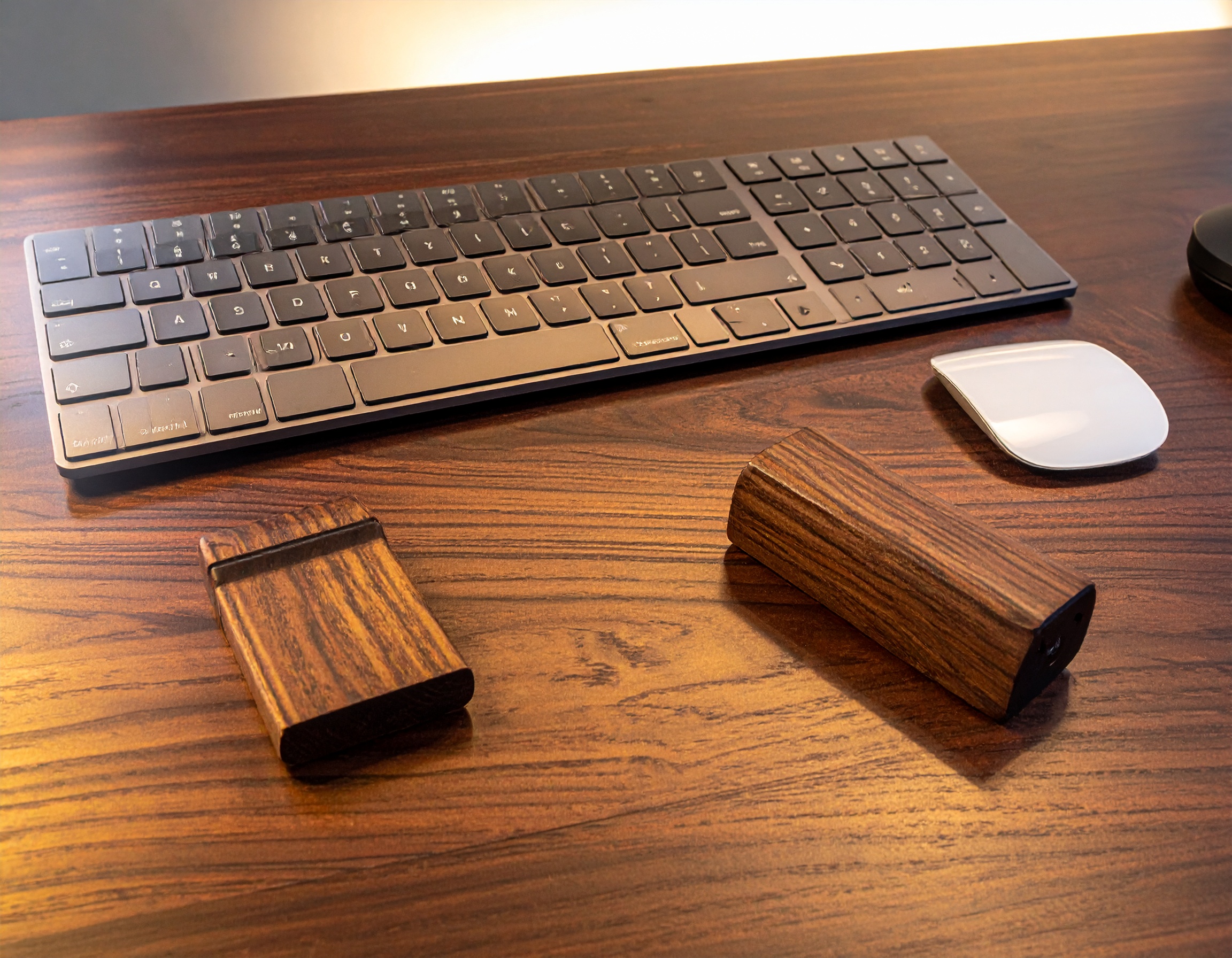
When you sit at your desk, the world goes quiet. Your first interaction with your workflow isn’t the screen—it’s the tactile feedback of your fingertips meeting the keys. In a high-end setup, this moment should feel like an event. We believe that technology shouldn’t just be fast; it should have a character that grounds you. Whether it’s the cool touch of CNC-milled aluminum or the subtle grain of high-quality PBT, the textures of your desk define your creative flow.
Professional Curator’s Choice
The Professional Curator’s Choice: Custom Mechanical Luxury
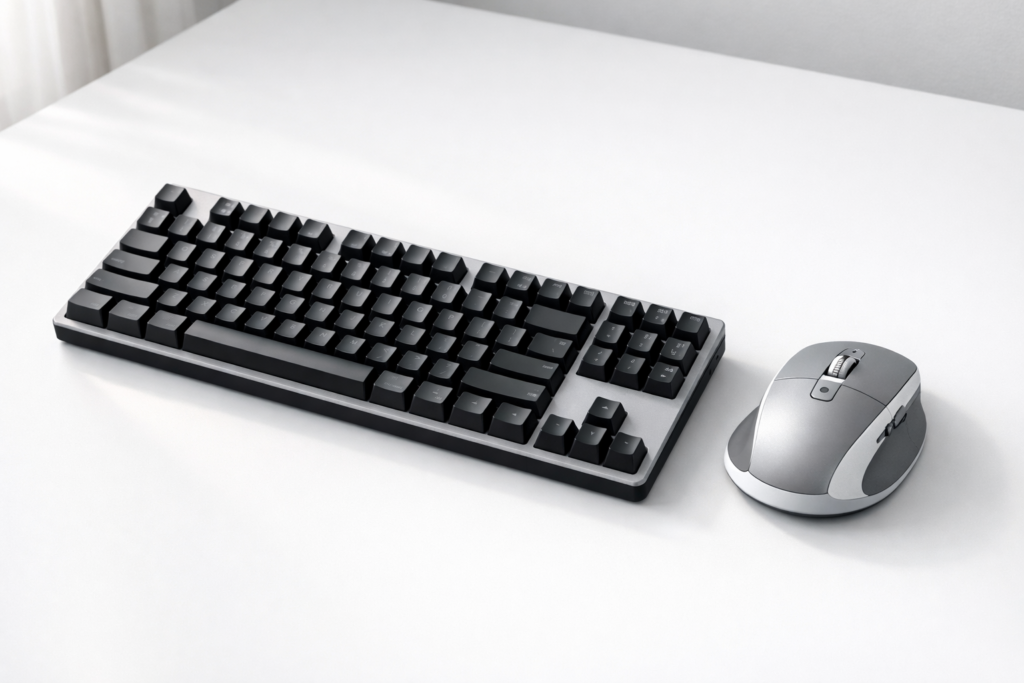
Moving beyond generic office peripherals is the first step toward a Terra Pods-level sanctuary. For the Mac Mini M4 ecosystem, the Keychron Q1 Max becomes the desk’s keystone: a 75% layout with measured resistance, elegant acoustics, and a confident tactile signature. Pairing industrial aluminum with a walnut wrist rest creates the kind of visual tension plastic setups never achieve.
There is a specific magic to working at 11 PM, illuminated only by the amber glow of a desk lamp and the soft backlight of your monitor. In these moments, your mouse needs to become an extension of intent. The Logitech MX Master 3S delivers haptic sophistication with near-silent clicks, adding a sensory layer that turns routine interaction into professional craft.
The keyboard and mouse are the two things you touch every single time you sit down at your desk. Yet most people are still using whatever came in the box. A proper keyboard and mouse upgrade doesn’t just feel better — it reduces fatigue, improves accuracy, and makes your entire setup more enjoyable to use.
We researched the best-selling and highest-rated keyboards and mice on Amazon for 2026. Here are our top picks across every budget and use case.
Our Top Picks at a Glance
Product
Best For
Price Range
Logitech MX Keys S
Best Overall Keyboard
$$$
Keychron K2 Pro
Best Mechanical Keyboard
$$
Logitech MX Master 3S
Best Overall Mouse
$$$
Razer DeathAdder V3
Best for Gaming
$$
Logitech Pebble M350
Best Budget Pick
$
#1. Logitech MX Keys S — Best Overall Keyboard
The MX Keys S is the keyboard for people who type a lot and want it to feel effortless. The keys have a satisfying, slightly tactile feel without being loud — perfect for home offices, open spaces, or anyone who wants to type faster with less effort. It connects to up to three devices via Bluetooth and switches between them with a single key press. Backlit, rechargeable via USB-C, and built to last.
What we love: Comfortable for long typing sessions, seamless multi-device switching, premium build quality.
What to know: Not a mechanical keyboard — if you want clicky keys, see #2.
The Keychron K2 Pro is the go-to mechanical keyboard for anyone who wants that satisfying click-clack experience without paying a premium for a “gaming” brand. It’s compact (75% layout), connects via Bluetooth or USB-C, and comes hot-swappable — meaning you can change the switches to match your preferred feel without soldering. Works flawlessly on Mac and Windows.
What we love: Hot-swappable switches, Mac/Windows compatibility, compact footprint.
What to know: Some switch options are louder — check the switch type before buying if you’re in a shared space.
The MX Master 3S is the mouse that productivity enthusiasts keep recommending — and for good reason. It has an electromagnetic scroll wheel that can scroll through thousands of lines in seconds, a precise 8,000 DPI sensor, and side buttons that work brilliantly in apps like Excel, Figma, and browsers. Connects to three devices, charges via USB-C, and works on virtually any surface including glass.
What we love: MagSpeed scroll wheel is a game-changer, excellent ergonomics, works on any surface.
What to know: Right-hand only design. Left-handed users should look at a symmetrical alternative.
If you want a mouse built for fast, precise movement, the DeathAdder V3 is one of the best gaming mice on the market. It’s ultra-lightweight at 59g, uses Razer’s Focus Pro 30K optical sensor, and the ergonomic right-hand shape fits most grip styles perfectly. Wired for zero-latency input. It’s the mouse used by pro gamers worldwide — but it’s just as great for everyday desktop use if you like a light, fast mouse.
What we love: Incredibly light, best-in-class sensor, proven in competitive gaming.
What to know: Wired only (wireless version available at higher price). Right-hand design.
Want a solid wireless mouse without spending much? The Pebble M350 is the answer. It’s compact, silent, connects via Bluetooth or the nano USB receiver, and runs on a single AA battery for up to 18 months. It’s not a performance mouse, but for everyday web browsing, documents, and general computer use, it’s unbeatable at the price.
What we love: Silent clicks, dual-connection (Bluetooth + USB), incredibly long battery life.
What to know: Basic feature set — no fast scroll wheel or extra buttons.
Wired vs wireless: Wireless is more convenient for clean desk setups. Wired is better for gaming (zero latency). Modern wireless mice like the MX Master 3S are reliable enough for everyday work.
Mechanical vs membrane: Mechanical keyboards have individual switches per key — more tactile, more durable, and more satisfying to type on. Membrane keyboards are quieter and cheaper. Both are valid choices depending on your preference.
Ergonomics: If you type or use a mouse for hours every day, ergonomics matter. Look for keyboards with a slight tilt and mice that support a natural hand position. Vertical mice are worth considering if you have wrist strain.
Multi-device pairing: If you switch between a laptop, desktop, or tablet, look for keyboards and mice that support Bluetooth multi-device pairing — it saves a lot of hassle.
Battery life: Rechargeable (USB-C) is more convenient long-term. AA-battery mice and keyboards can last months or even years on a single set.
Bottom Line
For most people, the Logitech MX Keys S + MX Master 3S combo is the best keyboard and mouse setup money can buy for productivity and everyday use. If you’re on a budget, the Pebble M350 delivers surprising quality for the price. Mechanical keyboard fans should go straight for the Keychron K2 Pro — it’s the best in that category without question.
Any upgrade here will immediately make your desk feel more premium and your daily work more comfortable. It’s one of the easiest wins in any setup.
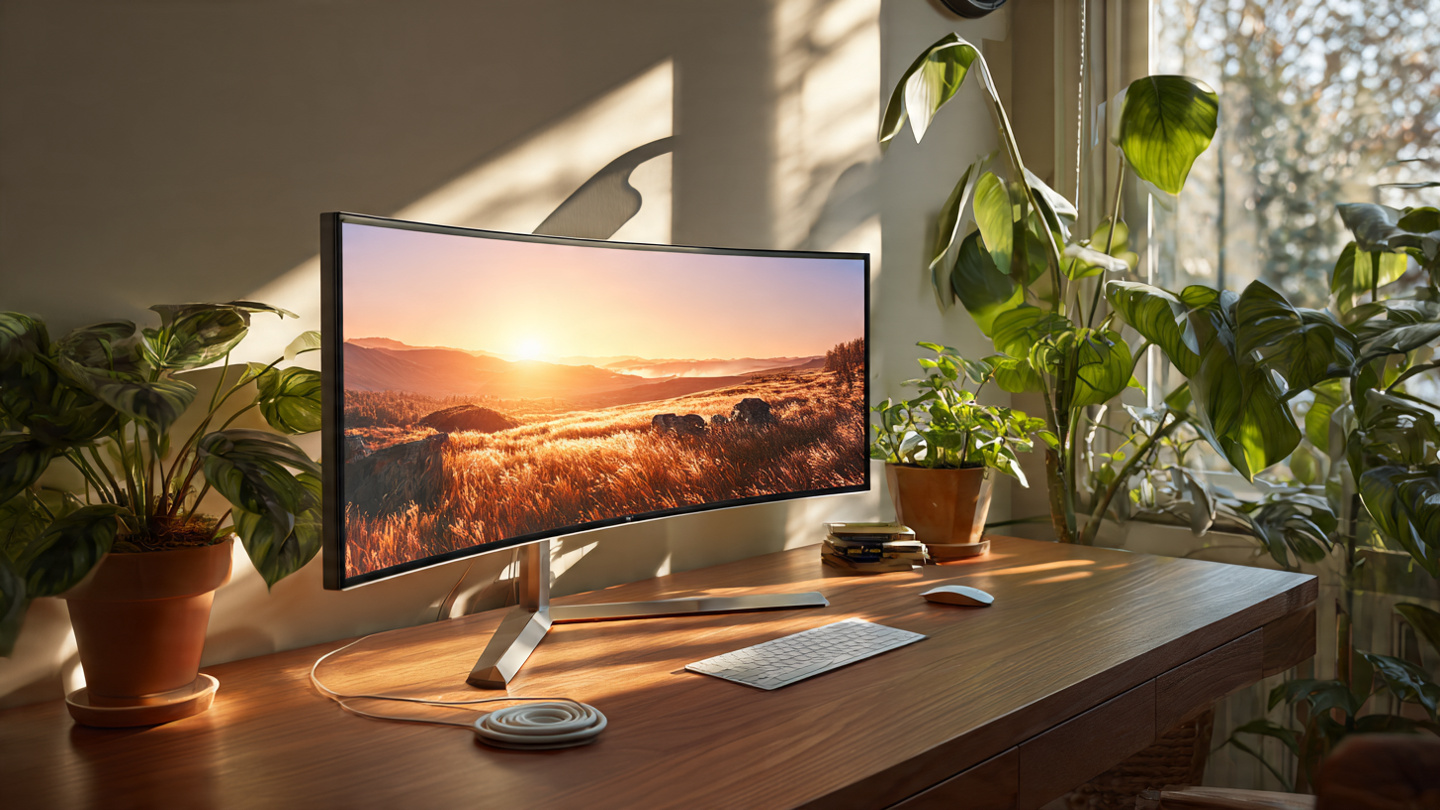
A monitor arm is the single biggest upgrade you can make to any desk setup. It frees up surface space, improves your posture, and makes any desk look instantly cleaner and more professional. Whether you’re building a minimal home office or a full dual-monitor workstation, the right monitor arm changes everything.
We tested and researched the top monitor arms available on Amazon in 2026. Here are our top picks for every budget and setup type.
Our Top Picks at a Glance
Monitor Arm
Best For
Price Range
Ergotron LX
Best Overall
$$$
Amazon Basics Single Monitor Arm
Best Budget
$
Flexispot F7L
Best for Heavy Monitors
$$
VIVO Dual Monitor Arm
Best Dual Setup
$$
Fully Jarvis Monitor Arm
Best Premium
$$$$
#1. Ergotron LX Desk Mount — Best Overall
The Ergotron LX is the gold standard of monitor arms. It handles monitors up to 34 inches and 25 lbs, moves smoothly in every direction, and looks clean on any desk. The cable management channel keeps everything tidy. It’s the arm that appears in more desk setup photos than any other — for good reason.
What we love: Buttery smooth adjustment, premium build quality, works with ultrawide monitors.
What to know: Premium price, but it lasts for years.
#2. Amazon Basics Single Monitor Arm — Best Budget Pick
If you want the benefits of a monitor arm without spending much, the Amazon Basics arm delivers solid performance at a fraction of the price. It supports monitors up to 27 inches and handles basic tilt, swivel, and height adjustment. Not as smooth as the Ergotron, but a huge upgrade over a fixed stand.
What we love: Unbeatable value, easy installation, gets the job done.
What to know: Not ideal for heavy or ultrawide monitors.
Running a large 34″+ ultrawide or a heavy professional display? The Flexispot F7L is built for it. It supports monitors up to 33 lbs and stays locked in position without drift — a common problem with cheaper arms under heavy loads. Solid construction, clean look.
What we love: Handles heavy monitors without drooping, sturdy build.
The VIVO dual arm is the most popular dual monitor mount on Amazon for good reason — it’s affordable, adjustable, and clears up a massive amount of desk space. Each arm adjusts independently, so you can angle each monitor exactly where you need it. Works great for productivity setups and side-by-side coding environments.
What we love: Great value for a dual arm, independent adjustment, very popular.
What to know: Better for standard monitors than ultrawides.
The Fully Jarvis arm is built for people who want the absolute best. Exceptionally smooth movement, premium materials, and a design that looks great on high-end desk setups. If you’re investing in a standing desk or a serious workstation, this arm matches that level of quality.
What we love: Premium feel, flawless cable management, beautiful design.
What to know: Higher price point — but worth it for a permanent setup.
Weight capacity: Check your monitor’s weight before buying. Most standard monitors are under 15 lbs, but large ultrawides can hit 20-25 lbs.
VESA compatibility: Nearly all monitors have a 75x75mm or 100x100mm VESA mount on the back. Confirm yours before ordering.
Desk clamp vs grommet: Most arms come with both options. Clamp is easier to install; grommet is more stable for heavy setups.
Cable management: Look for arms with a built-in cable channel — it keeps your desk looking clean and professional.
Bottom Line
If you’re serious about your desk setup, a monitor arm is not optional — it’s essential. The Ergotron LX is our top pick for most people. If budget is tight, the Amazon Basics arm does the job well. Going dual? The VIVO dual arm is the move.
Any of these will immediately make your desk look cleaner, give you back surface space, and reduce neck strain. It’s one of the best $30-$150 investments you can make in your workspace.
Disclosure: This post may contain affiliate links. As an Amazon Associate, I earn from qualifying purchases. Learn more.
Choosing the ideal tablet for academic success and efficient remote work in 2026 requires balancing performance, portability, and value. If your workflow involves intensive creative tasks like video editing, advanced graphic design, or running multiple demanding applications simultaneously, investing in a premium tablet with top-tier processors and ample memory will prevent frustration and boost productivity. For most students, general office tasks, note-taking, and media consumption, a feature-rich mid-range tablet offers an excellent balance of capability and affordability, handling daily demands without unnecessary cost.
This comprehensive buying guide will help you navigate the essential features and considerations, ensuring you select a tablet that perfectly supports your studies and professional responsibilities without compromising on performance or breaking your budget.
Best Picks (2026)
Quick Answer (TL;DR) (Updated March 12, 2026)
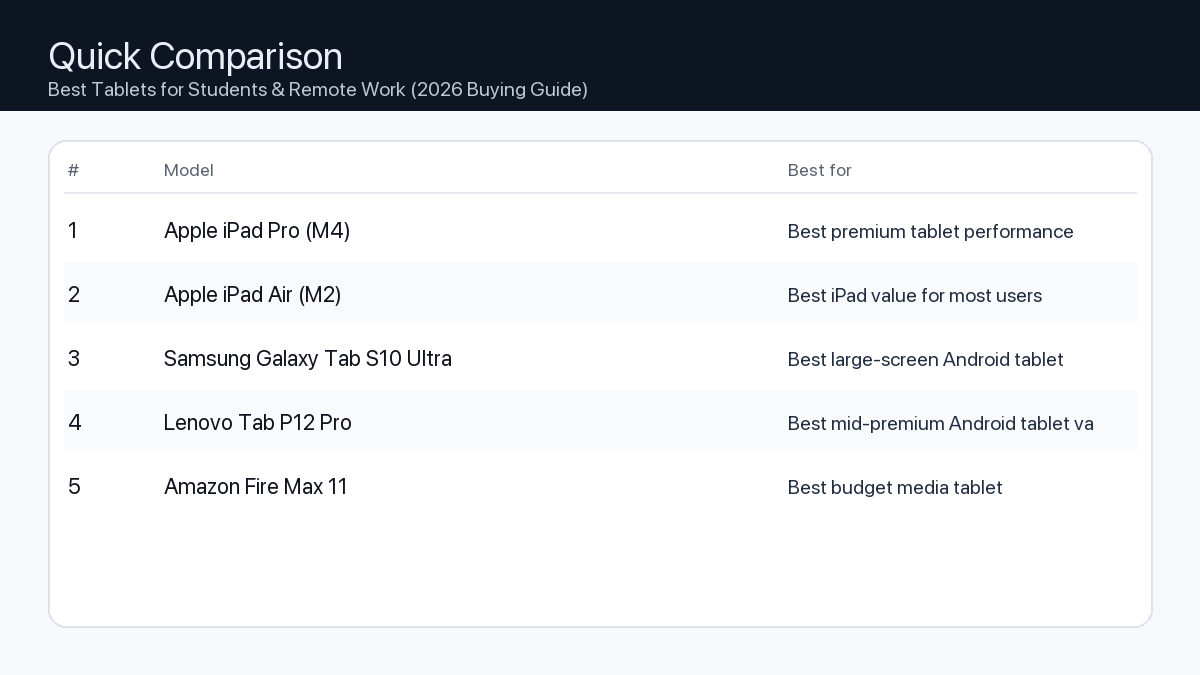
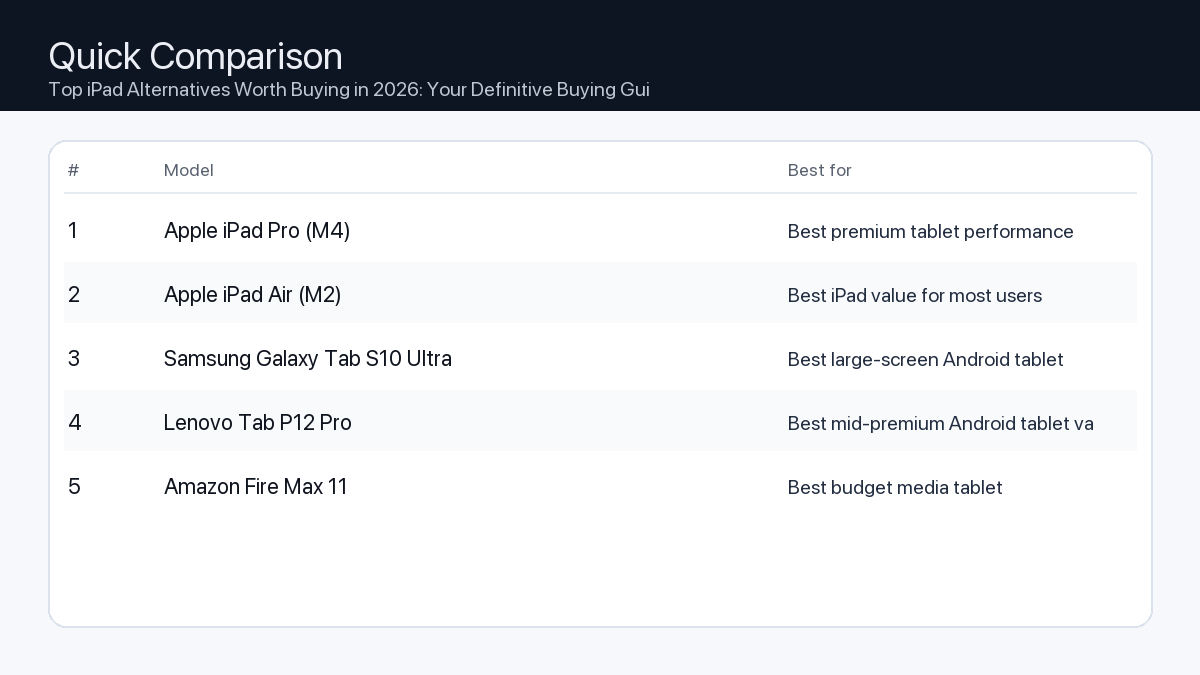
If you want one safe pick: Apple iPad Pro (M4). If you want a better value: Apple iPad Air (M2).
How to use this page: scan the comparison table, jump to the matching use case, then open only the listing that fits your setup.
Fast path: choose one track below and ignore the rest.
Track A (least risk): Apple iPad Pro (M4)
Track B (better value): Apple iPad Air (M2)
How we picked: research-based selection using manufacturer specs, compatibility notes, and what to verify on the Amazon listing (no hands-on testing claims). Affiliate links may earn us a commission, but rankings are not paid placements.
The right tablet can be a powerful tool for productivity, creativity, and learning. Understanding the key specifications and how they impact your daily tasks is crucial for making an informed decision.
Key Features to Consider
Performance (Processor & RAM): The tablet’s ‘brain’ and ‘short-term memory’.
Problem: An underpowered processor or insufficient RAM leads to slow app loading, stuttering during multitasking, and inability to run demanding software.
Consequence: Frustration, wasted time, and limitations on the type of work you can accomplish.
Recommendation: For basic note-taking and web browsing, 6-8GB RAM is acceptable. For heavy multitasking, graphic design, or complex spreadsheets, target 12GB RAM or higher paired with a modern, high-performance chip.
Display Quality: Your primary interaction point.
Problem: A low-resolution, dim, or color-inaccurate screen causes eye strain, makes reading difficult, and compromises creative work.
Consequence: Reduced comfort, poor visual experience, and inaccurate representations of your content.
Recommendation: Look for resolutions of at least 2K (2560×1600 or similar), good brightness (400+ nits), and wide color gamut support (e.g., DCI-P3) for vibrant, accurate visuals. OLED panels offer superior contrast and true blacks, ideal for media consumption and design.
Storage: Where your files and apps reside.
Problem: Insufficient storage means constantly deleting files, managing cloud storage, or being unable to install essential applications.
Consequence: Disrupted workflow and limited software access.
Recommendation: Start with a minimum of 128GB. For students with many textbooks or remote workers handling large files (video, CAD), 256GB or 512GB is more appropriate. Cloud storage complements, but doesn’t fully replace, local storage.
Battery Life: Powering your day.
Problem: A tablet that constantly needs recharging limits portability and disrupts work sessions, especially when power outlets are scarce.
Consequence: Anxiety about battery levels and interruption of critical tasks.
Recommendation: Aim for tablets offering 8-10+ hours of mixed-use battery life. Check manufacturer claims and look for efficiency ratings.
Operating System (OS): The software foundation.
Recommendation: Evaluate the app ecosystem, multitasking capabilities, and desktop-like features offered by different tablet operating systems. One OS might excel in creative applications and tight integration with specific smartphone ecosystems, another might offer robust multitasking and desktop-grade application experiences, while a third provides extensive customization and broad hardware compatibility. Consider which environment best supports your existing software and future needs.
Connectivity: Staying connected and expanding functionality.
Recommendation: Ensure Wi-Fi 6E or Wi-Fi 7 for fast wireless internet. Consider 5G cellular connectivity if you frequently work remotely without Wi-Fi. A USB-C port with support for display output and fast data transfer is essential for external monitors and accessories. Bluetooth 5.2 or newer is important for reliable wireless accessory connections.
Accessories & Ecosystem: Enhancing productivity.
Recommendation: Check for robust stylus support (for note-taking, drawing), high-quality keyboard accessories for extended typing, and the ability to connect to external displays to create a desktop-like setup. A strong accessory ecosystem often extends the tablet’s utility significantly.
Checklist for Students & Remote Workers
✓ Performance: Meets or exceeds demands for core applications (e.g., word processing, video conferencing, specialized software).
✓ Display: Sufficient resolution, brightness, and size for comfortable reading and viewing.
✓ Storage: Enough capacity for all essential apps, files, and media, with room to grow.
✓ Battery: Provides all-day power for your typical usage patterns.
✓ OS & Apps: Compatible with all necessary software and offers a productive workflow.
✓ Connectivity: Reliable Wi-Fi, optional cellular, and versatile USB-C.
✓ Accessories: Supports a stylus for notes and a keyboard for typing, if needed.
✓ Portability: Comfortable weight and size for carrying daily.
Example Setups: Matching Tablets to Your Workflow
Understanding your specific needs helps narrow down the choices. Here are a few archetypes:
For the Power User (Video Editor/Graphic Designer/Engineering Student)
Needs: Top-tier processor, 16GB+ RAM, large high-resolution (OLED preferred) display with excellent color accuracy, 512GB+ fast storage, robust stylus support, versatile USB-C port for external monitors/storage.
Consequence of Compromise: Slow rendering times, laggy editing, inaccurate color representation leading to reworks, inability to handle large project files.
Recommendation: Prioritize tablets marketed for professionals and creators. These devices often feature cooling systems to maintain performance under load.
For the Office Professional (Heavy Multitasker/Writer/Data Analyst)
Needs: High-end or strong mid-range processor, 8-12GB RAM, bright display for indoor/outdoor use, comfortable and responsive keyboard accessory, external monitor support, strong battery life.
Consequence of Compromise: Frustrating delays when switching between apps, limited screen real estate for concurrent tasks, uncomfortable typing experience.
Recommendation: Focus on tablets with robust multitasking features, excellent keyboard accessories, and good integration with cloud productivity suites.
For the Everyday Student/Casual User (Notes/Streaming/Light Work)
Needs: Mid-range processor, 6-8GB RAM, good quality display for media and reading, decent battery life, lightweight design, optional stylus for notes, budget-friendly keyboard.
Consequence of Compromise: Slower app loading, less enjoyable media consumption, potential for sluggish performance with multiple browser tabs or basic games.
Recommendation: Look for tablets that offer a balance of features without the premium price tag. Emphasis on portability and core functionality.
How We Picked
Our selection process focused on analyzing published technical specifications, feature sets, and compatibility notes from manufacturers for tablets expected to be available in 2026. We prioritized devices that demonstrate a strong balance of processing power, display quality, battery longevity, and accessory ecosystem support, factoring in their suitability for both academic and professional remote work environments. Input from prominent industry analysts and common user workflow requirements was also considered to assess real-world applicability and future-proofing potential.
Frequently Asked Questions
Which should I buy: the #1 pick or the best value pick?
Choose the #1 pick if you demand the absolute best performance for demanding tasks like 4K video editing, complex 3D rendering, or future-proofing your device for several years. Opt for the best value pick if your primary needs include note-taking, document creation, web browsing, streaming, and light to moderate productivity, where budget and a strong feature set are equally important.
Do I need 5G for a tablet?
5G connectivity is beneficial if you frequently work or study in locations without reliable Wi-Fi, such as during commutes, in coffee shops, or when traveling. It provides a fast, secure, and independent internet connection. If your work is primarily confined to Wi-Fi enabled environments (home, office, campus), then a Wi-Fi-only model is usually sufficient and more cost-effective.
Can a tablet replace a laptop for school/work?
For many students and remote workers, a modern tablet with a good keyboard accessory and stylus can largely replace a laptop, especially for tasks like writing papers, presentations, research, note-taking, and video conferencing. However, specialized software (e.g., specific engineering tools, complex coding IDEs) that requires a full desktop operating system or high-end discrete graphics might still necessitate a traditional laptop or desktop computer.
What’s the ideal screen size?
Screen size is a personal preference driven by portability and usage. Smaller tablets (around 10-11 inches) are highly portable and excellent for reading and casual use. Larger tablets (12-13 inches or more) offer more screen real estate for multitasking, creative work, and a more comfortable laptop-like experience when paired with a keyboard, but they are less portable.
Final Recommendation
The ‘best’ tablet for students and remote work in 2026 isn’t a one-size-fits-all answer. It’s the device that best aligns with your specific academic and professional demands, integrates seamlessly with your workflow, and respects your budget. By carefully evaluating performance needs, display quality, storage requirements, battery life, and the crucial ecosystem of accessories, you can select a tablet that will be a powerful and reliable companion throughout your studies and career. Invest wisely, and your tablet will serve as a versatile hub for productivity and creativity.
Disclosure: This post may contain affiliate links. As an Amazon Associate, I earn from qualifying purchases. Learn more.
Are you primarily looking for a reliable communication tool or a high-fidelity creative instrument? If your needs are basic video calls and virtual meetings, a value-focused webcam offering solid 1080p performance will likely serve you well. For advanced uses like live streaming, content creation, or frequent high-stakes presentations, investing in a premium model with 4K resolution, faster frame rates, and advanced features can significantly elevate your visual presence.
This guide helps you understand the crucial features and tradeoffs to consider when selecting a webcam from the best-selling models on Amazon for 2026, ensuring you make an informed decision tailored to your specific needs without getting bogged down in technical jargon.
Best Picks (2026)
Quick Answer (TL;DR) (Updated March 11, 2026)
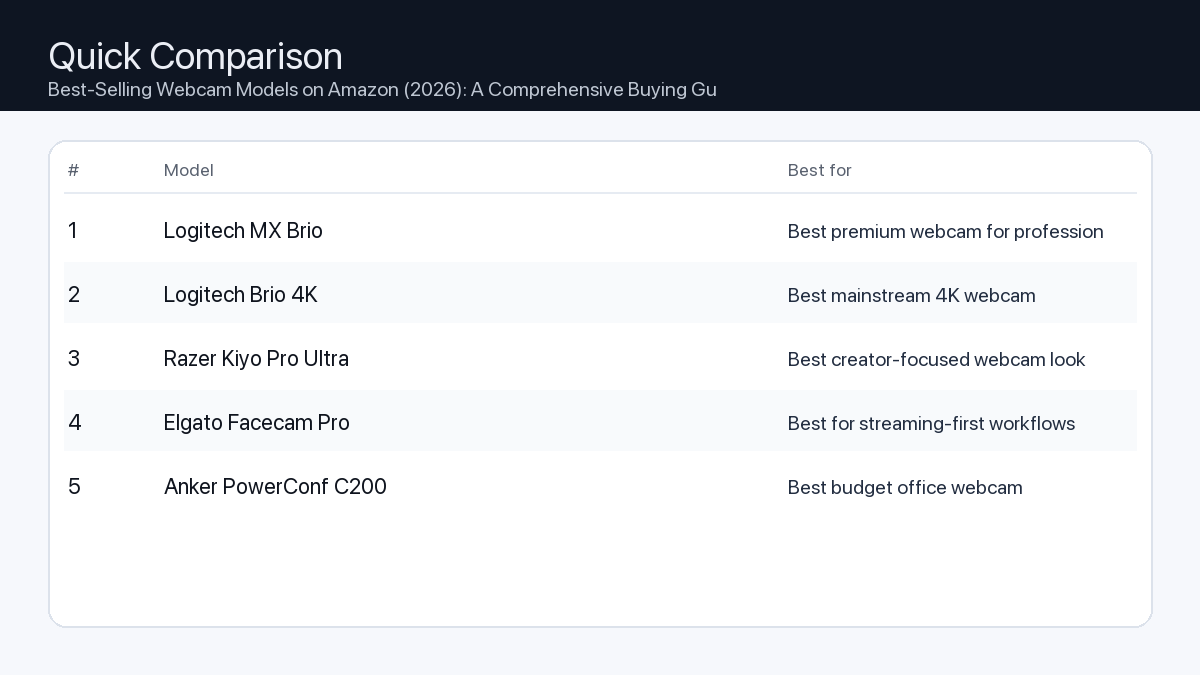
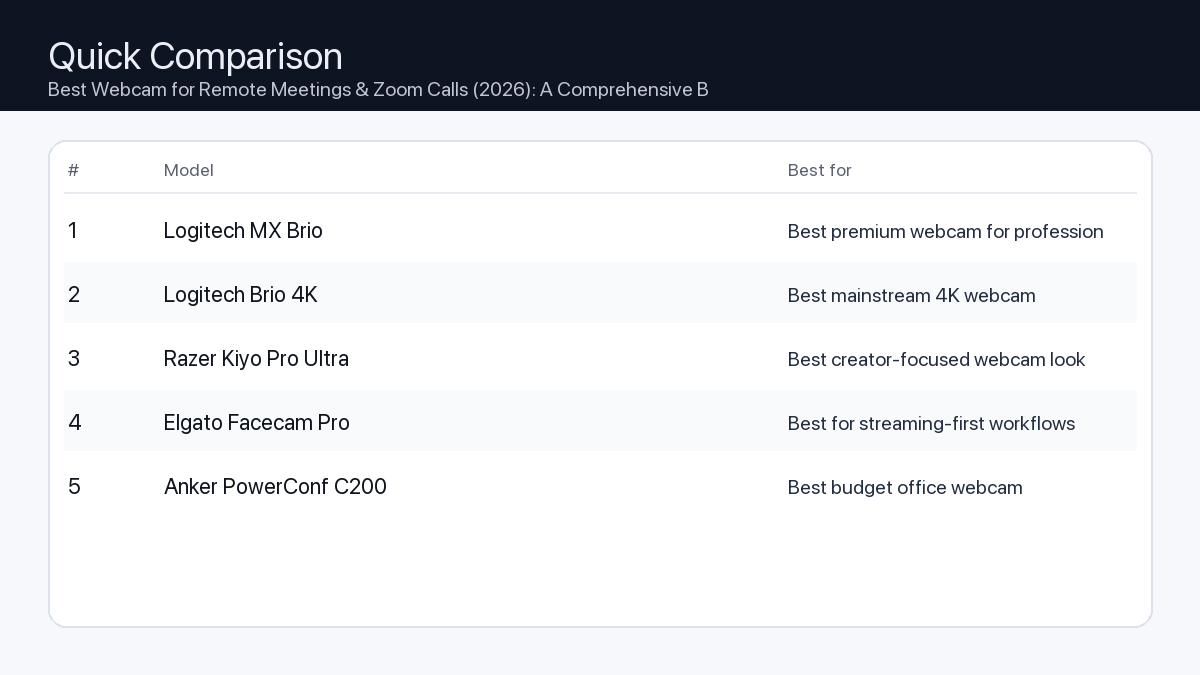
If you want one safe pick: Logitech MX Brio. If you want a better value: Logitech Brio 4K.
How to use this page: scan the comparison table, jump to the matching use case, then open only the listing that fits your setup.
Fast path: choose one track below and ignore the rest.
Track A (least risk): Logitech MX Brio
Track B (better value): Logitech Brio 4K
How we picked: research-based selection using manufacturer specs, compatibility notes, and what to verify on the Amazon listing (no hands-on testing claims). Affiliate links may earn us a commission, but rankings are not paid placements.
Selecting a webcam involves balancing your specific use case with key technical specifications. Understanding these tradeoffs is essential to avoid overspending on features you don’t need or under-investing in critical capabilities.
Key Features and Tradeoffs
Here’s a breakdown of the most important factors:
Resolution (1080p vs. 4K)
Problem: A webcam with too low a resolution can make your video appear pixelated or lacking in detail, especially on larger screens or during full-screen presentations.
Consequence: This can lead to an unprofessional image, hindering clear communication or content quality.
Recommendation: For most standard video calls and virtual meetings, 1080p (Full HD) is sufficient, offering a clear and crisp image. For serious content creation, high-fidelity streaming, or situations where maximum detail is paramount, a 4K resolution webcam provides superior image quality.
Frame Rate (30fps vs. 60fps)
Problem: A low frame rate can result in choppy, unnatural-looking video, particularly when there’s movement on screen.
Consequence: Viewers might find the video distracting or less engaging, especially during dynamic presentations or fast-paced gaming streams.
Recommendation: 30 frames per second (fps) is adequate for static video calls and typical office use. For smooth motion, such as in gaming streams, vlogs with active movement, or professional presentations requiring fluid visuals, 60fps is highly recommended.
Autofocus vs. Fixed Focus
Problem: A fixed-focus webcam might blur if you move significantly closer or further from the lens, while a poor autofocus system can constantly hunt for focus.
Consequence: Blurry visuals detract from your professionalism and can be distracting for viewers. Constant focus adjustments are also disruptive.
Recommendation: Autofocus is generally preferred for versatility, ensuring you remain sharp even if you shift your position. If you consistently sit at a precise, unchanging distance from your webcam, a well-tuned fixed-focus lens can offer consistent sharpness without hunting.
Field of View (FoV)
Problem: An FoV that is too narrow might cut off parts of your head or immediate surroundings, while one that’s too wide could reveal too much distracting background.
Consequence: Limited framing options, requiring you to adjust your seating position frequently, or showing unintended background elements.
Recommendation: A narrower FoV (e.g., 60-70 degrees) is suitable for individual close-ups, ideal for personal calls. A wider FoV (e.g., 78-90+ degrees) is beneficial for showing more of your environment, including multiple people, or for capturing a broader setting for content creation. Some models offer adjustable FoV.
Integrated Microphone Quality
Problem: Many built-in webcam microphones can produce muffled, echoey, or tinny audio, making it hard for others to hear you clearly.
Consequence: Unprofessional sound quality can lead to miscommunications and require you to invest in an external microphone.
Recommendation: For basic video chats, a decent integrated microphone might suffice. However, for important presentations, professional calls, or any form of content creation, an external microphone is almost always superior and highly recommended for clear, high-quality audio.
Privacy Features
Problem: Concerns about accidentally leaving your camera on or unauthorized access can be a significant privacy issue.
Consequence: Potential security risks and discomfort.
Recommendation: An integrated physical privacy shutter is a crucial feature for peace of mind. This provides a definitive way to block the lens when the webcam is not in use, preventing accidental broadcasts.
Low-Light Performance
Problem: In dimly lit environments, many webcams produce grainy, noisy, or excessively dark video.
Consequence: Your image appears unprofessional, and details are lost, forcing you to rely on additional lighting setups.
Recommendation: Look for webcams that boast larger sensors, advanced light correction technology, or software enhancements designed to perform well in less-than-ideal lighting conditions.
Finding Your Perfect Webcam: User Profiles & Checklists
Different users have distinct needs. Here are common profiles and the features they should prioritize:
The Office Professional / Remote Worker
You need reliability, clear communication, and a professional image for virtual meetings and collaborations.
Resolution: At least 1080p (Full HD) at 30fps.
Autofocus: Recommended for flexibility.
Field of View: 70-80 degrees, suitable for individual framing.
Audio: Clear built-in microphone for convenience, or external mic for critical calls.
Low-Light: Good auto-exposure and light correction.
Mounting: Stable clip for monitor, tripod thread for flexibility.
The Gamer / Live Streamer
You require smooth, high-quality video to engage your audience, often alongside dynamic gameplay.
Resolution & Frame Rate: 1080p at 60fps or 4K at 30fps for excellent fluidity and detail.
Autofocus: Fast and accurate autofocus to keep you sharp.
Field of View: Wider (80-90+ degrees) or adjustable for dynamic shots or showing more of your setup.
Audio: External microphone highly recommended for superior sound quality.
Privacy: Integrated physical privacy shutter for control.
Low-Light: Excellent performance for diverse lighting setups, often paired with dedicated streaming lights.
Mounting: Robust clip and tripod compatibility for flexible camera placement.
The Content Creator / Video Editor
You demand the highest possible image quality, versatility, and control for producing polished video content.
Resolution & Frame Rate: 4K at 30fps or 1080p at 60fps, prioritizing detail and smooth motion.
Autofocus: Advanced, precise autofocus with quick adjustments.
Field of View: Adjustable FoV to suit various shooting styles, from close-ups to wider scene shots.
Audio: Professional-grade external microphone is mandatory.
Privacy: Integrated physical privacy shutter.
Low-Light: Superior low-light performance with minimal noise, often supported by dedicated studio lighting.
Mounting: Versatile mounting options, including strong monitor clips and multiple tripod threads.
Lens Quality: Look for models with premium glass elements for sharper images and better color rendition.
How We Picked
To identify the characteristics of the best-selling webcams for 2026, we analyzed market trends, popular feature sets from leading manufacturers, and accumulated feedback patterns from Amazon customer reviews. Our methodology focused on understanding which specifications consistently met diverse user needs and demonstrated broad compatibility. We considered aspects like resolution, frame rate, lens type, audio capabilities, and mounting flexibility as described in product specifications. This guide is built upon industry benchmarks and expected technological advancements, rather than hands-on product testing.
FAQ
Which should I buy: the #1 pick or the best value pick?
The #1 pick is typically chosen for its comprehensive feature set, superior performance in most categories, and suitability for demanding users who prioritize top-tier quality without compromise. The best value pick, conversely, offers an excellent balance of essential features and performance for its price point, making it ideal for users with standard communication needs or those on a tighter budget who still require reliable quality. Consider your primary use case and budget: if you need top-tier performance for creation or professional streaming, the #1 pick is likely a better fit; for general use and clear communication, the best value pick offers impressive utility and saves you money.
Do I need 4K resolution?
Not necessarily. While 4K offers exceptional detail, 1080p is perfectly adequate for most video calls, virtual meetings, and even some casual streaming. 4K is primarily beneficial for professional content creators, high-fidelity live streamers, or users who frequently need to display extremely detailed visuals.
Is a built-in microphone good enough?
For basic, casual video calls, a decent built-in microphone can be sufficient. However, for any professional context, content creation, or situations where clear, high-quality audio is critical, an external microphone (such as a USB mic or a headset with a good mic) will almost always provide superior sound quality.
What’s a privacy shutter?
A privacy shutter is a physical cover or slide that blocks the webcam’s lens when not in use. It provides an immediate and undeniable way to ensure your camera is not inadvertently broadcasting, addressing privacy concerns more effectively than software controls alone.
Final Recommendation
Choosing the best-selling webcam for 2026 ultimately comes down to aligning its features with your personal or professional requirements. Whether you’re a remote professional needing clear communication, a streamer captivating an audience, or a creator producing polished content, prioritize the features that directly impact your specific use case. By understanding the tradeoffs in resolution, frame rate, focus, and other key aspects, you can confidently select a webcam that not only performs well but also enhances your digital presence without unnecessary complexity.
Disclosure: This post may contain affiliate links. As an Amazon Associate, I earn from qualifying purchases. Learn more.
Navigating the power bank market can feel overwhelming, but within the under-$80 budget for 2026, you can secure a truly capable device. If your daily demands include rapid laptop charging, powering multiple gadgets simultaneously, or ensuring extended uptime for demanding creative work, aim for models closer to the $80 mark for superior wattage and capacity. For those primarily needing reliable smartphone top-ups, a compact design for everyday commutes, or an emergency backup, excellent value options exist that capably meet these less intensive requirements.
This comprehensive buying guide is designed to cut through the jargon, helping you understand the key features and trade-offs of power banks available in 2026. We’ll empower you to make an informed decision that perfectly aligns with your specific charging needs and budget, ensuring your devices stay powered, no matter where life takes you.
Best Picks (2026)
Quick Answer (TL;DR) (Updated March 10, 2026)
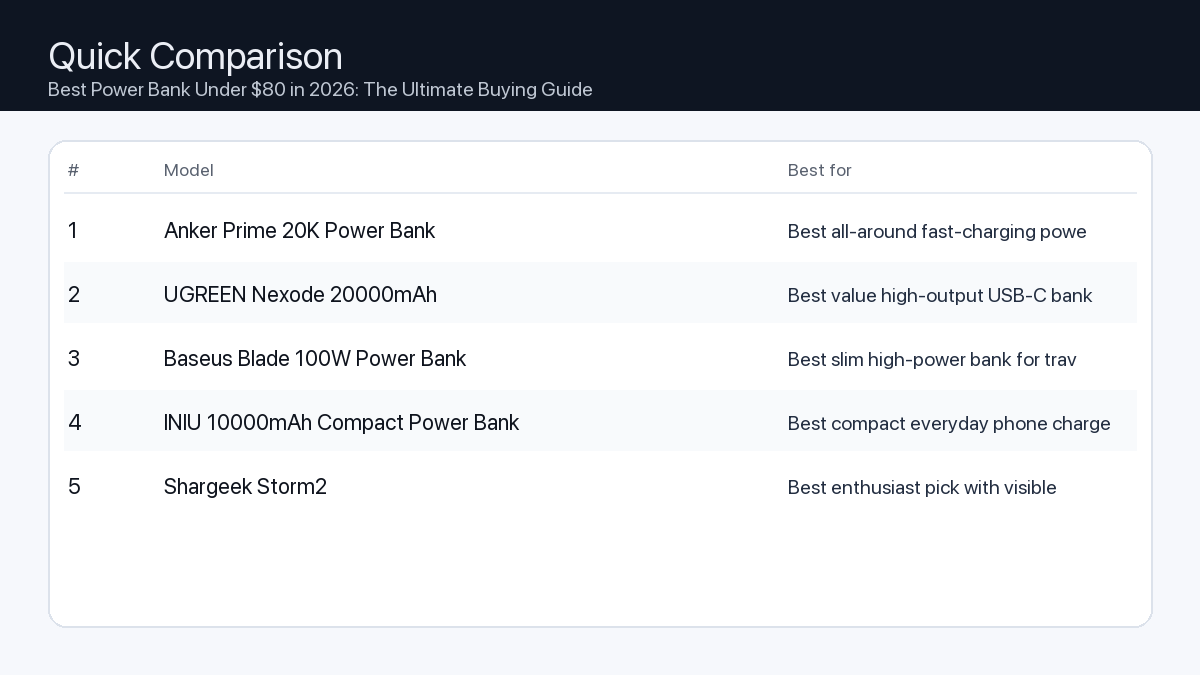
If you want one safe pick: Anker Prime 20K Power Bank. If you want a better value: UGREEN Nexode 20000mAh.
How to use this page: scan the comparison table, jump to the matching use case, then open only the listing that fits your setup.
Fast path: choose one track below and ignore the rest.
Track A (least risk): Anker Prime 20K Power Bank
Track B (better value): UGREEN Nexode 20000mAh
How we picked: research-based selection using manufacturer specs, compatibility notes, and what to verify on the Amazon listing (no hands-on testing claims). Affiliate links may earn us a commission, but rankings are not paid placements.
Selecting the ideal power bank involves more than just picking a random model. Consider these critical factors to ensure your investment serves you effectively.
1. Capacity (mAh): How Much Power Do You Really Need?
Power bank capacity is measured in milliampere-hours (mAh). A higher mAh rating means the power bank can store more energy and provide more charges to your devices.
Problem: Insufficient capacity means your devices won’t fully charge, or the power bank itself runs out of juice too quickly.
Consequence: Your smartphone dies mid-day, your tablet becomes unusable on a long flight, or your laptop shuts down during critical work.
Recommendation: Match the power bank’s capacity to the battery sizes of your most-used devices and how many charges you anticipate needing.
Capacity Quick Reference:
5,000 – 10,000mAh: Ideal for 1-2 smartphone charges or topping up small accessories (earbuds, smartwatches). Highly portable.
10,000 – 15,000mAh: Good for 2-3 smartphone charges, 1 tablet charge, or a partial charge for smaller laptops (e.g., Chromebooks, ultrabooks). A balance of power and portability.
15,000 – 20,000mAh+: Essential for multiple smartphone charges, full tablet charges, or providing significant power to laptops (especially those requiring 45W+). Expect more bulk and weight.
2. Charging Speed (Watts and USB PD): Get Charged Faster
Charging speed is measured in watts (W). Higher wattage means faster charging for compatible devices. In 2026, USB Power Delivery (USB PD) via USB-C ports is the dominant fast-charging standard for most modern electronics, including laptops.
Problem: A power bank with low wattage charges devices agonizingly slowly, or can’t charge power-hungry devices like laptops effectively.
Consequence: Long wait times for your devices to reach a usable charge, or finding your laptop battery depleting even while connected to the power bank.
Recommendation: Look for USB-C ports with Power Delivery (PD) capabilities, especially if you plan to charge tablets or laptops. For smartphones, 20W USB PD is typically sufficient; for most laptops, aim for 45W to 65W USB PD output.
3. Port Variety and Count: Charge All Your Devices
A power bank’s utility is often defined by its ports. Modern power banks should offer a mix of USB-C and USB-A ports.
Problem: Not having the right port type or enough ports means you can’t charge all your devices simultaneously, or at all.
Consequence: You end up carrying multiple chargers or prioritizing which device gets power, leading to downtime for others.
Recommendation: Prioritize at least one USB-C port with Power Delivery (PD) that functions for both input and output. An additional USB-A output is useful for older devices or accessories.
Port Checklist:
At least one USB-C (input/output) with PD: Crucial for fast charging and compatibility with modern laptops, tablets, and phones.
At least one USB-A (output): For charging older devices, smartwatches, or accessories.
Total Output Wattage: If you plan to charge multiple devices at once, ensure the power bank’s total output wattage is sufficient to distribute power effectively without slowing down significantly.
4. Size and Weight: Portability Matters
The physical dimensions and weight of a power bank directly impact its portability. Generally, higher capacity means a larger and heavier device.
Problem: A power bank that’s too bulky or heavy often gets left behind, defeating its purpose.
Consequence: You’re caught without power when you need it most because your backup is at home.
Recommendation: Balance the required capacity and charging speed with your portability needs. A 10,000mAh bank might fit comfortably in a pocket, while a 20,000mAh+ bank is better suited for a backpack or bag.
5. Safety Features: Protect Your Devices
Reputable power banks include multiple safety features to protect both the power bank and your connected devices.
Problem: Lack of proper safety features can lead to overcharging, overheating, short-circuits, or even battery damage.
Consequence: Damaged devices, reduced battery lifespan, or potential safety hazards.
Recommendation: Look for explicit mentions of safeguards like overcharge protection, overcurrent protection, short-circuit protection, and temperature control. Reputable brands typically integrate these as standard.
6. Build Quality and Durability: A Long-Lasting Investment
The materials and construction quality of a power bank contribute to its longevity and ability to withstand daily use.
Problem: Flimsy construction can lead to cracked casings, port damage, or internal component failure with minimal impact.
Consequence: Frequent replacements, unreliable performance, or a dead power bank when you need it most.
Recommendation: Consider models made from durable materials like robust polycarbonate or aluminum alloys. A textured finish can improve grip and resistance to scratches.
Who Needs What? Example Setups for 2026
Here’s how different users might prioritize power bank features:
Needs: Very high capacity to keep laptops running for hours, rapid USB-C PD (45W-65W+) for quick recharges, multiple ports to charge several devices simultaneously.
Recommendation: Prioritize 20,000mAh+ capacity with at least one 60W USB-C PD port, and ideally a secondary 20-30W USB-C or USB-A port.
Needs: High capacity to sustain gaming sessions, high-wattage USB-C PD (45W+) to charge consoles while playing, robust build quality.
Recommendation: Target 20,000mAh+ capacity with a 45W+ USB-C PD output to ensure devices like the Steam Deck can charge effectively even under load.
How We Picked Power Banks for This Guide
Our selection process for the best power banks under $80 in 2026 focuses on a rigorous evaluation of available technical specifications and industry standards. We do not perform hands-on testing of specific products. Instead, our recommendations are based on:
Technical Specifications: Detailed analysis of advertised capacity (mAh), output wattage (especially USB-C Power Delivery), and port configurations to ensure they meet modern charging demands.
Compatibility: Assessment of each power bank’s stated compatibility with a wide range of devices, including current smartphones, tablets, laptops, and handheld gaming consoles that support USB-C PD and other relevant fast-charging standards in 2026.
Feature Set: Prioritizing models that offer a practical and robust blend of charging speed, port versatility, and essential safety features (like overcharge and short-circuit protection) within the specified sub-$80 budget.
Manufacturer Information: Consideration of details provided by manufacturers regarding construction materials, internal protective circuits, and adherence to industry safety and performance standards.
FAQ: Your Power Bank Questions Answered
Which should I buy: the #1 pick or the best value pick?
Choosing between the top-rated power bank and the best value option depends entirely on your primary needs and budget flexibility:
Choose the #1 pick if: You prioritize maximum performance, require higher capacity for demanding devices like laptops, need the fastest possible charging speeds, and seek a broader range of device compatibility. The slightly higher investment ensures future-proofing and premium features that handle virtually any portable charging scenario.
Choose the best value pick if: Your main requirement is reliable charging for smartphones and smaller tablets, you are highly budget-conscious, and you don’t need the absolute highest charging speeds or extensive laptop support. This option provides excellent functionality for everyday use without overspending.
Is a 20,000mAh power bank allowed on an airplane?
Most airlines allow power banks up to 27,000mAh (100Wh) in carry-on luggage. A 20,000mAh power bank is typically well within this limit and should be carried in your carry-on, not checked luggage.
Can I charge my laptop with a power bank under $80?
Yes, many power banks under $80 in 2026 offer USB-C Power Delivery (PD) outputs of 45W or even 60W, which is sufficient to charge most ultrabooks, Chromebooks, and even some MacBook Air/Pro models. Always check the power bank’s output wattage and your laptop’s charging requirements.
How long will it take to fully charge a 20,000mAh power bank?
Charging time depends on the power bank’s input wattage. A 20,000mAh power bank with a 20W USB-C PD input might take 5-7 hours, while one with a 45W input could charge in 3-4 hours. Using a compatible fast charger is key.
Final Recommendation
In 2026, the market for power banks under $80 offers an impressive array of choices, capable of meeting diverse charging needs. By understanding your specific requirements for capacity, charging speed, and portability, you can confidently select a power bank that seamlessly integrates into your digital life. Whether you’re a demanding creator needing robust laptop support or an everyday user seeking reliable smartphone top-ups, this guide provides the framework to make an informed decision. Prioritize features that align with your most frequent use cases, and rest assured that within this budget, a powerful and efficient solution awaits to keep your devices charged and ready.
Disclosure: This post may contain affiliate links. As an Amazon Associate, I earn from qualifying purchases. Learn more.
Building a minimal desk setup in 2026 starts with one decision that affects everything else: the keyboard. It sits at the center of your workspace, you touch it thousands of times a day, and it either elevates or kills the aesthetic you’re going for. This guide cuts through the noise and gives you the best mechanical keyboards specifically chosen for clean, minimal desk setups — not gaming battlestations.
Best Picks (2026)
Quick Answer (TL;DR)
If you want one safe pick: Keychron Q1 Max. If you want the cleanest low-profile look: Nuphy Air75 V2. If you’re on a budget: Keychron K2 HE.
#1. Keychron Q1 Max — Best All-Around Minimal Mechanical Keyboard
Full aluminum build, QMK/VIA compatible, 2.4GHz wireless + Bluetooth + USB-C. Available in neutral colorways that suit minimal desk setups without the gaming aesthetic.
Why it made the list: Heavy aluminum build (zero flex), full wireless, deeply customizable
Tradeoffs: Heavy at ~1.5kg, premium price point
Avoid if: You need portability or have a tight budget
#4. Lofree Flow — Best Mac-Style Retro Minimal Look
Round keycap design that matches modern minimal interiors. Gasket mounted for softer, quieter typing. White and gray colorways complement neutral desk setups.
How to Choose: Key Factors for Minimal Desk Setups
Layout: 75% Is the Sweet Spot
Full-size keyboards with numpads take up 40% of your desk surface and kill the minimal look. For minimal setups, 75% or 65% layouts give you arrow keys (which 60% drops) while clearing significant desk space.
Color: Match Your Desk, Not Your Game
Most gaming keyboards come in black with aggressive RGB. For minimal aesthetics, look for white, cream, gray, or slate colorways. Disable RGB or use warm white backlight only — it’s more cohesive with neutral desk setups.
Switches: Sound Matters in a Focused Setup
Loud clicky switches break the calm atmosphere of a minimal home office. For minimal desk setups: prioritize linear silent switches (Gateron Yellow, Keychron Red) or light tactile switches (Brown, Banana). Avoid clicky Blues — too loud for the vibe.
Wired vs. Wireless: Cables Are Part of the Aesthetic
A cable running across your desk breaks the clean look. Wireless is strongly preferred for minimal setups. All top picks in this guide support wireless. If you need wired, use a coiled cable in a matching color.
FAQ
Do I need a mechanical keyboard for a minimal setup?
No — but mechanical keyboards offer better aesthetics, more colorway choices, and longer durability than membrane keyboards. For a setup you’ll look at every day, the investment is usually worth it.
Is the Keychron Q1 Max worth the price?
For a permanent desk setup, yes. The aluminum build, wireless connectivity, and QMK customization make it a long-term purchase. If budget is tight, the K2 HE delivers 80% of the experience at roughly half the price.
What color keyboard looks best on a minimal white desk?
White or cream keyboards with white or warm-white backlighting. The Keychron Q1 Max in White and the Nuphy Air75 V2 in White are the most recommended for neutral minimal setups.
Final Recommendation
The keyboard is the centerpiece of any desk setup. For a minimal aesthetic, prioritize layout size, colorway, and switch noise over specs. The Keychron Q1 Max remains the safest all-around choice for anyone building a serious minimal home office in 2026. If you want something visually lighter and flatter, the Nuphy Air75 V2 is the best low-profile option on the market. And if you’re building your first clean setup on a budget, start with the Keychron K2 HE — you won’t regret it.
Disclosure: This post may contain affiliate links. As an Amazon Associate, I earn from qualifying purchases. Learn more.
Looking beyond the iPad in 2026 reveals a landscape of innovation, offering powerful features, diverse operating systems, and specialized hardware designed to meet unique user demands. Whether you prioritize peak performance for demanding creative tasks or seek exceptional value for daily productivity and entertainment, understanding the core distinctions is key.
This comprehensive guide helps you navigate the options without listing specific models, focusing instead on crucial considerations, practical applications, and the underlying technologies that define the best alternatives. We empower you to make an informed choice that perfectly aligns with your workflow and budget.
Best Picks (2026)
Quick Answer (TL;DR) (Updated March 09, 2026)
If you want one safe pick: Apple iPad Pro (M4). If you want a better value: Apple iPad Air (M2).
How to use this page: scan the comparison table, jump to the matching use case, then open only the listing that fits your setup.
Fast path: choose one track below and ignore the rest.
Track A (least risk): Apple iPad Pro (M4)
Track B (better value): Apple iPad Air (M2)
How we picked: research-based selection using manufacturer specs, compatibility notes, and what to verify on the Amazon listing (no hands-on testing claims). Affiliate links may earn us a commission, but rankings are not paid placements.
Stepping away from the iPad opens up a world of tablets with distinct advantages. Here’s what you need to prioritize to find your ideal device.
Key Considerations for 2026
Evaluate these critical areas to ensure your chosen alternative meets your expectations.
1. Performance: Processor, RAM, and Storage
Problem: Insufficient processing power or RAM can lead to app lag, slow multitasking, and crashes when running demanding software.
Consequence: Frustration during intensive tasks like video editing, 3D rendering, or running multiple professional applications simultaneously.
Recommendation: For demanding creative or professional work, prioritize models with high-end, multi-core processors (e.g., those found in premium laptops) and a minimum of 12GB RAM. For general use, 8GB RAM and a capable mid-range processor are often sufficient. Aim for at least 256GB of internal storage, with expansion options if available.
2. Display Quality and Features
Problem: A low-resolution, poorly calibrated, or non-responsive display diminishes the experience for media consumption, detailed design work, or even simple web browsing.
Consequence: Eyestrain, inaccurate color representation for creative projects, and a less immersive viewing experience.
Recommendation: Look for screens with high pixel density (e.g., QHD or higher), OLED technology for superior contrast and true blacks, and a refresh rate of 90Hz or 120Hz for smoother scrolling and interactions. For artists, verify active stylus support with low latency.
3. Battery Life
Problem: A tablet that can’t last through your typical workday or a long trip requires constant charging, tethering you to power outlets.
Consequence: Reduced portability and workflow interruptions.
Recommendation: Target devices offering 10-12 hours of mixed-use battery life. Check manufacturer specifications for typical video playback or web browsing durations. Fast charging capabilities are a significant convenience.
4. Ecosystem and Accessories
Problem: Limited accessory availability or poor integration can hinder productivity and restrict your tablet’s functionality.
Consequence: Inability to fully utilize your device as a laptop replacement, drawing canvas, or media hub.
Recommendation: Consider the availability and quality of first-party or reputable third-party accessories like keyboard covers, active styluses, and protective cases. Ensure the tablet supports external monitors if desktop mode is crucial.
5. Operating System (Beyond iPadOS)
Problem: Choosing an OS that doesn’t align with your existing software or workflow creates compatibility issues and a steep learning curve.
Consequence: Lost productivity, difficulty transferring files, or inability to run specific applications.
Recommendation:
Android: Offers extensive customization, app variety (though not always fully optimized for large screens), and robust integration with Google services. Ideal for media consumption, casual gaming, and flexible productivity.
Windows: Provides a full desktop operating system experience, allowing you to run professional Windows software directly. Excellent for business users, developers, and those needing specific legacy applications.
Other Linux-based OS options: Niche but offer complete open-source control for advanced users, though with a smaller app ecosystem.
Tailoring Your Choice: Example Setups
For the Video Editor
You need power, a great display, and connectivity.
Processor & RAM: Latest generation, top-tier processor and 16GB+ RAM to handle 4K video editing and multiple effects.
Display: Large (12-inch+), high-resolution OLED with excellent color accuracy and HDR support.
Storage: Minimum 512GB internal SSD, preferably with a microSD slot or robust USB-C external drive support.
Connectivity: At least one high-speed USB-C port (Thunderbolt 4 or USB 4) for external drives and monitors.
OS Consideration: A Windows-based tablet often provides the most robust desktop editing software compatibility.
For the Office Worker
Productivity, portability, and reliable connectivity are paramount.
Processor & RAM: Mid-range to high-end processor, 8GB-12GB RAM for smooth multitasking with office suites and browser tabs.
Display: 10-13 inches, good brightness for various lighting conditions, and comfortable for reading documents.
Accessories: High-quality, responsive keyboard cover with a trackpad is essential for laptop-like functionality.
Battery Life: All-day battery life (10+ hours) is crucial for working on the go.
Connectivity: Wi-Fi 6E/7 for fast network access; optional 5G cellular for always-on connectivity.
OS Consideration: Both Android with robust productivity suites and Windows for full desktop applications are viable.
For the Gamer/Creator
Immersion, responsiveness, and artistic freedom are key.
Processor & RAM: High-performance processor, 12GB+ RAM, and a capable integrated or dedicated GPU for demanding games and creative applications.
Display: High refresh rate (120Hz), vibrant colors, and low input lag for gaming; good pen support for drawing/design.
Stylus: Pressure-sensitive active stylus with tilt recognition and minimal latency for digital art.
Audio: Quality stereo speakers or support for high-fidelity audio output.
OS Consideration: Android offers a vast mobile game library; Windows provides access to PC game libraries and professional creative suites.
How We Picked iPad Alternatives for 2026
Our selection process for identifying top iPad alternatives in 2026 involves a rigorous analysis of publicly available specifications, industry benchmarks, and compatibility information. We scrutinize processor architectures, RAM configurations, display technologies, battery capacities, and operating system features for their potential to deliver robust performance across various use cases. We also consider manufacturer track records for software updates and long-term support. This assessment is based purely on data points and technical capabilities, rather than hands-on testing.
FAQ: Your Questions Answered
Which should I buy: the #1 pick or the best value pick?
The choice between our top-ranked alternative and the best value pick depends entirely on your primary needs and budget flexibility. If your workflow involves demanding tasks like professional video editing, graphic design, or complex multitasking, and you prioritize uncompromised performance and the latest features, the #1 pick is likely to be a superior investment, offering longevity and higher capability. However, if your usage centers around web browsing, media consumption, casual gaming, document editing, and general productivity, and you seek excellent performance without the premium cost, the best value pick will deliver a highly satisfying experience while freeing up budget for accessories or other needs.
Final Recommendation: Making Your Decision
Choosing an iPad alternative in 2026 means empowering yourself with a device tailored precisely to your requirements. By focusing on processor power, display quality, battery longevity, accessory ecosystem, and the specific advantages of different operating systems, you can confidently select a tablet that not only replaces but potentially surpasses the iPad experience for your unique workflow. Prioritize the features that directly impact your daily tasks and creative pursuits, and you’ll find an alternative that serves as a powerful, indispensable tool.
Disclosure: This post may contain affiliate links. As an Amazon Associate, I earn from qualifying purchases. Learn more.
In the evolving landscape of remote work and virtual collaboration, a high-quality webcam is more than a luxury—it’s an essential tool. While many laptops include integrated cameras, dedicated webcams offer superior image clarity, better low-light performance, and advanced features crucial for making a strong impression in 2026. This guide will help you understand the core aspects of webcam technology so you can make an informed decision.
For those who frequently engage in client meetings, virtual presentations, or content creation, investing in a premium webcam is often justified by its enhanced professional presence and robust feature set. These users benefit from superior resolution, advanced low-light capabilities, and precise control over their video output. Conversely, if your primary use involves casual team check-ins or occasional family calls, a value-oriented webcam offering solid 1080p performance in well-lit conditions can comfortably meet your needs without overspending.
Best Picks (2026)
Quick Answer (TL;DR) (Updated March 08, 2026)
If you want one safe pick: Logitech MX Brio. If you want a better value: Logitech Brio 4K.
How to use this page: scan the comparison table, jump to the matching use case, then open only the listing that fits your setup.
Fast path: choose one track below and ignore the rest.
Track A (least risk): Logitech MX Brio
Track B (better value): Logitech Brio 4K
How we picked: research-based selection using manufacturer specs, compatibility notes, and what to verify on the Amazon listing (no hands-on testing claims). Affiliate links may earn us a commission, but rankings are not paid placements.
Selecting the right webcam involves balancing your specific use case with key technical specifications. Here’s what to consider:
Resolution & Frame Rate
Problem: Blurry, pixelated video or choppy motion can create a poor impression during important calls.
Consequence: Your professionalism may be undermined, and subtle visual cues can be missed, leading to communication breakdowns.
Recommendation: For crisp, clear video, prioritize 1080p (Full HD) as a minimum standard. If you require exceptional detail for presentations or large screen viewing, consider 4K (Ultra HD) webcams. Frame rate dictates smoothness; 30 frames per second (fps) is standard and adequate for most meetings, while 60fps offers noticeably fluid motion, ideal for dynamic presentations or streaming.
1080p Full HD resolution (minimum)
4K Ultra HD resolution (for maximum detail)
30fps frame rate (standard smoothness)
60fps frame rate (smoother motion for dynamic use)
Low-Light Performance
Problem: Appearing dark, grainy, or poorly lit, especially in dimly lit rooms or late-day meetings.
Consequence: Your face might be obscured, making it harder for others to engage with you visually and potentially affecting how you’re perceived.
Recommendation: Look for webcams with larger sensors and advanced auto-exposure features. These cameras can capture more light, reducing graininess and producing a brighter, more natural image even without perfect lighting. Some models include AI-powered light correction.
Problem: Your camera captures too little (cutting off your head) or too much (showing clutter in your room).
Consequence: An awkward frame can distract from your message or reveal unwanted background elements.
Recommendation: A field of view between 78 and 90 degrees is suitable for most individual users, capturing you and a small portion of your immediate surroundings. Some webcams offer adjustable FOV, allowing you to switch between a narrow view for solo calls and a wider view for whiteboarding or group discussions. Ensure the FOV matches how much of your background you intend to show.
Adjustable Field of View
Fixed FOV appropriate for your setup (e.g., 78-90 degrees for single person)
Autofocus vs. Fixed Focus
Problem: Constantly appearing out of focus, especially if you move even slightly during a call.
Consequence: Viewers might perceive you as unprofessional, and your image can become distracting.
Recommendation: Autofocus webcams continuously adjust to keep you sharp, even if you lean in or move around. This is ideal for dynamic presenters. Fixed-focus cameras, while simpler, are suitable if you remain relatively stationary and are positioned within the camera’s fixed focal plane.
Reliable autofocus (for movement)
Fixed focus (if you stay still within optimal distance)
Microphone Quality
Problem: Your voice sounds muffled, distorted, or is overridden by background noise.
Consequence: Colleagues or clients struggle to hear you, leading to repeated questions, frustration, and a less productive meeting.
Recommendation: While a dedicated external microphone is always superior, many webcams include dual stereo microphones with noise-reduction technology. These can be perfectly adequate for general meeting use. However, if audio clarity is paramount, consider using an external USB microphone or headset.
Dual stereo microphones
Noise-reducing technology
Considered external microphone for critical audio
Mounting & Portability
Problem: Inability to position the webcam optimally, leading to awkward angles or instability.
Consequence: You might appear less engaged or present a less professional visual.
Recommendation: Most webcams come with an integrated clip for monitor mounting. Ensure it’s sturdy and compatible with your display thickness. For more flexible placement, look for models with a standard tripod thread (1/4-inch), allowing use with tripods or desk stands. If you travel frequently, a compact and durable design is a plus.
Secure monitor clip
Standard tripod mounting thread
Compact design (if portability is key)
Privacy Features
Problem: Concerns about the camera being inadvertently active when not in use.
Consequence: A feeling of unease or a breach of personal privacy.
Recommendation: Many webcams now include a physical privacy shutter that slides over the lens. This provides absolute visual security. An LED indicator light that clearly signals when the camera is active is also a valuable feature.
Physical privacy shutter
Clear activity LED indicator
Software & Compatibility
Problem: The webcam isn’t recognized by your operating system, or you lack control over its settings.
Consequence: Frustration during setup and inability to optimize your video feed.
Recommendation: Ensure the webcam is compatible with your operating system (Windows, macOS, Linux, ChromeOS). Many manufacturers offer companion software that allows you to adjust settings like brightness, contrast, white balance, and FOV, often saving profiles for different scenarios. Check for UVC (USB Video Class) compliance for broad plug-and-play support.
Broad OS compatibility (Windows, macOS)
User-friendly customization software
UVC compliant for plug-and-play
Webcam Setups for Different Users
The Remote Office Worker
Needs: Reliable, clear video for daily team meetings, client calls, and virtual presentations. Good low-light performance is a plus for varied working hours.
Recommended Features:
1080p resolution at 30fps (minimum)
Good auto-exposure and light correction
Fixed or adjustable FOV (78-90 degrees)
Physical privacy shutter
Sturdy monitor mount
The Professional Video Editor / Online Coach
Needs: Exceptional video quality for high-stakes virtual sessions, recording tutorials, or one-on-one coaching where image clarity directly impacts perceived value. Requires fine control over image settings.
Recommended Features:
4K resolution at 30fps or 1080p at 60fps
Excellent low-light performance with advanced image processing
Accurate autofocus
Adjustable FOV and granular software controls
Tripod mounting option for flexible setup
Consider pairing with an external microphone and dedicated lighting
The Gamer / Content Creator
Needs: Smooth, high-fidelity video for live streaming, recording gameplay, or creating engaging video content. May require background removal features and strong integration with streaming software.
Recommended Features:
1080p at 60fps (minimum) or 4K at 30fps
Wide or adjustable FOV to capture more of the environment or guest
Fast and reliable autofocus
Integration with streaming platforms (e.g., OBS Studio)
Software for background removal/blur (if green screen not used)
Tripod mount essential for varied setups
How We Picked
Our selection process for identifying top webcams focuses on a thorough analysis of technical specifications and reported user experiences. We meticulously review product spec sheets for key features such as sensor size, lens aperture, native resolution and frame rates, autofocus capabilities, and microphone arrays. Compatibility with major operating systems (Windows and macOS) and popular video conferencing platforms is a primary consideration. We also evaluate privacy features like physical shutters and activity LEDs, as well as mounting flexibility. While we do not conduct hands-on testing, our recommendations are informed by compiling verifiable product data, assessing general market trends for 2026, and noting common user feedback patterns regarding reliability and performance across diverse usage scenarios.
FAQ
Which should I buy: the #1 pick or the best value pick?
Choose the #1 pick if you demand the absolute best in video quality, advanced features (like superior low-light handling or precise software controls), and are willing to invest for an uncompromising professional presence. Opt for the best value pick if you need reliable, clear video for everyday remote meetings and Zoom calls, perform well in standard lighting conditions, and seek excellent performance without exceeding a moderate budget.
Final Recommendation
Choosing the right webcam for your remote meetings and Zoom calls in 2026 is a pivotal decision that impacts your professional image and communication effectiveness. By understanding the core features—from resolution and low-light performance to field of view and microphone quality—you can confidently select a model that aligns with your specific needs and usage patterns. Whether you prioritize cutting-edge performance or excellent value, a well-chosen webcam will significantly enhance your virtual interactions, ensuring you look and sound your best every time.
Disclosure: This post may contain affiliate links. As an Amazon Associate, I earn from qualifying purchases. Learn more.
By 2026, the $600 price point for robot vacuums represents a sweet spot, offering advanced features that were once reserved for premium models. If you have a complex multi-room home, multiple pets, or value maximum automation like self-emptying and advanced mopping, consider aiming for the top of this budget for the most comprehensive cleaning solutions. For smaller spaces, simpler layouts, or if you primarily need reliable daily vacuuming with basic mopping, many excellent value picks will deliver exceptional performance without demanding the absolute peak of your budget.
This guide cuts through the noise to help you understand what truly matters when investing in a robot vacuum within this competitive category. We’ll explore the key features, explain common trade-offs, and provide practical advice to match a robot cleaner to your specific lifestyle and home environment.
Best Picks (2026)
Quick Answer (TL;DR) (Updated March 07, 2026)
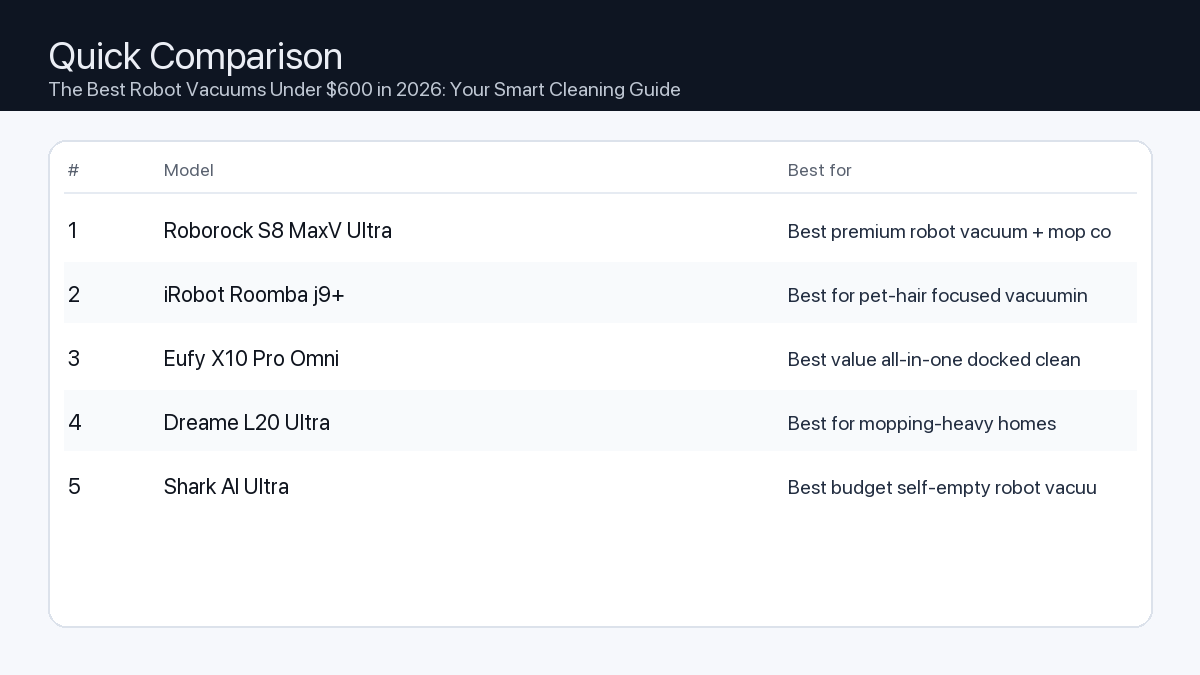
If you want one safe pick: Roborock S8 MaxV Ultra. If you want a better value: iRobot Roomba j9+.
How to use this page: scan the comparison table, jump to the matching use case, then open only the listing that fits your setup.
Fast path: choose one track below and ignore the rest.
Track A (least risk): Roborock S8 MaxV Ultra
Track B (better value): iRobot Roomba j9+
How we picked: research-based selection using manufacturer specs, compatibility notes, and what to verify on the Amazon listing (no hands-on testing claims). Affiliate links may earn us a commission, but rankings are not paid placements.
Understanding Your Needs: Premium vs. Value Features
At under $600, robot vacuums in 2026 offer a wide spectrum of capabilities. Understanding the core differences will help you prioritize what matters most for your home.
Navigation & Mapping: Value models might use basic visual navigation (vSLAM) or random patterns, sufficient for smaller, less cluttered spaces. Premium options in this range will feature advanced LiDAR or improved vSLAM for precise mapping, multi-floor support, and accurate no-go zones.
Suction Power: While all models will vacuum, higher-end devices will offer significantly more kPa (kilopascals) for deep carpet cleaning and pet hair removal. Value options are generally excellent for hard floors and low-pile carpets.
Mopping Capabilities: Basic mopping is often a wet wipe. Superior systems within this budget offer pressure mopping, sonic scrubbing, or auto-lift mop pads to prevent wetting carpets and to tackle dried-on stains more effectively.
Battery Life & Charging: All robots will return to their dock to recharge. Premium options will typically have longer runtimes (e.g., 180+ minutes) and smart recharge-and-resume logic for large homes, while value models might be better suited for single-session cleaning in average-sized spaces.
App Control & Smart Features: Expect comprehensive app control across the board. Premium models might add features like advanced AI obstacle avoidance, custom cleaning modes per room, or more robust smart home integration.
Self-Emptying Bins: A significant convenience feature, self-emptying stations are becoming more common at this price point. They reduce the need to manually empty the robot’s dustbin for weeks, a huge plus for pet owners or those with dust allergies.
Key Features to Consider
Navigation & Mapping Precision
Problem: Older or simpler robot vacuums often navigate inefficiently, get stuck frequently, or miss entire sections of your home. This leads to incomplete cleaning and frustration.
Consequence: Your floors remain partially dirty, you waste time rescuing the robot, and the overall cleaning experience is poor.
Recommendation: Prioritize models equipped with LiDAR (laser distance sensor) navigation or advanced visual simultaneous localization and mapping (vSLAM). These technologies create accurate maps, allow for efficient cleaning paths, enable features like no-go zones, and support multi-floor mapping for homes with stairs.
Suction Power for Deeper Cleaning
Problem: Insufficient suction power leaves behind fine dust, pet hair, and debris, especially on carpets or from crevices.
Consequence: You still feel the need to manually vacuum or find your floors aren’t as clean as desired, undermining the robot’s purpose.
Recommendation: Look for models with a high kPa (kilopascal) rating, generally 3000 kPa or more, if you have carpets, rugs, or pets. Higher suction ensures effective removal of embedded dirt and pet dander.
Mopping Performance
Problem: Basic drag-and-wipe mopping often leaves streaks, doesn’t effectively clean dried spills, or can accidentally wet carpets.
Consequence: Hard floors don’t get a thorough clean, requiring additional manual mopping, and you risk damaging sensitive floor coverings.
Recommendation: Seek out advanced mopping systems like pressure mopping, sonic scrubbing, or models with an auto-lifting mop pad. These features provide a more effective clean, can tackle tougher stains, and offer better protection for carpeted areas.
Battery Life & Auto-Recharge
Problem: A robot with inadequate battery life might not be able to complete cleaning your entire home in a single session.
Consequence: The robot frequently returns to its dock mid-clean, prolonging the cleaning process or leaving areas untouched.
Recommendation: Match the stated battery runtime (often in minutes or mAh) to your home’s square footage. While most robots offer auto-recharge and resume functionality, a longer single-charge runtime means fewer interruptions and faster overall cleaning for larger spaces.
Smart Features & App Integration
Problem: A clunky app or limited smart features can diminish the convenience factor of a robot vacuum.
Consequence: You might struggle to schedule cleanings, define specific zones, or integrate the robot into your smart home ecosystem, making it less helpful.
Recommendation: Look for an intuitive, feature-rich companion app that allows for easy scheduling, zone cleaning, setting virtual walls/no-go zones, monitoring cleaning progress, and compatibility with voice assistants like Google Home or Amazon Alexa.
Self-Emptying Dustbins
Problem: The robot’s internal dustbin fills up quickly, especially with pet hair or in busy homes, requiring frequent manual emptying.
Consequence: The robot stops mid-clean, alerts you to empty the bin, or you have to deal with accumulated dust more often, reducing hands-free convenience.
Recommendation: Consider models that come with a self-emptying station. This feature automatically transfers collected debris from the robot’s small internal bin into a larger bag or container in the dock, providing weeks of hands-free operation and minimizing dust exposure.
Who Needs What? Practical Setups
The Home Office Worker/Minimalist Apartment Dweller
Lifestyle: You value quiet operation during work hours, need efficient cleaning for smaller, often less cluttered spaces, and appreciate basic scheduling to maintain cleanliness effortlessly.
Key Cleaning Priorities: Daily maintenance, quiet operation, hard floor and low-pile carpet cleaning.
Checklist:
Efficient basic navigation (vSLAM or early LiDAR)
Quiet operating mode
Decent suction for hard floors and low-pile rugs
Reliable app scheduling and spot cleaning
Compact design for easy storage
The Busy Parent with Pets
Lifestyle: Your home sees high traffic, pet hair is a constant battle, and you need a robust cleaning solution that handles daily messes with minimal intervention.
Key Cleaning Priorities: Strong pet hair pick-up, effective mopping for spills, hands-free operation.
Checklist:
High kPa suction (3500+ kPa) for pet hair and deep carpets
Advanced mopping (pressure or sonic) with auto-lift feature
Self-empty station for weeks of hands-free disposal
Robust LiDAR navigation with good obstacle avoidance
Zone cleaning for high-traffic areas
The Gamer/Creator in a Multi-Room Space
Lifestyle: You have dedicated zones (e.g., gaming setup, creative studio, living area) that require specific cleaning schedules or quiet times, and potentially multiple floor levels.
Integration with smart home ecosystems (Alexa, Google Assistant)
Long battery life for larger areas
How We Picked These Recommendations
Our selection of the best robot vacuums under $600 for 2026 is based on a thorough analysis of product specifications, technological advancements, and a careful review of cumulative user feedback patterns. We focused on models that demonstrate strong performance metrics in key areas such as navigation technology (LiDAR, advanced vSLAM), stated suction power (kPa), battery capacity (mAh/runtime), and the sophistication of their mopping systems (pressure mopping, sonic scrubbing, auto-lift). We also considered the quality and features of accompanying mobile applications, smart home compatibility, and the increasing availability of convenience features like self-emptying stations within this budget. Our recommendations reflect current market trends, compatibility notes from manufacturers, and aim to identify devices that offer the most verifiable value and utility for diverse household needs, without claiming hands-on testing.
FAQ
Is a robot vacuum under $600 worth it in 2026?
Absolutely. By 2026, the $600 price point for robot vacuums represents an incredible value proposition. Advancements in navigation (LiDAR), suction power, and mopping technology have made devices in this range highly capable, often including premium features like self-emptying docks, multi-floor mapping, and advanced app controls that were once exclusive to much higher price tiers. They are more than capable of handling daily cleaning demands for most homes.
Can robot vacuums truly replace manual vacuuming?
For daily maintenance and general cleanliness, a quality robot vacuum under $600 can largely replace manual vacuuming, especially on hard floors and low to medium-pile carpets. They excel at picking up dust, dirt, pet hair, and small debris consistently. However, for very deep cleaning, particularly on high-pile carpets, or for tackling specific, tough spills, occasional manual intervention with a traditional vacuum or mop may still be beneficial.
Which should I buy: the #1 pick or the best value pick?
Choose the #1 pick if: You prioritize the most comprehensive feature set, superior performance across all metrics (e.g., strongest suction, most advanced mopping, cutting-edge obstacle avoidance, or largest self-empty capacity), and desire the most hands-off, automated cleaning experience available within the $600 budget. The #1 pick is typically the most complete package for a wide range of homes and cleaning challenges.
Choose the best value pick if: You need a highly reliable robot vacuum that excels at core cleaning tasks (effective vacuuming, capable mopping) without requiring every single premium bell and whistle. It’s an excellent choice for smaller to medium-sized homes, simpler layouts, or if you’re comfortable with slightly less advanced automation to save a significant amount while still getting outstanding daily cleaning performance.
Final Recommendation
The robot vacuum market under $600 in 2026 is robust, offering a compelling blend of advanced technology and affordability. Whether you’re seeking a simple, efficient cleaner for an apartment or a full-featured workhorse for a busy family home with pets, there’s an option that will meet your needs without overstretching your budget. By focusing on your specific home environment and prioritizing the key features discussed in this guide, you can confidently select a robot vacuum that delivers exceptional daily cleanliness and simplifies your life.