Author: DevicePickr Team

  • Best-Selling Webcam Models on Amazon (2026): A Comprehensive Buying Guide

    Best-Selling Webcam Models on Amazon (2026): A Comprehensive Buying Guide

    Disclosure: This post may contain affiliate links. As an Amazon Associate, I earn from qualifying purchases. Learn more.

    Best-Selling Webcam Models on Amazon (2026): A Comprehensive Buying Guide

    Are you primarily looking for a reliable communication tool or a high-fidelity creative instrument? If your needs are basic video calls and virtual meetings, a value-focused webcam offering solid 1080p performance will likely serve you well. For advanced uses like live streaming, content creation, or frequent high-stakes presentations, investing in a premium model with 4K resolution, faster frame rates, and advanced features can significantly elevate your visual presence.

    This guide helps you understand the crucial features and tradeoffs to consider when selecting a webcam from the best-selling models on Amazon for 2026, ensuring you make an informed decision tailored to your specific needs without getting bogged down in technical jargon.

    Best Picks (2026)

    Quick Answer (TL;DR) (Updated March 11, 2026)

    If you want one safe pick: Logitech MX Brio. If you want a better value: Logitech Brio 4K.

    How to use this page: scan the comparison table, jump to the matching use case, then open only the listing that fits your setup.

    Fast path: choose one track below and ignore the rest.

    • Track A (least risk): Logitech MX Brio
    • Track B (better value): Logitech Brio 4K

    How we picked: research-based selection using manufacturer specs, compatibility notes, and what to verify on the Amazon listing (no hands-on testing claims). Affiliate links may earn us a commission, but rankings are not paid placements.

    Start with Logitech MX Brio on Amazon Prefer value? Open Logitech Brio 4K

    Skip to a pick: #1 Logitech MX Brio | #2 Logitech Brio 4K | #3 Razer Kiyo Pro Ultra | #4 Elgato Facecam Pro | #5 Anker PowerConf C200

    Head-to-Head: Top Pick vs Best Value

    Logitech MX Brio
    Best premium webcam for professionals

    Read full #1 breakdown

    Go to Amazon: Logitech MX Brio

    Logitech Brio 4K
    Best mainstream 4K webcam

    Read full best-value breakdown

    Go to Amazon: Logitech Brio 4K

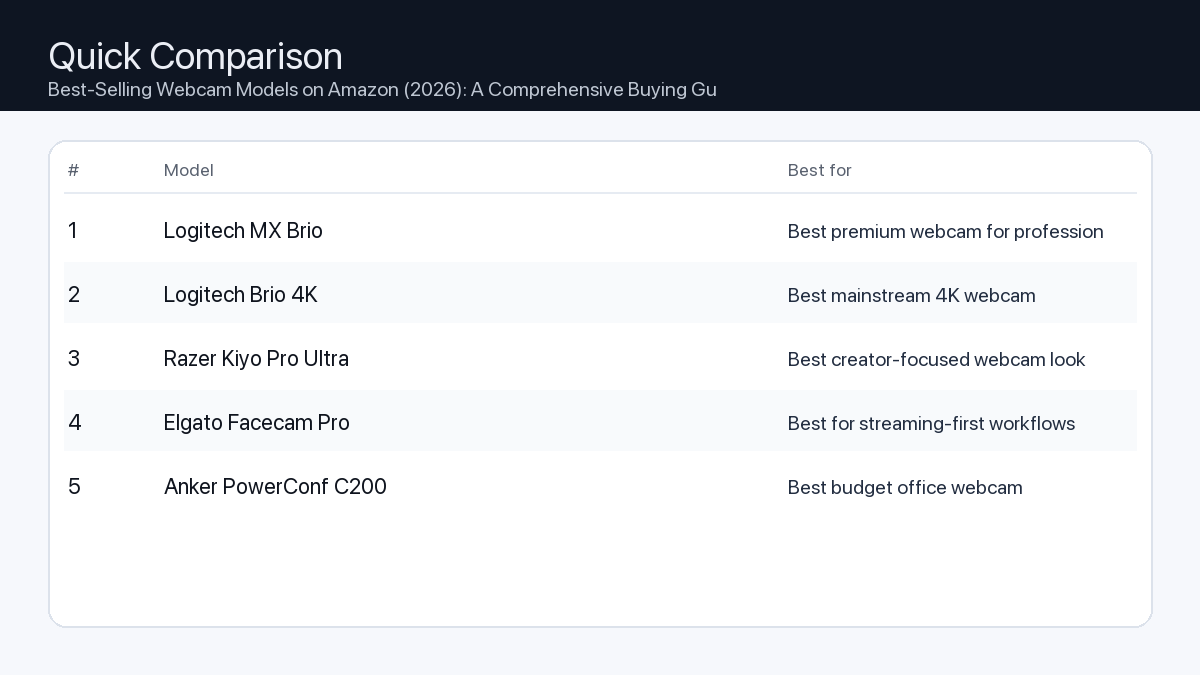
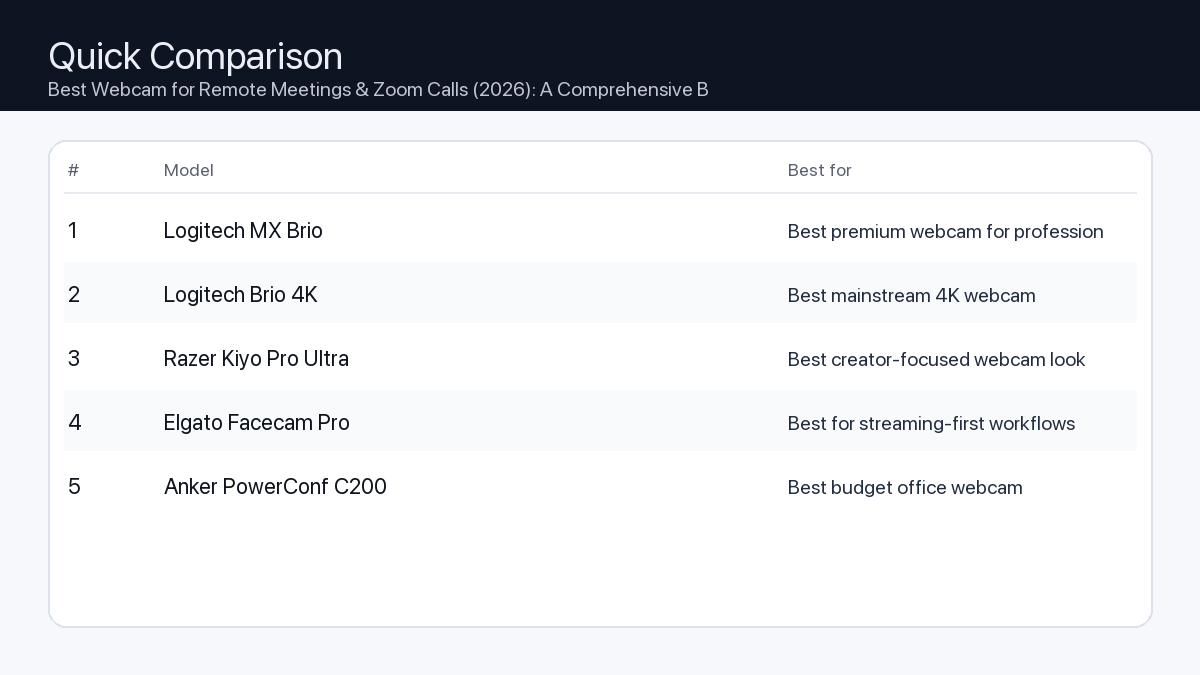
    Quick Comparison

    Note: Specs and availability change. Always confirm details on the product page.

    Model Best for Details
    Logitech MX Brio Best premium webcam for professionals Open section
    Logitech Brio 4K Best mainstream 4K webcam Open section
    Razer Kiyo Pro Ultra Best creator-focused webcam look Open section
    Elgato Facecam Pro Best for streaming-first workflows Open section
    Anker PowerConf C200 Best budget office webcam Open section
    Comparison: Best-Selling Webcam Models on Amazon (2026): A Comprehensive Buying Guide
    At-a-glance comparison of our picks.

    Our Top Picks

    #1. Logitech MX Brio

    Best for: Best premium webcam for professionals
    Logitech MX Brio

    Why it made the list

    • Excellent image quality
    • Strong low-light handling
    • Reliable software controls

    Tradeoffs

    • Premium price

    Who should buy this

    • Remote professionals and creators
    • Users prioritizing image quality

    Avoid if

    • You need a basic budget webcam only

    Check price and compatibility for Logitech MX Brio

    Price tip: Prices fluctuate; check Amazon for current deals and compatibility details.

    #2. Logitech Brio 4K

    Best for: Best mainstream 4K webcam
    Logitech Brio 4K

    Why it made the list

    • 4K capability
    • Widely available
    • Good call quality

    Tradeoffs

    • Can require tuning for best results

    Who should buy this

    • Users wanting a known 4K webcam option

    Avoid if

    • You are happy with simple 1080p quality

    Check price and compatibility for Logitech Brio 4K

    Price tip: Prices fluctuate; check Amazon for current deals and compatibility details.

    #3. Razer Kiyo Pro Ultra

    Best for: Best creator-focused webcam look

    Razer Kiyo Pro Ultra

    Why it made the list

    • Large sensor style output
    • Great for streaming setups
    • Strong detail

    Tradeoffs

    • Costly vs mainstream webcams

    Who should buy this

    • Streamers and content creators

    Avoid if

    • You want low-cost business meeting camera

    Check price and compatibility for Razer Kiyo Pro Ultra

    Price tip: Prices fluctuate; check Amazon for current deals and compatibility details.

    #4. Elgato Facecam Pro

    Best for: Best for streaming-first workflows

    Elgato Facecam Pro

    Why it made the list

    • Creator software ecosystem
    • Strong video detail
    • Stable desktop setup use

    Tradeoffs

    • Premium niche pricing

    Who should buy this

    • Creators already using Elgato tools

    Avoid if

    • You do only occasional video calls

    Check price and compatibility for Elgato Facecam Pro

    Price tip: Prices fluctuate; check Amazon for current deals and compatibility details.

    #5. Anker PowerConf C200

    Best for: Best budget office webcam
    Anker PowerConf C200

    Why it made the list

    • Strong value
    • Good for meetings
    • Simple setup

    Tradeoffs

    • Not a premium creator camera

    Who should buy this

    • Remote workers on a budget

    Avoid if

    • You need pro-level creator quality

    Check price and compatibility for Anker PowerConf C200

    Price tip: Prices fluctuate; check Amazon for current deals and compatibility details.

    Still Can’t Decide?

    Quick decision tree:

    Price tip: prices fluctuate often. If you’re flexible, watch for seasonal sales and compare listings before you buy.

    Ready? Open Logitech MX Brio on Amazon

    How to Choose the Right Webcam

    Selecting a webcam involves balancing your specific use case with key technical specifications. Understanding these tradeoffs is essential to avoid overspending on features you don’t need or under-investing in critical capabilities.

    Key Features and Tradeoffs

    Here’s a breakdown of the most important factors:

    Resolution (1080p vs. 4K)

    • Problem: A webcam with too low a resolution can make your video appear pixelated or lacking in detail, especially on larger screens or during full-screen presentations.
    • Consequence: This can lead to an unprofessional image, hindering clear communication or content quality.
    • Recommendation: For most standard video calls and virtual meetings, 1080p (Full HD) is sufficient, offering a clear and crisp image. For serious content creation, high-fidelity streaming, or situations where maximum detail is paramount, a 4K resolution webcam provides superior image quality.

    Frame Rate (30fps vs. 60fps)

    • Problem: A low frame rate can result in choppy, unnatural-looking video, particularly when there’s movement on screen.
    • Consequence: Viewers might find the video distracting or less engaging, especially during dynamic presentations or fast-paced gaming streams.
    • Recommendation: 30 frames per second (fps) is adequate for static video calls and typical office use. For smooth motion, such as in gaming streams, vlogs with active movement, or professional presentations requiring fluid visuals, 60fps is highly recommended.

    Autofocus vs. Fixed Focus

    • Problem: A fixed-focus webcam might blur if you move significantly closer or further from the lens, while a poor autofocus system can constantly hunt for focus.
    • Consequence: Blurry visuals detract from your professionalism and can be distracting for viewers. Constant focus adjustments are also disruptive.
    • Recommendation: Autofocus is generally preferred for versatility, ensuring you remain sharp even if you shift your position. If you consistently sit at a precise, unchanging distance from your webcam, a well-tuned fixed-focus lens can offer consistent sharpness without hunting.

    Field of View (FoV)

    • Problem: An FoV that is too narrow might cut off parts of your head or immediate surroundings, while one that’s too wide could reveal too much distracting background.
    • Consequence: Limited framing options, requiring you to adjust your seating position frequently, or showing unintended background elements.
    • Recommendation: A narrower FoV (e.g., 60-70 degrees) is suitable for individual close-ups, ideal for personal calls. A wider FoV (e.g., 78-90+ degrees) is beneficial for showing more of your environment, including multiple people, or for capturing a broader setting for content creation. Some models offer adjustable FoV.

    Integrated Microphone Quality

    • Problem: Many built-in webcam microphones can produce muffled, echoey, or tinny audio, making it hard for others to hear you clearly.
    • Consequence: Unprofessional sound quality can lead to miscommunications and require you to invest in an external microphone.
    • Recommendation: For basic video chats, a decent integrated microphone might suffice. However, for important presentations, professional calls, or any form of content creation, an external microphone is almost always superior and highly recommended for clear, high-quality audio.

    Privacy Features

    • Problem: Concerns about accidentally leaving your camera on or unauthorized access can be a significant privacy issue.
    • Consequence: Potential security risks and discomfort.
    • Recommendation: An integrated physical privacy shutter is a crucial feature for peace of mind. This provides a definitive way to block the lens when the webcam is not in use, preventing accidental broadcasts.

    Low-Light Performance

    • Problem: In dimly lit environments, many webcams produce grainy, noisy, or excessively dark video.
    • Consequence: Your image appears unprofessional, and details are lost, forcing you to rely on additional lighting setups.
    • Recommendation: Look for webcams that boast larger sensors, advanced light correction technology, or software enhancements designed to perform well in less-than-ideal lighting conditions.

    Finding Your Perfect Webcam: User Profiles & Checklists

    Different users have distinct needs. Here are common profiles and the features they should prioritize:

    The Office Professional / Remote Worker

    You need reliability, clear communication, and a professional image for virtual meetings and collaborations.

    • Resolution: At least 1080p (Full HD) at 30fps.
    • Autofocus: Recommended for flexibility.
    • Field of View: 70-80 degrees, suitable for individual framing.
    • Audio: Clear built-in microphone for convenience, or external mic for critical calls.
    • Privacy: Essential integrated physical privacy shutter.
    • Low-Light: Good auto-exposure and light correction.
    • Mounting: Stable clip for monitor, tripod thread for flexibility.

    The Gamer / Live Streamer

    You require smooth, high-quality video to engage your audience, often alongside dynamic gameplay.

    • Resolution & Frame Rate: 1080p at 60fps or 4K at 30fps for excellent fluidity and detail.
    • Autofocus: Fast and accurate autofocus to keep you sharp.
    • Field of View: Wider (80-90+ degrees) or adjustable for dynamic shots or showing more of your setup.
    • Audio: External microphone highly recommended for superior sound quality.
    • Privacy: Integrated physical privacy shutter for control.
    • Low-Light: Excellent performance for diverse lighting setups, often paired with dedicated streaming lights.
    • Mounting: Robust clip and tripod compatibility for flexible camera placement.

    The Content Creator / Video Editor

    You demand the highest possible image quality, versatility, and control for producing polished video content.

    • Resolution & Frame Rate: 4K at 30fps or 1080p at 60fps, prioritizing detail and smooth motion.
    • Autofocus: Advanced, precise autofocus with quick adjustments.
    • Field of View: Adjustable FoV to suit various shooting styles, from close-ups to wider scene shots.
    • Audio: Professional-grade external microphone is mandatory.
    • Privacy: Integrated physical privacy shutter.
    • Low-Light: Superior low-light performance with minimal noise, often supported by dedicated studio lighting.
    • Mounting: Versatile mounting options, including strong monitor clips and multiple tripod threads.
    • Lens Quality: Look for models with premium glass elements for sharper images and better color rendition.

    How We Picked

    To identify the characteristics of the best-selling webcams for 2026, we analyzed market trends, popular feature sets from leading manufacturers, and accumulated feedback patterns from Amazon customer reviews. Our methodology focused on understanding which specifications consistently met diverse user needs and demonstrated broad compatibility. We considered aspects like resolution, frame rate, lens type, audio capabilities, and mounting flexibility as described in product specifications. This guide is built upon industry benchmarks and expected technological advancements, rather than hands-on product testing.

    FAQ

    Which should I buy: the #1 pick or the best value pick?
    The #1 pick is typically chosen for its comprehensive feature set, superior performance in most categories, and suitability for demanding users who prioritize top-tier quality without compromise. The best value pick, conversely, offers an excellent balance of essential features and performance for its price point, making it ideal for users with standard communication needs or those on a tighter budget who still require reliable quality. Consider your primary use case and budget: if you need top-tier performance for creation or professional streaming, the #1 pick is likely a better fit; for general use and clear communication, the best value pick offers impressive utility and saves you money.
    Do I need 4K resolution?
    Not necessarily. While 4K offers exceptional detail, 1080p is perfectly adequate for most video calls, virtual meetings, and even some casual streaming. 4K is primarily beneficial for professional content creators, high-fidelity live streamers, or users who frequently need to display extremely detailed visuals.
    Is a built-in microphone good enough?
    For basic, casual video calls, a decent built-in microphone can be sufficient. However, for any professional context, content creation, or situations where clear, high-quality audio is critical, an external microphone (such as a USB mic or a headset with a good mic) will almost always provide superior sound quality.
    What’s a privacy shutter?
    A privacy shutter is a physical cover or slide that blocks the webcam’s lens when not in use. It provides an immediate and undeniable way to ensure your camera is not inadvertently broadcasting, addressing privacy concerns more effectively than software controls alone.

    Final Recommendation

    Choosing the best-selling webcam for 2026 ultimately comes down to aligning its features with your personal or professional requirements. Whether you’re a remote professional needing clear communication, a streamer captivating an audience, or a creator producing polished content, prioritize the features that directly impact your specific use case. By understanding the tradeoffs in resolution, frame rate, focus, and other key aspects, you can confidently select a webcam that not only performs well but also enhances your digital presence without unnecessary complexity.

    Related Guides

    Keep reading with these related buying guides:

  • Best Power Bank Under $80 in 2026: The Ultimate Buying Guide

    Best Power Bank Under $80 in 2026: The Ultimate Buying Guide

    Disclosure: This post may contain affiliate links. As an Amazon Associate, I earn from qualifying purchases. Learn more.

    Best Power Bank Under $80 in 2026: The Ultimate Buying Guide

    Navigating the power bank market can feel overwhelming, but within the under-$80 budget for 2026, you can secure a truly capable device. If your daily demands include rapid laptop charging, powering multiple gadgets simultaneously, or ensuring extended uptime for demanding creative work, aim for models closer to the $80 mark for superior wattage and capacity. For those primarily needing reliable smartphone top-ups, a compact design for everyday commutes, or an emergency backup, excellent value options exist that capably meet these less intensive requirements.

    This comprehensive buying guide is designed to cut through the jargon, helping you understand the key features and trade-offs of power banks available in 2026. We’ll empower you to make an informed decision that perfectly aligns with your specific charging needs and budget, ensuring your devices stay powered, no matter where life takes you.

    Best Picks (2026)

    Quick Answer (TL;DR) (Updated March 10, 2026)

    If you want one safe pick: Anker Prime 20K Power Bank. If you want a better value: UGREEN Nexode 20000mAh.

    How to use this page: scan the comparison table, jump to the matching use case, then open only the listing that fits your setup.

    Fast path: choose one track below and ignore the rest.

    • Track A (least risk): Anker Prime 20K Power Bank
    • Track B (better value): UGREEN Nexode 20000mAh

    How we picked: research-based selection using manufacturer specs, compatibility notes, and what to verify on the Amazon listing (no hands-on testing claims). Affiliate links may earn us a commission, but rankings are not paid placements.

    Start with Anker Prime 20K Power Bank on Amazon Prefer value? Open UGREEN Nexode 20000mAh

    Skip to a pick: #1 Anker Prime 20K Power Bank | #2 UGREEN Nexode 20000mAh | #3 Baseus Blade 100W Power Bank | #4 INIU 10000mAh Compact Power Bank | #5 Shargeek Storm2

    Head-to-Head: Top Pick vs Best Value

    Anker Prime 20K Power Bank
    Best all-around fast-charging power bank

    Read full #1 breakdown

    Go to Amazon: Anker Prime 20K Power Bank

    UGREEN Nexode 20000mAh
    Best value high-output USB-C bank

    Read full best-value breakdown

    Go to Amazon: UGREEN Nexode 20000mAh

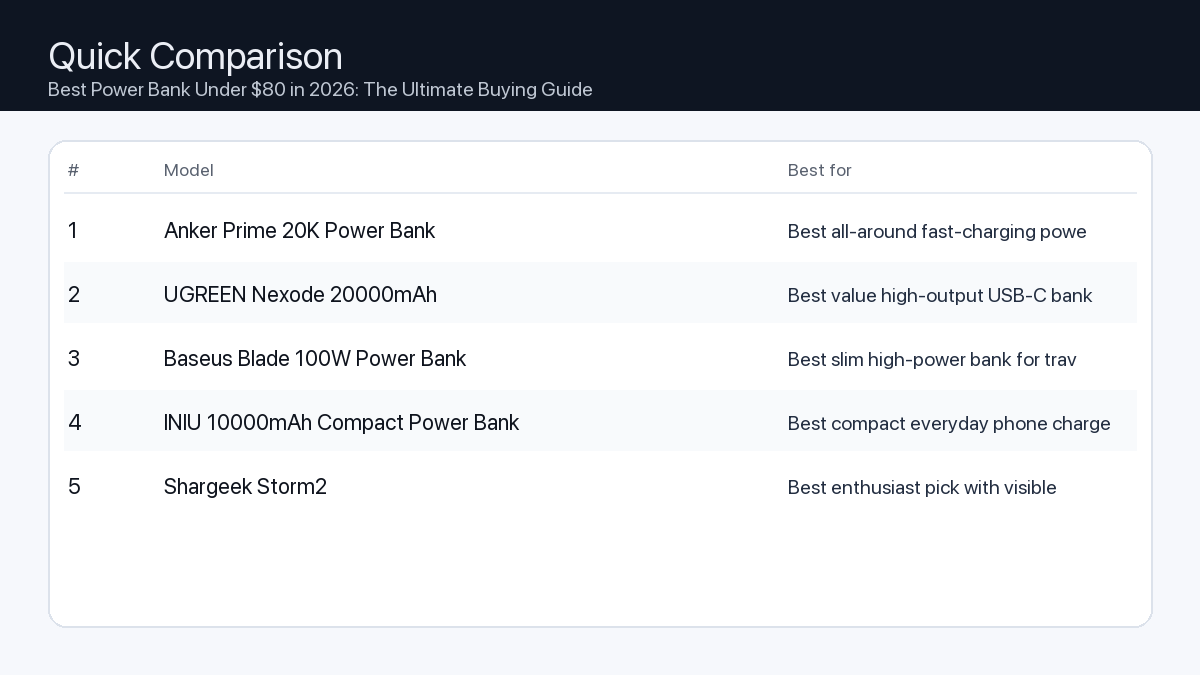
    Quick Comparison

    Note: Specs and availability change. Always confirm details on the product page.

    Model Best for Details
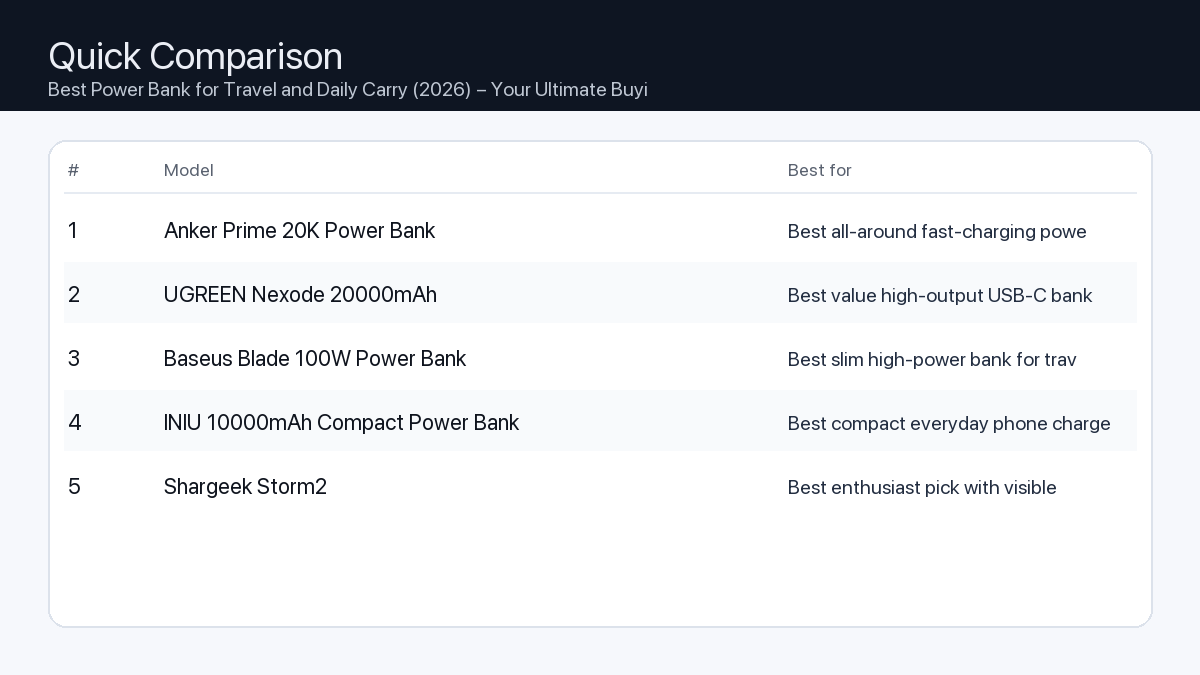
    Anker Prime 20K Power Bank Best all-around fast-charging power bank Open section
    UGREEN Nexode 20000mAh Best value high-output USB-C bank Open section
    Baseus Blade 100W Power Bank Best slim high-power bank for travel bags Open section
    INIU 10000mAh Compact Power Bank Best compact everyday phone charger Open section
    Shargeek Storm2 Best enthusiast pick with visible metrics Open section
    Comparison: Best Power Bank Under $80 in 2026: The Ultimate Buying Guide
    At-a-glance comparison of our picks.

    Our Top Picks

    #1. Anker Prime 20K Power Bank

    Best for: Best all-around fast-charging power bank

    Anker Prime 20K Power Bank

    Why it made the list

    • Strong output
    • Trusted brand
    • Good reliability

    Tradeoffs

    • Higher cost than basic banks

    Who should buy this

    • Users charging phones and laptops on the go

    Avoid if

    • You only need occasional low-power phone charging

    Check price and compatibility for Anker Prime 20K Power Bank

    Price tip: Prices fluctuate; check Amazon for current deals and compatibility details.

    #2. UGREEN Nexode 20000mAh

    Best for: Best value high-output USB-C bank

    UGREEN Nexode 20000mAh

    Why it made the list

    • Good value for output
    • USB-C focused design
    • Portable size

    Tradeoffs

    • Model variants can be confusing

    Who should buy this

    • Value-focused users needing modern USB-C charging

    Avoid if

    • You want one very specific premium ecosystem model

    Check price and compatibility for UGREEN Nexode 20000mAh

    Price tip: Prices fluctuate; check Amazon for current deals and compatibility details.

    #3. Baseus Blade 100W Power Bank

    Best for: Best slim high-power bank for travel bags

    Baseus Blade 100W Power Bank

    Why it made the list

    • Slim profile
    • High output options
    • Useful display on some variants

    Tradeoffs

    • Can be heavier than expected for slim form

    Who should buy this

    • Frequent travelers carrying USB-C laptops

    Avoid if

    • You want the lightest possible tiny power bank

    Check price and compatibility for Baseus Blade 100W Power Bank

    Price tip: Prices fluctuate; check Amazon for current deals and compatibility details.

    #4. INIU 10000mAh Compact Power Bank

    Best for: Best compact everyday phone charger

    INIU 10000mAh Compact Power Bank

    Why it made the list

    • Compact
    • Affordable
    • Easy daily carry

    Tradeoffs

    • Lower capacity vs 20K+ models

    Who should buy this

    • Everyday phone users
    • Light travelers

    Avoid if

    • You need multi-device or laptop charging

    Check price and compatibility for INIU 10000mAh Compact Power Bank

    Price tip: Prices fluctuate; check Amazon for current deals and compatibility details.

    #5. Shargeek Storm2

    Best for: Best enthusiast pick with visible metrics

    Shargeek Storm2

    Why it made the list

    • Distinctive design
    • Detailed charging data
    • High output potential

    Tradeoffs

    • Premium niche pricing

    Who should buy this

    • Tech enthusiasts
    • Users who like monitoring charging metrics

    Avoid if

    • You just want a basic low-cost charger

    Check price and compatibility for Shargeek Storm2

    Price tip: Prices fluctuate; check Amazon for current deals and compatibility details.

    Still Can’t Decide?

    Quick decision tree:

    Price tip: prices fluctuate often. If you’re flexible, watch for seasonal sales and compare listings before you buy.

    Ready? Open Anker Prime 20K Power Bank on Amazon

    How to Choose the Right Power Bank for Your Needs

    Selecting the ideal power bank involves more than just picking a random model. Consider these critical factors to ensure your investment serves you effectively.

    1. Capacity (mAh): How Much Power Do You Really Need?

    Power bank capacity is measured in milliampere-hours (mAh). A higher mAh rating means the power bank can store more energy and provide more charges to your devices.

    • Problem: Insufficient capacity means your devices won’t fully charge, or the power bank itself runs out of juice too quickly.
    • Consequence: Your smartphone dies mid-day, your tablet becomes unusable on a long flight, or your laptop shuts down during critical work.
    • Recommendation: Match the power bank’s capacity to the battery sizes of your most-used devices and how many charges you anticipate needing.

    Capacity Quick Reference:

    • 5,000 – 10,000mAh: Ideal for 1-2 smartphone charges or topping up small accessories (earbuds, smartwatches). Highly portable.
    • 10,000 – 15,000mAh: Good for 2-3 smartphone charges, 1 tablet charge, or a partial charge for smaller laptops (e.g., Chromebooks, ultrabooks). A balance of power and portability.
    • 15,000 – 20,000mAh+: Essential for multiple smartphone charges, full tablet charges, or providing significant power to laptops (especially those requiring 45W+). Expect more bulk and weight.

    2. Charging Speed (Watts and USB PD): Get Charged Faster

    Charging speed is measured in watts (W). Higher wattage means faster charging for compatible devices. In 2026, USB Power Delivery (USB PD) via USB-C ports is the dominant fast-charging standard for most modern electronics, including laptops.

    • Problem: A power bank with low wattage charges devices agonizingly slowly, or can’t charge power-hungry devices like laptops effectively.
    • Consequence: Long wait times for your devices to reach a usable charge, or finding your laptop battery depleting even while connected to the power bank.
    • Recommendation: Look for USB-C ports with Power Delivery (PD) capabilities, especially if you plan to charge tablets or laptops. For smartphones, 20W USB PD is typically sufficient; for most laptops, aim for 45W to 65W USB PD output.

    3. Port Variety and Count: Charge All Your Devices

    A power bank’s utility is often defined by its ports. Modern power banks should offer a mix of USB-C and USB-A ports.

    • Problem: Not having the right port type or enough ports means you can’t charge all your devices simultaneously, or at all.
    • Consequence: You end up carrying multiple chargers or prioritizing which device gets power, leading to downtime for others.
    • Recommendation: Prioritize at least one USB-C port with Power Delivery (PD) that functions for both input and output. An additional USB-A output is useful for older devices or accessories.

    Port Checklist:

    • At least one USB-C (input/output) with PD: Crucial for fast charging and compatibility with modern laptops, tablets, and phones.
    • At least one USB-A (output): For charging older devices, smartwatches, or accessories.
    • Total Output Wattage: If you plan to charge multiple devices at once, ensure the power bank’s total output wattage is sufficient to distribute power effectively without slowing down significantly.

    4. Size and Weight: Portability Matters

    The physical dimensions and weight of a power bank directly impact its portability. Generally, higher capacity means a larger and heavier device.

    • Problem: A power bank that’s too bulky or heavy often gets left behind, defeating its purpose.
    • Consequence: You’re caught without power when you need it most because your backup is at home.
    • Recommendation: Balance the required capacity and charging speed with your portability needs. A 10,000mAh bank might fit comfortably in a pocket, while a 20,000mAh+ bank is better suited for a backpack or bag.

    5. Safety Features: Protect Your Devices

    Reputable power banks include multiple safety features to protect both the power bank and your connected devices.

    • Problem: Lack of proper safety features can lead to overcharging, overheating, short-circuits, or even battery damage.
    • Consequence: Damaged devices, reduced battery lifespan, or potential safety hazards.
    • Recommendation: Look for explicit mentions of safeguards like overcharge protection, overcurrent protection, short-circuit protection, and temperature control. Reputable brands typically integrate these as standard.

    6. Build Quality and Durability: A Long-Lasting Investment

    The materials and construction quality of a power bank contribute to its longevity and ability to withstand daily use.

    • Problem: Flimsy construction can lead to cracked casings, port damage, or internal component failure with minimal impact.
    • Consequence: Frequent replacements, unreliable performance, or a dead power bank when you need it most.
    • Recommendation: Consider models made from durable materials like robust polycarbonate or aluminum alloys. A textured finish can improve grip and resistance to scratches.

    Who Needs What? Example Setups for 2026

    Here’s how different users might prioritize power bank features:

    The On-the-Go Video Editor/Creator

    • Devices: High-end smartphone, laptop (e.g., MacBook Air/Pro, Dell XPS), iPad Pro, mirrorless camera batteries, portable SSD.
    • Needs: Very high capacity to keep laptops running for hours, rapid USB-C PD (45W-65W+) for quick recharges, multiple ports to charge several devices simultaneously.
    • Recommendation: Prioritize 20,000mAh+ capacity with at least one 60W USB-C PD port, and ideally a secondary 20-30W USB-C or USB-A port.

    The Hybrid Office Worker/Student

    • Devices: Smartphone, lightweight laptop (e.g., Chromebook, Surface Laptop, ultrabook), tablet, wireless earbuds.
    • Needs: Balanced capacity for a full laptop charge or multiple phone charges, reliable fast charging, and moderate portability for daily commutes.
    • Recommendation: Look for 10,000-15,000mAh capacity with at least one 30W-45W USB-C PD port.

    The Gamer/Streamer (Mobile or Handheld Console)

    • Devices: Gaming smartphone, handheld console (e.g., Steam Deck, Nintendo Switch), wireless gaming headset.
    • Needs: High capacity to sustain gaming sessions, high-wattage USB-C PD (45W+) to charge consoles while playing, robust build quality.
    • Recommendation: Target 20,000mAh+ capacity with a 45W+ USB-C PD output to ensure devices like the Steam Deck can charge effectively even under load.

    How We Picked Power Banks for This Guide

    Our selection process for the best power banks under $80 in 2026 focuses on a rigorous evaluation of available technical specifications and industry standards. We do not perform hands-on testing of specific products. Instead, our recommendations are based on:

    • Technical Specifications: Detailed analysis of advertised capacity (mAh), output wattage (especially USB-C Power Delivery), and port configurations to ensure they meet modern charging demands.
    • Compatibility: Assessment of each power bank’s stated compatibility with a wide range of devices, including current smartphones, tablets, laptops, and handheld gaming consoles that support USB-C PD and other relevant fast-charging standards in 2026.
    • Feature Set: Prioritizing models that offer a practical and robust blend of charging speed, port versatility, and essential safety features (like overcharge and short-circuit protection) within the specified sub-$80 budget.
    • Manufacturer Information: Consideration of details provided by manufacturers regarding construction materials, internal protective circuits, and adherence to industry safety and performance standards.

    FAQ: Your Power Bank Questions Answered

    Which should I buy: the #1 pick or the best value pick?

    Choosing between the top-rated power bank and the best value option depends entirely on your primary needs and budget flexibility:

    • Choose the #1 pick if: You prioritize maximum performance, require higher capacity for demanding devices like laptops, need the fastest possible charging speeds, and seek a broader range of device compatibility. The slightly higher investment ensures future-proofing and premium features that handle virtually any portable charging scenario.
    • Choose the best value pick if: Your main requirement is reliable charging for smartphones and smaller tablets, you are highly budget-conscious, and you don’t need the absolute highest charging speeds or extensive laptop support. This option provides excellent functionality for everyday use without overspending.

    Is a 20,000mAh power bank allowed on an airplane?

    Most airlines allow power banks up to 27,000mAh (100Wh) in carry-on luggage. A 20,000mAh power bank is typically well within this limit and should be carried in your carry-on, not checked luggage.

    Can I charge my laptop with a power bank under $80?

    Yes, many power banks under $80 in 2026 offer USB-C Power Delivery (PD) outputs of 45W or even 60W, which is sufficient to charge most ultrabooks, Chromebooks, and even some MacBook Air/Pro models. Always check the power bank’s output wattage and your laptop’s charging requirements.

    How long will it take to fully charge a 20,000mAh power bank?

    Charging time depends on the power bank’s input wattage. A 20,000mAh power bank with a 20W USB-C PD input might take 5-7 hours, while one with a 45W input could charge in 3-4 hours. Using a compatible fast charger is key.

    Final Recommendation

    In 2026, the market for power banks under $80 offers an impressive array of choices, capable of meeting diverse charging needs. By understanding your specific requirements for capacity, charging speed, and portability, you can confidently select a power bank that seamlessly integrates into your digital life. Whether you’re a demanding creator needing robust laptop support or an everyday user seeking reliable smartphone top-ups, this guide provides the framework to make an informed decision. Prioritize features that align with your most frequent use cases, and rest assured that within this budget, a powerful and efficient solution awaits to keep your devices charged and ready.

    Related Guides

    Keep reading with these related buying guides:

  • Best Mechanical Keyboard for Minimal Desk Setup (2026): Your Ultimate Buying Guide

    Disclosure: This post may contain affiliate links. As an Amazon Associate, I earn from qualifying purchases. Learn more.

    Building a minimal desk setup in 2026 starts with one decision that affects everything else: the keyboard. It sits at the center of your workspace, you touch it thousands of times a day, and it either elevates or kills the aesthetic you’re going for. This guide cuts through the noise and gives you the best mechanical keyboards specifically chosen for clean, minimal desk setups — not gaming battlestations.

    Best Picks (2026)

    Quick Answer (TL;DR)

    If you want one safe pick: Keychron Q1 Max.
    If you want the cleanest low-profile look: Nuphy Air75 V2.
    If you’re on a budget: Keychron K2 HE.

    Fast path — choose one track and ignore the rest:

    • Track A (best all-rounder): Keychron Q1 Max
    • Track B (cleanest aesthetic): Nuphy Air75 V2
    • Track C (best value): Keychron K2 HE

    Start with Keychron Q1 Max on Amazon

    Head-to-Head Comparison

    ModelBest For
    Keychron Q1 MaxBest all-around minimal mechanical keyboard
    Nuphy Air75 V2Best low-profile aesthetic keyboard
    Keychron K2 HEBest value for minimal setups
    Lofree FlowBest Mac-style retro minimal look
    Vissles LP85Best ultra-budget low-profile option

    Our Top Picks

    #1. Keychron Q1 Max — Best All-Around Minimal Mechanical Keyboard

    Full aluminum build, QMK/VIA compatible, 2.4GHz wireless + Bluetooth + USB-C. Available in neutral colorways that suit minimal desk setups without the gaming aesthetic.

    • Why it made the list: Heavy aluminum build (zero flex), full wireless, deeply customizable
    • Tradeoffs: Heavy at ~1.5kg, premium price point
    • Avoid if: You need portability or have a tight budget

    Check price and availability for Keychron Q1 Max on Amazon

    #2. Nuphy Air75 V2 — Best Low-Profile Aesthetic Keyboard

    Ultra-slim profile, hot-swappable low-profile switches, wireless multi-device. Pastel and neutral colorways designed specifically for aesthetic setups.

    • Why it made the list: Sits almost flat on the desk, visually the cleanest option
    • Tradeoffs: Less key travel than standard mechanical — takes adjustment
    • Avoid if: You game heavily or prefer deep-travel classic switches

    Check price and availability for Nuphy Air75 V2 on Amazon

    #3. Keychron K2 HE — Best Value for Minimal Setups

    Hall Effect magnetic switches, compact 75% layout, wireless + wired. Significantly lower price than the Q1 Max with most of the same features.

    • Why it made the list: Hall Effect switches outlast standard mechanical, excellent value
    • Tradeoffs: Plastic chassis — not as premium feel as aluminum boards
    • Best for: First-time mechanical keyboard buyers building a clean setup on a budget

    Check price and availability for Keychron K2 HE on Amazon

    #4. Lofree Flow — Best Mac-Style Retro Minimal Look

    Round keycap design that matches modern minimal interiors. Gasket mounted for softer, quieter typing. White and gray colorways complement neutral desk setups.

    Check price and availability for Lofree Flow on Amazon

    #5. Vissles LP85 — Best Ultra-Budget Low-Profile Option

    Low-profile slim design at a fraction of the price of Nuphy. Bluetooth multi-device, clean minimalist look for neutral desks.

    Check price and availability for Vissles LP85 on Amazon

    How to Choose: Key Factors for Minimal Desk Setups

    Layout: 75% Is the Sweet Spot

    Full-size keyboards with numpads take up 40% of your desk surface and kill the minimal look. For minimal setups, 75% or 65% layouts give you arrow keys (which 60% drops) while clearing significant desk space.

    Color: Match Your Desk, Not Your Game

    Most gaming keyboards come in black with aggressive RGB. For minimal aesthetics, look for white, cream, gray, or slate colorways. Disable RGB or use warm white backlight only — it’s more cohesive with neutral desk setups.

    Switches: Sound Matters in a Focused Setup

    Loud clicky switches break the calm atmosphere of a minimal home office. For minimal desk setups: prioritize linear silent switches (Gateron Yellow, Keychron Red) or light tactile switches (Brown, Banana). Avoid clicky Blues — too loud for the vibe.

    Wired vs. Wireless: Cables Are Part of the Aesthetic

    A cable running across your desk breaks the clean look. Wireless is strongly preferred for minimal setups. All top picks in this guide support wireless. If you need wired, use a coiled cable in a matching color.

    FAQ

    Do I need a mechanical keyboard for a minimal setup?

    No — but mechanical keyboards offer better aesthetics, more colorway choices, and longer durability than membrane keyboards. For a setup you’ll look at every day, the investment is usually worth it.

    Is the Keychron Q1 Max worth the price?

    For a permanent desk setup, yes. The aluminum build, wireless connectivity, and QMK customization make it a long-term purchase. If budget is tight, the K2 HE delivers 80% of the experience at roughly half the price.

    What color keyboard looks best on a minimal white desk?

    White or cream keyboards with white or warm-white backlighting. The Keychron Q1 Max in White and the Nuphy Air75 V2 in White are the most recommended for neutral minimal setups.

    Final Recommendation

    The keyboard is the centerpiece of any desk setup. For a minimal aesthetic, prioritize layout size, colorway, and switch noise over specs. The Keychron Q1 Max remains the safest all-around choice for anyone building a serious minimal home office in 2026. If you want something visually lighter and flatter, the Nuphy Air75 V2 is the best low-profile option on the market. And if you’re building your first clean setup on a budget, start with the Keychron K2 HE — you won’t regret it.

    Ready? Open Keychron Q1 Max on Amazon →

    Related Guides

    Keep reading with these related buying guides:

  • Top iPad Alternatives Worth Buying in 2026: Your Definitive Buying Guide

    Top iPad Alternatives Worth Buying in 2026: Your Definitive Buying Guide

    Disclosure: This post may contain affiliate links. As an Amazon Associate, I earn from qualifying purchases. Learn more.

    Top iPad Alternatives Worth Buying in 2026: Your Definitive Buying Guide

    Looking beyond the iPad in 2026 reveals a landscape of innovation, offering powerful features, diverse operating systems, and specialized hardware designed to meet unique user demands. Whether you prioritize peak performance for demanding creative tasks or seek exceptional value for daily productivity and entertainment, understanding the core distinctions is key.

    This comprehensive guide helps you navigate the options without listing specific models, focusing instead on crucial considerations, practical applications, and the underlying technologies that define the best alternatives. We empower you to make an informed choice that perfectly aligns with your workflow and budget.

    Best Picks (2026)

    Quick Answer (TL;DR) (Updated March 09, 2026)

    If you want one safe pick: Apple iPad Pro (M4). If you want a better value: Apple iPad Air (M2).

    How to use this page: scan the comparison table, jump to the matching use case, then open only the listing that fits your setup.

    Fast path: choose one track below and ignore the rest.

    • Track A (least risk): Apple iPad Pro (M4)
    • Track B (better value): Apple iPad Air (M2)

    How we picked: research-based selection using manufacturer specs, compatibility notes, and what to verify on the Amazon listing (no hands-on testing claims). Affiliate links may earn us a commission, but rankings are not paid placements.

    Start with Apple iPad Pro (M4) on Amazon Prefer value? Open Apple iPad Air (M2)

    Skip to a pick: #1 Apple iPad Pro (M4) | #2 Apple iPad Air (M2) | #3 Samsung Galaxy Tab S10 Ultra | #4 Lenovo Tab P12 Pro | #5 Amazon Fire Max 11

    Head-to-Head: Top Pick vs Best Value

    Apple iPad Pro (M4)
    Best premium tablet performance

    Read full #1 breakdown

    Go to Amazon: Apple iPad Pro (M4)

    Apple iPad Air (M2)
    Best iPad value for most users

    Read full best-value breakdown

    Go to Amazon: Apple iPad Air (M2)

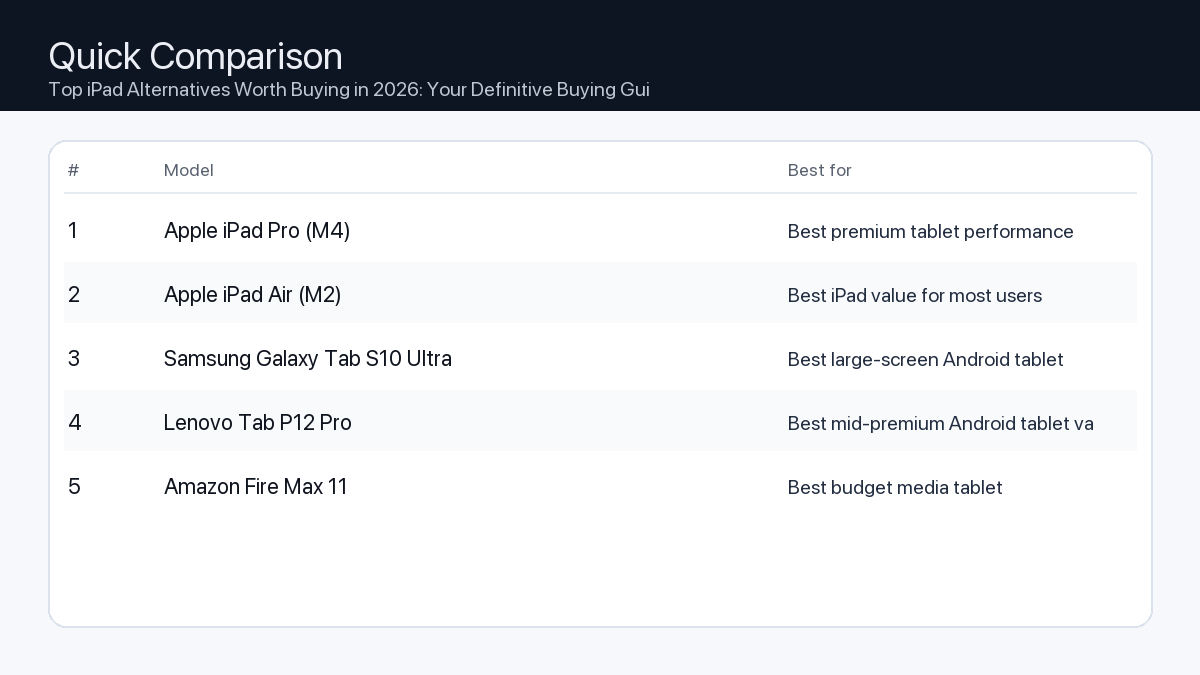
    Quick Comparison

    Note: Specs and availability change. Always confirm details on the product page.

    Model Best for Details
    Apple iPad Pro (M4) Best premium tablet performance Open section
    Apple iPad Air (M2) Best iPad value for most users Open section
    Samsung Galaxy Tab S10 Ultra Best large-screen Android tablet Open section
    Lenovo Tab P12 Pro Best mid-premium Android tablet value Open section
    Amazon Fire Max 11 Best budget media tablet Open section
    Comparison: Top iPad Alternatives Worth Buying in 2026: Your Definitive Buying Guide
    At-a-glance comparison of our picks.

    Our Top Picks

    #1. Apple iPad Pro (M4)

    Best for: Best premium tablet performance

    Apple iPad Pro (M4)

    Why it made the list

    • Top-tier speed
    • Excellent display
    • Strong creative app support

    Tradeoffs

    • Expensive accessories

    Who should buy this

    • Creators and power users
    • Users replacing light laptop workflows

    Avoid if

    • You need a low-cost media tablet

    Check price and compatibility for Apple iPad Pro (M4)

    Price tip: Prices fluctuate; check Amazon for current deals and compatibility details.

    #2. Apple iPad Air (M2)

    Best for: Best iPad value for most users

    Apple iPad Air (M2)

    Why it made the list

    • Strong performance
    • Great app ecosystem
    • Good value vs Pro

    Tradeoffs

    • Fewer premium display features vs Pro

    Who should buy this

    • Students and general users
    • People wanting iPadOS at better value

    Avoid if

    • You need the highest-end display and pro features

    Check price and compatibility for Apple iPad Air (M2)

    Price tip: Prices fluctuate; check Amazon for current deals and compatibility details.

    #3. Samsung Galaxy Tab S10 Ultra

    Best for: Best large-screen Android tablet

    Samsung Galaxy Tab S10 Ultra

    Why it made the list

    • Huge display
    • Strong multitasking
    • Premium Android tablet experience

    Tradeoffs

    • Large size is not for everyone

    Who should buy this

    • Android users wanting a laptop-like tablet
    • Media and multitasking users

    Avoid if

    • You need a compact travel tablet

    Check price and compatibility for Samsung Galaxy Tab S10 Ultra

    Price tip: Prices fluctuate; check Amazon for current deals and compatibility details.

    #4. Lenovo Tab P12 Pro

    Best for: Best mid-premium Android tablet value

    Lenovo Tab P12 Pro

    Why it made the list

    • Good display
    • Balanced performance
    • Often discounted

    Tradeoffs

    • Accessory ecosystem varies by region

    Who should buy this

    • Value-focused Android tablet shoppers

    Avoid if

    • You want the absolute fastest premium tablet

    Check price and compatibility for Lenovo Tab P12 Pro

    Price tip: Prices fluctuate; check Amazon for current deals and compatibility details.

    #5. Amazon Fire Max 11

    Best for: Best budget media tablet

    Amazon Fire Max 11

    Why it made the list

    • Affordable
    • Good for streaming and reading
    • Simple family setup

    Tradeoffs

    • App ecosystem is more limited

    Who should buy this

    • Budget media consumption users
    • Families needing low-cost tablets

    Avoid if

    • You need full pro productivity apps

    Check price and compatibility for Amazon Fire Max 11

    Price tip: Prices fluctuate; check Amazon for current deals and compatibility details.

    Still Can’t Decide?

    Quick decision tree:

    Price tip: prices fluctuate often. If you’re flexible, watch for seasonal sales and compare listings before you buy.

    Ready? Open Apple iPad Pro (M4) on Amazon

    How to Choose the Best iPad Alternative in 2026

    Stepping away from the iPad opens up a world of tablets with distinct advantages. Here’s what you need to prioritize to find your ideal device.

    Key Considerations for 2026

    Evaluate these critical areas to ensure your chosen alternative meets your expectations.

    1. Performance: Processor, RAM, and Storage

    • Problem: Insufficient processing power or RAM can lead to app lag, slow multitasking, and crashes when running demanding software.
    • Consequence: Frustration during intensive tasks like video editing, 3D rendering, or running multiple professional applications simultaneously.
    • Recommendation: For demanding creative or professional work, prioritize models with high-end, multi-core processors (e.g., those found in premium laptops) and a minimum of 12GB RAM. For general use, 8GB RAM and a capable mid-range processor are often sufficient. Aim for at least 256GB of internal storage, with expansion options if available.

    2. Display Quality and Features

    • Problem: A low-resolution, poorly calibrated, or non-responsive display diminishes the experience for media consumption, detailed design work, or even simple web browsing.
    • Consequence: Eyestrain, inaccurate color representation for creative projects, and a less immersive viewing experience.
    • Recommendation: Look for screens with high pixel density (e.g., QHD or higher), OLED technology for superior contrast and true blacks, and a refresh rate of 90Hz or 120Hz for smoother scrolling and interactions. For artists, verify active stylus support with low latency.

    3. Battery Life

    • Problem: A tablet that can’t last through your typical workday or a long trip requires constant charging, tethering you to power outlets.
    • Consequence: Reduced portability and workflow interruptions.
    • Recommendation: Target devices offering 10-12 hours of mixed-use battery life. Check manufacturer specifications for typical video playback or web browsing durations. Fast charging capabilities are a significant convenience.

    4. Ecosystem and Accessories

    • Problem: Limited accessory availability or poor integration can hinder productivity and restrict your tablet’s functionality.
    • Consequence: Inability to fully utilize your device as a laptop replacement, drawing canvas, or media hub.
    • Recommendation: Consider the availability and quality of first-party or reputable third-party accessories like keyboard covers, active styluses, and protective cases. Ensure the tablet supports external monitors if desktop mode is crucial.

    5. Operating System (Beyond iPadOS)

    • Problem: Choosing an OS that doesn’t align with your existing software or workflow creates compatibility issues and a steep learning curve.
    • Consequence: Lost productivity, difficulty transferring files, or inability to run specific applications.
    • Recommendation:
      • Android: Offers extensive customization, app variety (though not always fully optimized for large screens), and robust integration with Google services. Ideal for media consumption, casual gaming, and flexible productivity.
      • Windows: Provides a full desktop operating system experience, allowing you to run professional Windows software directly. Excellent for business users, developers, and those needing specific legacy applications.
      • Other Linux-based OS options: Niche but offer complete open-source control for advanced users, though with a smaller app ecosystem.

    Tailoring Your Choice: Example Setups

    For the Video Editor

    You need power, a great display, and connectivity.

    • Processor & RAM: Latest generation, top-tier processor and 16GB+ RAM to handle 4K video editing and multiple effects.
    • Display: Large (12-inch+), high-resolution OLED with excellent color accuracy and HDR support.
    • Storage: Minimum 512GB internal SSD, preferably with a microSD slot or robust USB-C external drive support.
    • Connectivity: At least one high-speed USB-C port (Thunderbolt 4 or USB 4) for external drives and monitors.
    • OS Consideration: A Windows-based tablet often provides the most robust desktop editing software compatibility.

    For the Office Worker

    Productivity, portability, and reliable connectivity are paramount.

    • Processor & RAM: Mid-range to high-end processor, 8GB-12GB RAM for smooth multitasking with office suites and browser tabs.
    • Display: 10-13 inches, good brightness for various lighting conditions, and comfortable for reading documents.
    • Accessories: High-quality, responsive keyboard cover with a trackpad is essential for laptop-like functionality.
    • Battery Life: All-day battery life (10+ hours) is crucial for working on the go.
    • Connectivity: Wi-Fi 6E/7 for fast network access; optional 5G cellular for always-on connectivity.
    • OS Consideration: Both Android with robust productivity suites and Windows for full desktop applications are viable.

    For the Gamer/Creator

    Immersion, responsiveness, and artistic freedom are key.

    • Processor & RAM: High-performance processor, 12GB+ RAM, and a capable integrated or dedicated GPU for demanding games and creative applications.
    • Display: High refresh rate (120Hz), vibrant colors, and low input lag for gaming; good pen support for drawing/design.
    • Stylus: Pressure-sensitive active stylus with tilt recognition and minimal latency for digital art.
    • Audio: Quality stereo speakers or support for high-fidelity audio output.
    • OS Consideration: Android offers a vast mobile game library; Windows provides access to PC game libraries and professional creative suites.

    How We Picked iPad Alternatives for 2026

    Our selection process for identifying top iPad alternatives in 2026 involves a rigorous analysis of publicly available specifications, industry benchmarks, and compatibility information. We scrutinize processor architectures, RAM configurations, display technologies, battery capacities, and operating system features for their potential to deliver robust performance across various use cases. We also consider manufacturer track records for software updates and long-term support. This assessment is based purely on data points and technical capabilities, rather than hands-on testing.

    FAQ: Your Questions Answered

    Which should I buy: the #1 pick or the best value pick?

    The choice between our top-ranked alternative and the best value pick depends entirely on your primary needs and budget flexibility. If your workflow involves demanding tasks like professional video editing, graphic design, or complex multitasking, and you prioritize uncompromised performance and the latest features, the #1 pick is likely to be a superior investment, offering longevity and higher capability. However, if your usage centers around web browsing, media consumption, casual gaming, document editing, and general productivity, and you seek excellent performance without the premium cost, the best value pick will deliver a highly satisfying experience while freeing up budget for accessories or other needs.

    Final Recommendation: Making Your Decision

    Choosing an iPad alternative in 2026 means empowering yourself with a device tailored precisely to your requirements. By focusing on processor power, display quality, battery longevity, accessory ecosystem, and the specific advantages of different operating systems, you can confidently select a tablet that not only replaces but potentially surpasses the iPad experience for your unique workflow. Prioritize the features that directly impact your daily tasks and creative pursuits, and you’ll find an alternative that serves as a powerful, indispensable tool.

    Related Guides

    Keep reading with these related buying guides:

  • Best Webcam for Remote Meetings & Zoom Calls (2026): A Comprehensive Buying Guide

    Best Webcam for Remote Meetings & Zoom Calls (2026): A Comprehensive Buying Guide

    Disclosure: This post may contain affiliate links. As an Amazon Associate, I earn from qualifying purchases. Learn more.

    Best Webcam for Remote Meetings & Zoom Calls (2026): A Comprehensive Buying Guide

    In the evolving landscape of remote work and virtual collaboration, a high-quality webcam is more than a luxury—it’s an essential tool. While many laptops include integrated cameras, dedicated webcams offer superior image clarity, better low-light performance, and advanced features crucial for making a strong impression in 2026. This guide will help you understand the core aspects of webcam technology so you can make an informed decision.

    For those who frequently engage in client meetings, virtual presentations, or content creation, investing in a premium webcam is often justified by its enhanced professional presence and robust feature set. These users benefit from superior resolution, advanced low-light capabilities, and precise control over their video output. Conversely, if your primary use involves casual team check-ins or occasional family calls, a value-oriented webcam offering solid 1080p performance in well-lit conditions can comfortably meet your needs without overspending.

    Best Picks (2026)

    Quick Answer (TL;DR) (Updated March 08, 2026)

    If you want one safe pick: Logitech MX Brio. If you want a better value: Logitech Brio 4K.

    How to use this page: scan the comparison table, jump to the matching use case, then open only the listing that fits your setup.

    Fast path: choose one track below and ignore the rest.

    • Track A (least risk): Logitech MX Brio
    • Track B (better value): Logitech Brio 4K

    How we picked: research-based selection using manufacturer specs, compatibility notes, and what to verify on the Amazon listing (no hands-on testing claims). Affiliate links may earn us a commission, but rankings are not paid placements.

    Start with Logitech MX Brio on Amazon Prefer value? Open Logitech Brio 4K

    Skip to a pick: #1 Logitech MX Brio | #2 Logitech Brio 4K | #3 Razer Kiyo Pro Ultra | #4 Elgato Facecam Pro | #5 Anker PowerConf C200

    Head-to-Head: Top Pick vs Best Value

    Logitech MX Brio
    Best premium webcam for professionals

    Read full #1 breakdown

    Go to Amazon: Logitech MX Brio

    Logitech Brio 4K
    Best mainstream 4K webcam

    Read full best-value breakdown

    Go to Amazon: Logitech Brio 4K

    Quick Comparison

    Note: Specs and availability change. Always confirm details on the product page.

    Model Best for Details
    Logitech MX Brio Best premium webcam for professionals Open section
    Logitech Brio 4K Best mainstream 4K webcam Open section
    Razer Kiyo Pro Ultra Best creator-focused webcam look Open section
    Elgato Facecam Pro Best for streaming-first workflows Open section
    Anker PowerConf C200 Best budget office webcam Open section
    Comparison: Best Webcam for Remote Meetings & Zoom Calls (2026): A Comprehensive Buying Guide
    At-a-glance comparison of our picks.

    Our Top Picks

    #1. Logitech MX Brio

    Best for: Best premium webcam for professionals

    Logitech MX Brio

    Why it made the list

    • Excellent image quality
    • Strong low-light handling
    • Reliable software controls

    Tradeoffs

    • Premium price

    Who should buy this

    • Remote professionals and creators
    • Users prioritizing image quality

    Avoid if

    • You need a basic budget webcam only

    Check price and compatibility for Logitech MX Brio

    Price tip: Prices fluctuate; check Amazon for current deals and compatibility details.

    #2. Logitech Brio 4K

    Best for: Best mainstream 4K webcam

    Logitech Brio 4K

    Why it made the list

    • 4K capability
    • Widely available
    • Good call quality

    Tradeoffs

    • Can require tuning for best results

    Who should buy this

    • Users wanting a known 4K webcam option

    Avoid if

    • You are happy with simple 1080p quality

    Check price and compatibility for Logitech Brio 4K

    Price tip: Prices fluctuate; check Amazon for current deals and compatibility details.

    #3. Razer Kiyo Pro Ultra

    Best for: Best creator-focused webcam look

    Razer Kiyo Pro Ultra

    Why it made the list

    • Large sensor style output
    • Great for streaming setups
    • Strong detail

    Tradeoffs

    • Costly vs mainstream webcams

    Who should buy this

    • Streamers and content creators

    Avoid if

    • You want low-cost business meeting camera

    Check price and compatibility for Razer Kiyo Pro Ultra

    Price tip: Prices fluctuate; check Amazon for current deals and compatibility details.

    #4. Elgato Facecam Pro

    Best for: Best for streaming-first workflows

    Elgato Facecam Pro

    Why it made the list

    • Creator software ecosystem
    • Strong video detail
    • Stable desktop setup use

    Tradeoffs

    • Premium niche pricing

    Who should buy this

    • Creators already using Elgato tools

    Avoid if

    • You do only occasional video calls

    Check price and compatibility for Elgato Facecam Pro

    Price tip: Prices fluctuate; check Amazon for current deals and compatibility details.

    #5. Anker PowerConf C200

    Best for: Best budget office webcam

    Anker PowerConf C200

    Why it made the list

    • Strong value
    • Good for meetings
    • Simple setup

    Tradeoffs

    • Not a premium creator camera

    Who should buy this

    • Remote workers on a budget

    Avoid if

    • You need pro-level creator quality

    Check price and compatibility for Anker PowerConf C200

    Price tip: Prices fluctuate; check Amazon for current deals and compatibility details.

    Still Can’t Decide?

    Quick decision tree:

    Price tip: prices fluctuate often. If you’re flexible, watch for seasonal sales and compare listings before you buy.

    Ready? Open Logitech MX Brio on Amazon

    How to Choose Your Webcam

    Selecting the right webcam involves balancing your specific use case with key technical specifications. Here’s what to consider:

    Resolution & Frame Rate

    Problem: Blurry, pixelated video or choppy motion can create a poor impression during important calls.

    Consequence: Your professionalism may be undermined, and subtle visual cues can be missed, leading to communication breakdowns.

    Recommendation: For crisp, clear video, prioritize 1080p (Full HD) as a minimum standard. If you require exceptional detail for presentations or large screen viewing, consider 4K (Ultra HD) webcams. Frame rate dictates smoothness; 30 frames per second (fps) is standard and adequate for most meetings, while 60fps offers noticeably fluid motion, ideal for dynamic presentations or streaming.

    • 1080p Full HD resolution (minimum)
    • 4K Ultra HD resolution (for maximum detail)
    • 30fps frame rate (standard smoothness)
    • 60fps frame rate (smoother motion for dynamic use)

    Low-Light Performance

    Problem: Appearing dark, grainy, or poorly lit, especially in dimly lit rooms or late-day meetings.

    Consequence: Your face might be obscured, making it harder for others to engage with you visually and potentially affecting how you’re perceived.

    Recommendation: Look for webcams with larger sensors and advanced auto-exposure features. These cameras can capture more light, reducing graininess and producing a brighter, more natural image even without perfect lighting. Some models include AI-powered light correction.

    • Automatic low-light correction
    • Larger image sensor (implies better light gathering)

    Field of View (FOV)

    Problem: Your camera captures too little (cutting off your head) or too much (showing clutter in your room).

    Consequence: An awkward frame can distract from your message or reveal unwanted background elements.

    Recommendation: A field of view between 78 and 90 degrees is suitable for most individual users, capturing you and a small portion of your immediate surroundings. Some webcams offer adjustable FOV, allowing you to switch between a narrow view for solo calls and a wider view for whiteboarding or group discussions. Ensure the FOV matches how much of your background you intend to show.

    • Adjustable Field of View
    • Fixed FOV appropriate for your setup (e.g., 78-90 degrees for single person)

    Autofocus vs. Fixed Focus

    Problem: Constantly appearing out of focus, especially if you move even slightly during a call.

    Consequence: Viewers might perceive you as unprofessional, and your image can become distracting.

    Recommendation: Autofocus webcams continuously adjust to keep you sharp, even if you lean in or move around. This is ideal for dynamic presenters. Fixed-focus cameras, while simpler, are suitable if you remain relatively stationary and are positioned within the camera’s fixed focal plane.

    • Reliable autofocus (for movement)
    • Fixed focus (if you stay still within optimal distance)

    Microphone Quality

    Problem: Your voice sounds muffled, distorted, or is overridden by background noise.

    Consequence: Colleagues or clients struggle to hear you, leading to repeated questions, frustration, and a less productive meeting.

    Recommendation: While a dedicated external microphone is always superior, many webcams include dual stereo microphones with noise-reduction technology. These can be perfectly adequate for general meeting use. However, if audio clarity is paramount, consider using an external USB microphone or headset.

    • Dual stereo microphones
    • Noise-reducing technology
    • Considered external microphone for critical audio

    Mounting & Portability

    Problem: Inability to position the webcam optimally, leading to awkward angles or instability.

    Consequence: You might appear less engaged or present a less professional visual.

    Recommendation: Most webcams come with an integrated clip for monitor mounting. Ensure it’s sturdy and compatible with your display thickness. For more flexible placement, look for models with a standard tripod thread (1/4-inch), allowing use with tripods or desk stands. If you travel frequently, a compact and durable design is a plus.

    • Secure monitor clip
    • Standard tripod mounting thread
    • Compact design (if portability is key)

    Privacy Features

    Problem: Concerns about the camera being inadvertently active when not in use.

    Consequence: A feeling of unease or a breach of personal privacy.

    Recommendation: Many webcams now include a physical privacy shutter that slides over the lens. This provides absolute visual security. An LED indicator light that clearly signals when the camera is active is also a valuable feature.

    • Physical privacy shutter
    • Clear activity LED indicator

    Software & Compatibility

    Problem: The webcam isn’t recognized by your operating system, or you lack control over its settings.

    Consequence: Frustration during setup and inability to optimize your video feed.

    Recommendation: Ensure the webcam is compatible with your operating system (Windows, macOS, Linux, ChromeOS). Many manufacturers offer companion software that allows you to adjust settings like brightness, contrast, white balance, and FOV, often saving profiles for different scenarios. Check for UVC (USB Video Class) compliance for broad plug-and-play support.

    • Broad OS compatibility (Windows, macOS)
    • User-friendly customization software
    • UVC compliant for plug-and-play

    Webcam Setups for Different Users

    The Remote Office Worker

    Needs: Reliable, clear video for daily team meetings, client calls, and virtual presentations. Good low-light performance is a plus for varied working hours.

    Recommended Features:

    • 1080p resolution at 30fps (minimum)
    • Good auto-exposure and light correction
    • Fixed or adjustable FOV (78-90 degrees)
    • Physical privacy shutter
    • Sturdy monitor mount

    The Professional Video Editor / Online Coach

    Needs: Exceptional video quality for high-stakes virtual sessions, recording tutorials, or one-on-one coaching where image clarity directly impacts perceived value. Requires fine control over image settings.

    Recommended Features:

    • 4K resolution at 30fps or 1080p at 60fps
    • Excellent low-light performance with advanced image processing
    • Accurate autofocus
    • Adjustable FOV and granular software controls
    • Tripod mounting option for flexible setup
    • Consider pairing with an external microphone and dedicated lighting

    The Gamer / Content Creator

    Needs: Smooth, high-fidelity video for live streaming, recording gameplay, or creating engaging video content. May require background removal features and strong integration with streaming software.

    Recommended Features:

    • 1080p at 60fps (minimum) or 4K at 30fps
    • Wide or adjustable FOV to capture more of the environment or guest
    • Fast and reliable autofocus
    • Integration with streaming platforms (e.g., OBS Studio)
    • Software for background removal/blur (if green screen not used)
    • Tripod mount essential for varied setups

    How We Picked

    Our selection process for identifying top webcams focuses on a thorough analysis of technical specifications and reported user experiences. We meticulously review product spec sheets for key features such as sensor size, lens aperture, native resolution and frame rates, autofocus capabilities, and microphone arrays. Compatibility with major operating systems (Windows and macOS) and popular video conferencing platforms is a primary consideration. We also evaluate privacy features like physical shutters and activity LEDs, as well as mounting flexibility. While we do not conduct hands-on testing, our recommendations are informed by compiling verifiable product data, assessing general market trends for 2026, and noting common user feedback patterns regarding reliability and performance across diverse usage scenarios.

    FAQ

    Which should I buy: the #1 pick or the best value pick?

    Choose the #1 pick if you demand the absolute best in video quality, advanced features (like superior low-light handling or precise software controls), and are willing to invest for an uncompromising professional presence. Opt for the best value pick if you need reliable, clear video for everyday remote meetings and Zoom calls, perform well in standard lighting conditions, and seek excellent performance without exceeding a moderate budget.

    Final Recommendation

    Choosing the right webcam for your remote meetings and Zoom calls in 2026 is a pivotal decision that impacts your professional image and communication effectiveness. By understanding the core features—from resolution and low-light performance to field of view and microphone quality—you can confidently select a model that aligns with your specific needs and usage patterns. Whether you prioritize cutting-edge performance or excellent value, a well-chosen webcam will significantly enhance your virtual interactions, ensuring you look and sound your best every time.

    Related Guides

    Keep reading with these related buying guides:

  • The Best Robot Vacuums Under $600 in 2026: Your Smart Cleaning Guide

    The Best Robot Vacuums Under $600 in 2026: Your Smart Cleaning Guide
    Disclosure: This post may contain affiliate links. As an Amazon Associate, I earn from qualifying purchases. Learn more.

    The Best Robot Vacuums Under $600 in 2026: Your Smart Cleaning Guide
    By 2026, the $600 price point for robot vacuums represents a sweet spot, offering advanced features that were once reserved for premium models. If you have a complex multi-room home, multiple pets, or value maximum automation like self-emptying and advanced mopping, consider aiming for the top of this budget for the most comprehensive cleaning solutions. For smaller spaces, simpler layouts, or if you primarily need reliable daily vacuuming with basic mopping, many excellent value picks will deliver exceptional performance without demanding the absolute peak of your budget.

    This guide cuts through the noise to help you understand what truly matters when investing in a robot vacuum within this competitive category. We’ll explore the key features, explain common trade-offs, and provide practical advice to match a robot cleaner to your specific lifestyle and home environment.

    Best Picks (2026)

    Quick Answer (TL;DR) (Updated March 07, 2026)

    If you want one safe pick: Roborock S8 MaxV Ultra. If you want a better value: iRobot Roomba j9+.

    How to use this page: scan the comparison table, jump to the matching use case, then open only the listing that fits your setup.

    Fast path: choose one track below and ignore the rest.

    • Track A (least risk): Roborock S8 MaxV Ultra
    • Track B (better value): iRobot Roomba j9+

    How we picked: research-based selection using manufacturer specs, compatibility notes, and what to verify on the Amazon listing (no hands-on testing claims). Affiliate links may earn us a commission, but rankings are not paid placements.

    Start with Roborock S8 MaxV Ultra on Amazon Prefer value? Open iRobot Roomba j9+

    Skip to a pick: #1 Roborock S8 MaxV Ultra | #2 iRobot Roomba j9+ | #3 Eufy X10 Pro Omni | #4 Dreame L20 Ultra | #5 Shark AI Ultra

    Head-to-Head: Top Pick vs Best Value

    Roborock S8 MaxV Ultra
    Best premium robot vacuum + mop combo

    Read full #1 breakdown

    Go to Amazon: Roborock S8 MaxV Ultra

    iRobot Roomba j9+
    Best for pet-hair focused vacuuming

    Read full best-value breakdown

    Go to Amazon: iRobot Roomba j9+

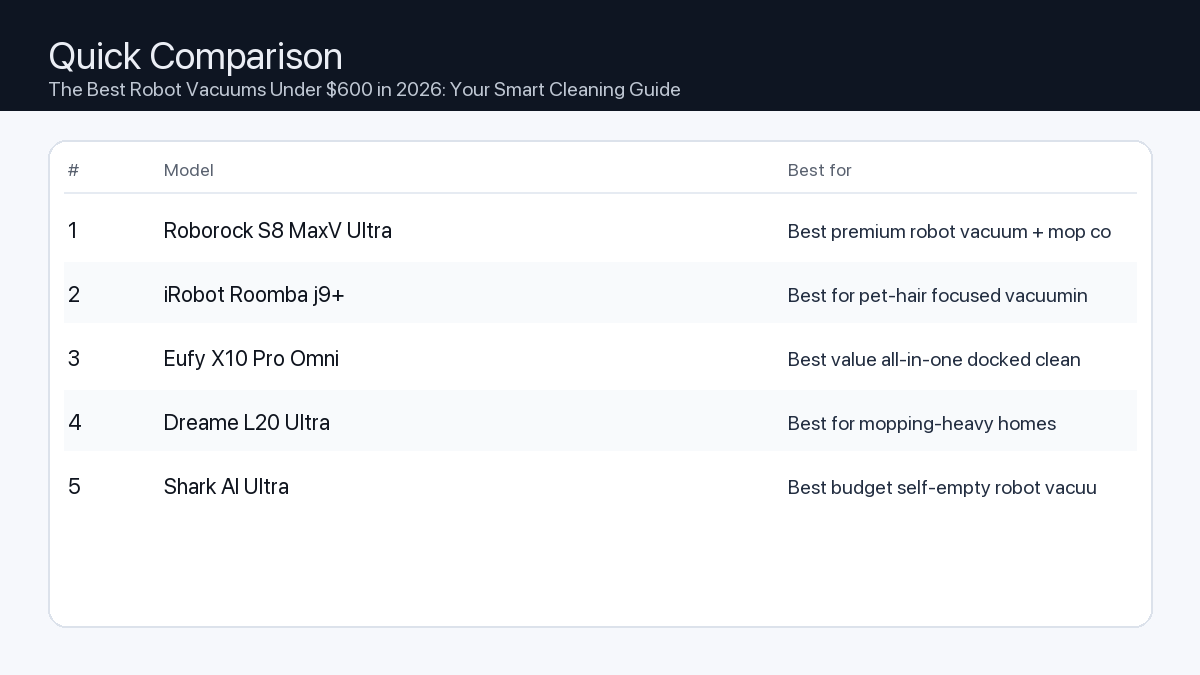
    Quick Comparison

    Note: Specs and availability change. Always confirm details on the product page.

    Model Best for Details
    Roborock S8 MaxV Ultra Best premium robot vacuum + mop combo Open section
    iRobot Roomba j9+ Best for pet-hair focused vacuuming Open section
    Eufy X10 Pro Omni Best value all-in-one docked cleaner Open section
    Dreame L20 Ultra Best for mopping-heavy homes Open section
    Shark AI Ultra Best budget self-empty robot vacuum Open section
    Comparison: The Best Robot Vacuums Under $600 in 2026: Your Smart Cleaning Guide
    At-a-glance comparison of our picks.

    Our Top Picks

    #1. Roborock S8 MaxV Ultra

    Best for: Best premium robot vacuum + mop combo

    Roborock S8 MaxV Ultra

    Why it made the list

    • Strong navigation
    • Powerful cleaning
    • Advanced dock features

    Tradeoffs

    • Premium pricing

    Who should buy this

    • Busy households wanting near-hands-off cleaning
    • Users with mixed floor types

    Avoid if

    • You need a low-budget cleaner

    Check price and compatibility for Roborock S8 MaxV Ultra

    Price tip: Prices fluctuate; check Amazon for current deals and compatibility details.

    #2. iRobot Roomba j9+

    Best for: Best for pet-hair focused vacuuming

    iRobot Roomba j9+

    Why it made the list

    • Strong suction and brush system
    • Good app controls
    • Reliable brand support

    Tradeoffs

    • Often pricier than value competitors

    Who should buy this

    • Pet owners
    • Users preferring iRobot ecosystem

    Avoid if

    • You want the cheapest self-empty model

    Check price and compatibility for iRobot Roomba j9+

    Price tip: Prices fluctuate; check Amazon for current deals and compatibility details.

    #3. Eufy X10 Pro Omni

    Best for: Best value all-in-one docked cleaner

    Eufy X10 Pro Omni

    Why it made the list

    • Strong value feature set
    • Good navigation
    • All-in-one dock convenience

    Tradeoffs

    • Software polish can vary by updates

    Who should buy this

    • Value buyers wanting premium-style features

    Avoid if

    • You only trust one specific flagship brand

    Check price and compatibility for Eufy X10 Pro Omni

    Price tip: Prices fluctuate; check Amazon for current deals and compatibility details.

    #4. Dreame L20 Ultra

    Best for: Best for mopping-heavy homes

    Dreame L20 Ultra

    Why it made the list

    • Strong mop features
    • Good obstacle handling
    • Powerful app automation

    Tradeoffs

    • Dock size can be large

    Who should buy this

    • Homes with hard floors and frequent mopping needs

    Avoid if

    • You have very limited docking space

    Check price and compatibility for Dreame L20 Ultra

    Price tip: Prices fluctuate; check Amazon for current deals and compatibility details.

    #5. Shark AI Ultra

    Best for: Best budget self-empty robot vacuum

    Shark AI Ultra

    Why it made the list

    • Affordable self-empty option
    • Simple setup
    • Good mainstream availability

    Tradeoffs

    • Not as advanced as ultra-premium models

    Who should buy this

    • Budget-conscious families
    • First-time robot vacuum buyers

    Avoid if

    • You want top-tier mapping and mopping automation

    Check price and compatibility for Shark AI Ultra

    Price tip: Prices fluctuate; check Amazon for current deals and compatibility details.

    Still Can’t Decide?

    Quick decision tree:

    Price tip: prices fluctuate often. If you’re flexible, watch for seasonal sales and compare listings before you buy.

    Ready? Open Roborock S8 MaxV Ultra on Amazon

    How to Choose the Best Robot Vacuum Under $600

    Understanding Your Needs: Premium vs. Value Features

    At under $600, robot vacuums in 2026 offer a wide spectrum of capabilities. Understanding the core differences will help you prioritize what matters most for your home.

    • Navigation & Mapping: Value models might use basic visual navigation (vSLAM) or random patterns, sufficient for smaller, less cluttered spaces. Premium options in this range will feature advanced LiDAR or improved vSLAM for precise mapping, multi-floor support, and accurate no-go zones.
    • Suction Power: While all models will vacuum, higher-end devices will offer significantly more kPa (kilopascals) for deep carpet cleaning and pet hair removal. Value options are generally excellent for hard floors and low-pile carpets.
    • Mopping Capabilities: Basic mopping is often a wet wipe. Superior systems within this budget offer pressure mopping, sonic scrubbing, or auto-lift mop pads to prevent wetting carpets and to tackle dried-on stains more effectively.
    • Battery Life & Charging: All robots will return to their dock to recharge. Premium options will typically have longer runtimes (e.g., 180+ minutes) and smart recharge-and-resume logic for large homes, while value models might be better suited for single-session cleaning in average-sized spaces.
    • App Control & Smart Features: Expect comprehensive app control across the board. Premium models might add features like advanced AI obstacle avoidance, custom cleaning modes per room, or more robust smart home integration.
    • Self-Emptying Bins: A significant convenience feature, self-emptying stations are becoming more common at this price point. They reduce the need to manually empty the robot’s dustbin for weeks, a huge plus for pet owners or those with dust allergies.

    Key Features to Consider

    Navigation & Mapping Precision

    • Problem: Older or simpler robot vacuums often navigate inefficiently, get stuck frequently, or miss entire sections of your home. This leads to incomplete cleaning and frustration.
    • Consequence: Your floors remain partially dirty, you waste time rescuing the robot, and the overall cleaning experience is poor.
    • Recommendation: Prioritize models equipped with LiDAR (laser distance sensor) navigation or advanced visual simultaneous localization and mapping (vSLAM). These technologies create accurate maps, allow for efficient cleaning paths, enable features like no-go zones, and support multi-floor mapping for homes with stairs.

    Suction Power for Deeper Cleaning

    • Problem: Insufficient suction power leaves behind fine dust, pet hair, and debris, especially on carpets or from crevices.
    • Consequence: You still feel the need to manually vacuum or find your floors aren’t as clean as desired, undermining the robot’s purpose.
    • Recommendation: Look for models with a high kPa (kilopascal) rating, generally 3000 kPa or more, if you have carpets, rugs, or pets. Higher suction ensures effective removal of embedded dirt and pet dander.

    Mopping Performance

    • Problem: Basic drag-and-wipe mopping often leaves streaks, doesn’t effectively clean dried spills, or can accidentally wet carpets.
    • Consequence: Hard floors don’t get a thorough clean, requiring additional manual mopping, and you risk damaging sensitive floor coverings.
    • Recommendation: Seek out advanced mopping systems like pressure mopping, sonic scrubbing, or models with an auto-lifting mop pad. These features provide a more effective clean, can tackle tougher stains, and offer better protection for carpeted areas.

    Battery Life & Auto-Recharge

    • Problem: A robot with inadequate battery life might not be able to complete cleaning your entire home in a single session.
    • Consequence: The robot frequently returns to its dock mid-clean, prolonging the cleaning process or leaving areas untouched.
    • Recommendation: Match the stated battery runtime (often in minutes or mAh) to your home’s square footage. While most robots offer auto-recharge and resume functionality, a longer single-charge runtime means fewer interruptions and faster overall cleaning for larger spaces.

    Smart Features & App Integration

    • Problem: A clunky app or limited smart features can diminish the convenience factor of a robot vacuum.
    • Consequence: You might struggle to schedule cleanings, define specific zones, or integrate the robot into your smart home ecosystem, making it less helpful.
    • Recommendation: Look for an intuitive, feature-rich companion app that allows for easy scheduling, zone cleaning, setting virtual walls/no-go zones, monitoring cleaning progress, and compatibility with voice assistants like Google Home or Amazon Alexa.

    Self-Emptying Dustbins

    • Problem: The robot’s internal dustbin fills up quickly, especially with pet hair or in busy homes, requiring frequent manual emptying.
    • Consequence: The robot stops mid-clean, alerts you to empty the bin, or you have to deal with accumulated dust more often, reducing hands-free convenience.
    • Recommendation: Consider models that come with a self-emptying station. This feature automatically transfers collected debris from the robot’s small internal bin into a larger bag or container in the dock, providing weeks of hands-free operation and minimizing dust exposure.

    Who Needs What? Practical Setups

    The Home Office Worker/Minimalist Apartment Dweller

    • Lifestyle: You value quiet operation during work hours, need efficient cleaning for smaller, often less cluttered spaces, and appreciate basic scheduling to maintain cleanliness effortlessly.
    • Key Cleaning Priorities: Daily maintenance, quiet operation, hard floor and low-pile carpet cleaning.
    • Checklist:
      • Efficient basic navigation (vSLAM or early LiDAR)
      • Quiet operating mode
      • Decent suction for hard floors and low-pile rugs
      • Reliable app scheduling and spot cleaning
      • Compact design for easy storage

    The Busy Parent with Pets

    • Lifestyle: Your home sees high traffic, pet hair is a constant battle, and you need a robust cleaning solution that handles daily messes with minimal intervention.
    • Key Cleaning Priorities: Strong pet hair pick-up, effective mopping for spills, hands-free operation.
    • Checklist:
      • High kPa suction (3500+ kPa) for pet hair and deep carpets
      • Advanced mopping (pressure or sonic) with auto-lift feature
      • Self-empty station for weeks of hands-free disposal
      • Robust LiDAR navigation with good obstacle avoidance
      • Zone cleaning for high-traffic areas

    The Gamer/Creator in a Multi-Room Space

    • Lifestyle: You have dedicated zones (e.g., gaming setup, creative studio, living area) that require specific cleaning schedules or quiet times, and potentially multiple floor levels.
    • Key Cleaning Priorities: Zoned cleaning flexibility, multi-floor mapping, quiet operation, smart home integration.
    • Checklist:
      • Advanced LiDAR mapping with multi-floor support
      • Precise zone cleaning and virtual walls
      • Low noise level during operation
      • Integration with smart home ecosystems (Alexa, Google Assistant)
      • Long battery life for larger areas

    How We Picked These Recommendations

    Our selection of the best robot vacuums under $600 for 2026 is based on a thorough analysis of product specifications, technological advancements, and a careful review of cumulative user feedback patterns. We focused on models that demonstrate strong performance metrics in key areas such as navigation technology (LiDAR, advanced vSLAM), stated suction power (kPa), battery capacity (mAh/runtime), and the sophistication of their mopping systems (pressure mopping, sonic scrubbing, auto-lift). We also considered the quality and features of accompanying mobile applications, smart home compatibility, and the increasing availability of convenience features like self-emptying stations within this budget. Our recommendations reflect current market trends, compatibility notes from manufacturers, and aim to identify devices that offer the most verifiable value and utility for diverse household needs, without claiming hands-on testing.

    FAQ

    Is a robot vacuum under $600 worth it in 2026?

    Absolutely. By 2026, the $600 price point for robot vacuums represents an incredible value proposition. Advancements in navigation (LiDAR), suction power, and mopping technology have made devices in this range highly capable, often including premium features like self-emptying docks, multi-floor mapping, and advanced app controls that were once exclusive to much higher price tiers. They are more than capable of handling daily cleaning demands for most homes.

    Can robot vacuums truly replace manual vacuuming?

    For daily maintenance and general cleanliness, a quality robot vacuum under $600 can largely replace manual vacuuming, especially on hard floors and low to medium-pile carpets. They excel at picking up dust, dirt, pet hair, and small debris consistently. However, for very deep cleaning, particularly on high-pile carpets, or for tackling specific, tough spills, occasional manual intervention with a traditional vacuum or mop may still be beneficial.

    Which should I buy: the #1 pick or the best value pick?

    Choose the #1 pick if: You prioritize the most comprehensive feature set, superior performance across all metrics (e.g., strongest suction, most advanced mopping, cutting-edge obstacle avoidance, or largest self-empty capacity), and desire the most hands-off, automated cleaning experience available within the $600 budget. The #1 pick is typically the most complete package for a wide range of homes and cleaning challenges.

    Choose the best value pick if: You need a highly reliable robot vacuum that excels at core cleaning tasks (effective vacuuming, capable mopping) without requiring every single premium bell and whistle. It’s an excellent choice for smaller to medium-sized homes, simpler layouts, or if you’re comfortable with slightly less advanced automation to save a significant amount while still getting outstanding daily cleaning performance.

    Final Recommendation

    The robot vacuum market under $600 in 2026 is robust, offering a compelling blend of advanced technology and affordability. Whether you’re seeking a simple, efficient cleaner for an apartment or a full-featured workhorse for a busy family home with pets, there’s an option that will meet your needs without overstretching your budget. By focusing on your specific home environment and prioritizing the key features discussed in this guide, you can confidently select a robot vacuum that delivers exceptional daily cleanliness and simplifies your life.

    Related Guides

    Keep reading with these related buying guides:

  • Best Power Bank for Travel and Daily Carry (2026) – Your Ultimate Buying Guide
    Best Power Bank for Travel and Daily Carry (2026) – Your Ultimate Buying Guide
    Disclosure: This post may contain affiliate links. As an Amazon Associate, I earn from qualifying purchases. Learn more.

    Best Power Bank for Travel and Daily Carry (2026) – Your Ultimate Buying Guide
    Choosing the right power bank for 2026 hinges on your daily usage and travel habits. If you’re a power user, frequently travel internationally, or carry multiple power-hungry devices like laptops and tablets, prioritize a premium power bank with high capacity, advanced fast charging protocols (like USB-PD up to 100W+), and versatile port options. For those with lighter needs—charging a single smartphone or earbuds throughout the day, or occasional local travel—a value-focused power bank offering sufficient capacity (5,000-10,000mAh) and basic fast charging will provide excellent utility without unnecessary bulk or expense.

    This buying guide cuts through the technical jargon to help you understand the critical features and tradeoffs involved. We’ll explore essential factors like capacity, charging speed, port selection, and portability, ensuring you can confidently select a power bank that keeps your devices powered through any adventure or workday.

    Best Picks (2026)

    Quick Answer (TL;DR) (Updated March 06, 2026)

    If you want one safe pick: Anker Prime 20K Power Bank. If you want a better value: UGREEN Nexode 20000mAh.

    How to use this page: scan the comparison table, jump to the matching use case, then open only the listing that fits your setup.

    Fast path: choose one track below and ignore the rest.

    • Track A (least risk): Anker Prime 20K Power Bank
    • Track B (better value): UGREEN Nexode 20000mAh

    How we picked: research-based selection using manufacturer specs, compatibility notes, and what to verify on the Amazon listing (no hands-on testing claims). Affiliate links may earn us a commission, but rankings are not paid placements.

    Start with Anker Prime 20K Power Bank on Amazon Prefer value? Open UGREEN Nexode 20000mAh

    Skip to a pick: #1 Anker Prime 20K Power Bank | #2 UGREEN Nexode 20000mAh | #3 Baseus Blade 100W Power Bank | #4 INIU 10000mAh Compact Power Bank | #5 Shargeek Storm2

    Head-to-Head: Top Pick vs Best Value

    Anker Prime 20K Power Bank
    Best all-around fast-charging power bank

    Read full #1 breakdown

    Go to Amazon: Anker Prime 20K Power Bank

    UGREEN Nexode 20000mAh
    Best value high-output USB-C bank

    Read full best-value breakdown

    Go to Amazon: UGREEN Nexode 20000mAh

    Quick Comparison

    Note: Specs and availability change. Always confirm details on the product page.

    Model Best for Details
    Anker Prime 20K Power Bank Best all-around fast-charging power bank Open section
    UGREEN Nexode 20000mAh Best value high-output USB-C bank Open section
    Baseus Blade 100W Power Bank Best slim high-power bank for travel bags Open section
    INIU 10000mAh Compact Power Bank Best compact everyday phone charger Open section
    Shargeek Storm2 Best enthusiast pick with visible metrics Open section
    Comparison: Best Power Bank for Travel and Daily Carry (2026) – Your Ultimate Buying Guide
    At-a-glance comparison of our picks.

    Our Top Picks

    #1. Anker Prime 20K Power Bank

    Best for: Best all-around fast-charging power bank

    Anker Prime 20K Power Bank

    Why it made the list

    • Strong output
    • Trusted brand
    • Good reliability

    Tradeoffs

    • Higher cost than basic banks

    Who should buy this

    • Users charging phones and laptops on the go

    Avoid if

    • You only need occasional low-power phone charging

    Check price and compatibility for Anker Prime 20K Power Bank

    Price tip: Prices fluctuate; check Amazon for current deals and compatibility details.

    #2. UGREEN Nexode 20000mAh

    Best for: Best value high-output USB-C bank

    UGREEN Nexode 20000mAh

    Why it made the list

    • Good value for output
    • USB-C focused design
    • Portable size

    Tradeoffs

    • Model variants can be confusing

    Who should buy this

    • Value-focused users needing modern USB-C charging

    Avoid if

    • You want one very specific premium ecosystem model

    Check price and compatibility for UGREEN Nexode 20000mAh

    Price tip: Prices fluctuate; check Amazon for current deals and compatibility details.

    #3. Baseus Blade 100W Power Bank

    Best for: Best slim high-power bank for travel bags

    Baseus Blade 100W Power Bank

    Why it made the list

    • Slim profile
    • High output options
    • Useful display on some variants

    Tradeoffs

    • Can be heavier than expected for slim form

    Who should buy this

    • Frequent travelers carrying USB-C laptops

    Avoid if

    • You want the lightest possible tiny power bank

    Check price and compatibility for Baseus Blade 100W Power Bank

    Price tip: Prices fluctuate; check Amazon for current deals and compatibility details.

    #4. INIU 10000mAh Compact Power Bank

    Best for: Best compact everyday phone charger

    INIU 10000mAh Compact Power Bank

    Why it made the list

    • Compact
    • Affordable
    • Easy daily carry

    Tradeoffs

    • Lower capacity vs 20K+ models

    Who should buy this

    • Everyday phone users
    • Light travelers

    Avoid if

    • You need multi-device or laptop charging

    Check price and compatibility for INIU 10000mAh Compact Power Bank

    Price tip: Prices fluctuate; check Amazon for current deals and compatibility details.

    #5. Shargeek Storm2

    Best for: Best enthusiast pick with visible metrics

    Shargeek Storm2

    Why it made the list

    • Distinctive design
    • Detailed charging data
    • High output potential

    Tradeoffs

    • Premium niche pricing

    Who should buy this

    • Tech enthusiasts
    • Users who like monitoring charging metrics

    Avoid if

    • You just want a basic low-cost charger

    Check price and compatibility for Shargeek Storm2

    Price tip: Prices fluctuate; check Amazon for current deals and compatibility details.

    Still Can’t Decide?

    Quick decision tree:

    Price tip: prices fluctuate often. If you’re flexible, watch for seasonal sales and compare listings before you buy.

    Ready? Open Anker Prime 20K Power Bank on Amazon

    How to Choose the Right Power Bank for You

    Capacity (mAh / Wh)

    Problem: Underestimating your charging needs leaves devices unpowered when you need them most, especially during long travel days or busy work schedules.

    Consequence: A dead smartphone prevents navigation, communication, or critical work. An uncharged laptop halts productivity.

    Recommendation: Match the power bank’s capacity to the battery sizes of your most frequently charged devices and the number of recharges you anticipate needing. Remember, a 10,000mAh power bank typically provides 1-2 full charges for a standard smartphone after accounting for efficiency losses.

    • Smartphone (3,000-5,000mAh battery): 5,000-10,000mAh for 1-2 charges.
    • Tablet (6,000-10,000mAh battery): 10,000-20,000mAh for 1-2 charges.
    • Laptop (40-80Wh battery): 20,000mAh (74Wh) and above, specifically looking for Watt-hour (Wh) ratings for laptops, as this is a more accurate comparison than mAh due to varying voltages. Note airline limits are typically 100Wh for carry-on.

    Charging Speed (Watts)

    Problem: Slow charging means longer waits, leaving your devices tethered to an outlet or the power bank when you’d rather be on the move.

    Consequence: You might miss critical messages or struggle to get your device ready before an important meeting or flight.

    Recommendation: Prioritize power banks with modern fast-charging protocols. Look for USB Power Delivery (USB-PD) for Apple devices, most Android devices, and laptops. For specific Android devices, Programmable Power Supply (PPS) offers optimized fast charging.

    • 20W-30W USB-PD: Ideal for fast-charging most modern smartphones and smaller tablets.
    • 45W-60W USB-PD: Suitable for larger tablets and many ultrabooks or smaller laptops.
    • 60W-100W+ USB-PD: Essential for quickly charging power-hungry laptops, gaming handhelds, and larger devices.

    Port Selection and Quantity

    Problem: Having the wrong ports or too few outputs means you can’t charge all your devices efficiently, or at all, with a single power bank.

    Consequence: Carrying multiple power banks or constantly swapping cables for different devices, leading to inconvenience and clutter.

    Recommendation: Evaluate your typical device ecosystem. A power bank with at least one USB-C port (for input and output) and one USB-A port offers good versatility. For multi-device users, multiple output ports are crucial.

    • USB-C Ports: Essential for modern devices and fast charging via USB-PD. Look for at least one that supports high-wattage output.
    • USB-A Ports: Useful for legacy devices, smartwatches, or accessories that don’t yet use USB-C.
    • Input/Output Versatility: A USB-C port that can both charge the power bank and charge other devices simplifies cable management.

    Size, Weight, and Portability

    Problem: A power bank that’s too bulky or heavy for your bag or pocket often gets left behind, defeating its purpose.

    Consequence: You’re left without a power solution on the go because the convenient option wasn’t convenient enough to carry.

    Recommendation: Balance capacity with physical dimensions and weight. Consider your primary carry method (pocket, small bag, backpack). Some models offer integrated cables or wall plugs for ultimate convenience.

    • Pocket Carry (Daily): Generally 5,000-10,000mAh, compact, lightweight.
    • Small Bag/Purse (Daily/Travel): 10,000-20,000mAh, balances capacity with manageable size.
    • Backpack (Travel/Heavy Use): 20,000mAh+, larger and heavier, but offers extensive power.

    Safety Features

    Problem: Generic or low-quality power banks can pose risks of overheating, overcharging, or damaging your devices.

    Consequence: Potential device failure, reduced battery lifespan, or in rare cases, safety hazards.

    Recommendation: Stick to reputable brands known for integrating comprehensive safety features. Look for mention of protections against overcharge, over-discharge, short-circuit, over-current, and temperature control.

    Who Needs What? Example Setups:

    The Mobile Video Editor / Professional Traveler

    You juggle a laptop, tablet, and smartphone across time zones, often working remotely or reviewing content on the go. Power is non-negotiable.

    • Capacity: 25,000mAh (92.5Wh) or higher, ensuring multiple recharges for all devices, including a full laptop charge.
    • Charging Speed: 60W-100W USB-PD output to rapidly charge laptops and fast-charge tablets simultaneously.
    • Ports: At least two high-power USB-C outputs and one USB-A for legacy accessories.
    • Portability: Designed for efficiency despite capacity; compact footprint, durable casing.

    The Office Worker / Daily Commuter

    Your main concern is keeping your smartphone and wireless earbuds powered throughout a busy workday or on your commute, without adding bulk to your everyday carry.

    • Capacity: 5,000-10,000mAh, sufficient for 1-2 phone charges.
    • Charging Speed: 20W-30W USB-PD output for quick smartphone top-ups.
    • Ports: One USB-C output and one USB-A output (optional) for versatility.
    • Portability: Slim, lightweight, and pocketable, easily fits into a small bag or jacket pocket.

    The Gamer / Creator (on the go)

    Whether you’re powering a gaming handheld, a high-performance laptop for creative tasks, or multiple accessories, sustained power and rapid charging are key to uninterrupted play or productivity.

    • Capacity: 27,000mAh (99.9Wh) or higher (if not flying), able to extend gaming sessions significantly or provide full laptop recharges.
    • Charging Speed: 100W+ USB-PD output is crucial for high-performance laptops and gaming handhelds, minimizing downtime.
    • Ports: Two high-power USB-C outputs and at least one high-output USB-A for controllers or other peripherals.
    • Portability: Prioritizes power over ultimate compactness, but still designed for backpack carry, potentially with robust construction.

    How We Picked the Best Power Banks

    Our selection process for the best power banks for travel and daily carry (2026) is built on a thorough analysis of current technology trends and user needs, without claiming hands-on testing. We focused on identifying models that excel in core performance metrics and practical features based on:

    • Manufacturer Specifications: Meticulous review of advertised capacity, Watt-hour (Wh) ratings, maximum power output (W) for all ports, and supported fast-charging protocols (USB-PD, PPS, QC).
    • Adherence to Industry Standards: Ensuring compliance with established charging standards like USB-PD for broad compatibility and safety across a wide range of devices, from smartphones to laptops.
    • Form Factor and Material Quality: Evaluating the design for optimal portability, durability, and effective heat dissipation based on published product information and typical brand construction.
    • Travel Compliance: Prioritizing power banks that meet international airline regulations for carry-on luggage, specifically staying within the 100Wh limit where practical for universal travel.
    • Anticipated User Feedback Trends: Analyzing general market sentiment and common points of satisfaction or concern from a broad range of existing public user data regarding reliability, actual performance compared to specs, and long-term durability.

    Frequently Asked Questions

    How much capacity (mAh) do I really need?
    For a smartphone (3,000-5,000mAh battery), 10,000mAh typically provides 1-2 full charges. For a tablet, 15,000-20,000mAh is often better. Laptops often require 20,000mAh+ with higher wattage output. Always calculate based on your device’s battery size and how many times you expect to recharge it.
    What is USB-PD and why is it important?
    USB Power Delivery (USB-PD) is a charging standard that allows for much higher power delivery (up to 240W, though commonly 20W-100W for power banks) over USB-C. It’s crucial for fast charging modern smartphones, tablets, and especially laptops, ensuring significantly quicker charge times than older USB standards.
    Can I take any power bank on a plane?
    Most airlines restrict power banks to carry-on luggage only. Typically, capacities are limited to 100 Watt-hours (Wh). Power banks between 100Wh and 160Wh may be allowed with airline approval. Devices over 160Wh are generally prohibited. Remember that 100Wh is approximately 27,000mAh at a nominal voltage of 3.7V.
    Which should I buy: the #1 pick or the best value pick?
    Choose the #1 pick if you prioritize maximum performance, superior versatility for charging multiple devices including demanding laptops, and cutting-edge fast charging capabilities, and if your budget allows for a premium investment. Opt for the best value pick if you primarily need reliable, efficient, and fast charging for a smartphone or a couple of smaller devices, and prefer a more budget-friendly or compact solution without sacrificing essential, core charging features.

    Final Recommendation

    Selecting the best power bank for 2026 comes down to a clear understanding of your personal use case. By considering your specific needs for capacity, charging speed, port compatibility, and portability, you can confidently choose a power bank that seamlessly integrates into your travel and daily routine. Whether you’re powering a workstation on the go or simply keeping your phone alive through a long day, the right power bank is an indispensable tool for staying connected and productive.

    Related Guides

    Keep reading with these related buying guides:

  • The Ultimate Robot Cleaner Buying Guide for Busy Homes (2026)
    The Ultimate Robot Cleaner Buying Guide for Busy Homes (2026)

    Disclosure: This post may contain affiliate links. As an Amazon Associate, I earn from qualifying purchases. Learn more.

    The Ultimate Robot Cleaner Buying Guide for Busy Homes (2026)
    In 2026, robot cleaners are indispensable tools for managing a busy household. They free up valuable time, reduce mental load, and maintain a consistently clean living space. Deciding which model is right for you often comes down to balancing automation with budget.

    For those prioritizing maximum convenience and truly hands-off operation, premium models with advanced self-maintenance features are the ideal choice. If your primary goal is effective, scheduled cleaning and you’re comfortable with slightly more interaction to manage dustbins or water tanks, excellent value-focused options offer robust performance without breaking the bank. This guide will help you understand the key differences and find your perfect match.

    Best Picks (2026)

    Quick Answer (TL;DR) (Updated March 05, 2026)

    If you want one safe pick: Roborock S8 MaxV Ultra. If you want a better value: iRobot Roomba j9+.

    How to use this page: scan the comparison table, jump to the matching use case, then open only the listing that fits your setup.

    Fast path: choose one track below and ignore the rest.

    • Track A (least risk): Roborock S8 MaxV Ultra
    • Track B (better value): iRobot Roomba j9+

    How we picked: research-based selection using manufacturer specs, compatibility notes, and what to verify on the Amazon listing (no hands-on testing claims). Affiliate links may earn us a commission, but rankings are not paid placements.

    Start with Roborock S8 MaxV Ultra on Amazon Prefer value? Open iRobot Roomba j9+

    Skip to a pick: #1 Roborock S8 MaxV Ultra | #2 iRobot Roomba j9+ | #3 Eufy X10 Pro Omni | #4 Dreame L20 Ultra | #5 Shark AI Ultra

    Head-to-Head: Top Pick vs Best Value

    Roborock S8 MaxV Ultra
    Best premium robot vacuum + mop combo

    Read full #1 breakdown

    Go to Amazon: Roborock S8 MaxV Ultra

    iRobot Roomba j9+
    Best for pet-hair focused vacuuming

    Read full best-value breakdown

    Go to Amazon: iRobot Roomba j9+

    Quick Comparison

    Note: Specs and availability change. Always confirm details on the product page.

    Model Best for Details
    Roborock S8 MaxV Ultra Best premium robot vacuum + mop combo Open section
    iRobot Roomba j9+ Best for pet-hair focused vacuuming Open section
    Eufy X10 Pro Omni Best value all-in-one docked cleaner Open section
    Dreame L20 Ultra Best for mopping-heavy homes Open section
    Shark AI Ultra Best budget self-empty robot vacuum Open section
    Comparison: The Ultimate Robot Cleaner Buying Guide for Busy Homes (2026)
    At-a-glance comparison of our picks.

    Our Top Picks

    #1. Roborock S8 MaxV Ultra

    Best for: Best premium robot vacuum + mop combo

    Roborock S8 MaxV Ultra

    Why it made the list

    • Strong navigation
    • Powerful cleaning
    • Advanced dock features

    Tradeoffs

    • Premium pricing

    Who should buy this

    • Busy households wanting near-hands-off cleaning
    • Users with mixed floor types

    Avoid if

    • You need a low-budget cleaner

    Check price and compatibility for Roborock S8 MaxV Ultra

    Price tip: Prices fluctuate; check Amazon for current deals and compatibility details.

    #2. iRobot Roomba j9+

    Best for: Best for pet-hair focused vacuuming

    iRobot Roomba j9+

    Why it made the list

    • Strong suction and brush system
    • Good app controls
    • Reliable brand support

    Tradeoffs

    • Often pricier than value competitors

    Who should buy this

    • Pet owners
    • Users preferring iRobot ecosystem

    Avoid if

    • You want the cheapest self-empty model

    Check price and compatibility for iRobot Roomba j9+

    Price tip: Prices fluctuate; check Amazon for current deals and compatibility details.

    #3. Eufy X10 Pro Omni

    Best for: Best value all-in-one docked cleaner

    Eufy X10 Pro Omni

    Why it made the list

    • Strong value feature set
    • Good navigation
    • All-in-one dock convenience

    Tradeoffs

    • Software polish can vary by updates

    Who should buy this

    • Value buyers wanting premium-style features

    Avoid if

    • You only trust one specific flagship brand

    Check price and compatibility for Eufy X10 Pro Omni

    Price tip: Prices fluctuate; check Amazon for current deals and compatibility details.

    #4. Dreame L20 Ultra

    Best for: Best for mopping-heavy homes

    Dreame L20 Ultra

    Why it made the list

    • Strong mop features
    • Good obstacle handling
    • Powerful app automation

    Tradeoffs

    • Dock size can be large

    Who should buy this

    • Homes with hard floors and frequent mopping needs

    Avoid if

    • You have very limited docking space

    Check price and compatibility for Dreame L20 Ultra

    Price tip: Prices fluctuate; check Amazon for current deals and compatibility details.

    #5. Shark AI Ultra

    Best for: Best budget self-empty robot vacuum

    Shark AI Ultra

    Why it made the list

    • Affordable self-empty option
    • Simple setup
    • Good mainstream availability

    Tradeoffs

    • Not as advanced as ultra-premium models

    Who should buy this

    • Budget-conscious families
    • First-time robot vacuum buyers

    Avoid if

    • You want top-tier mapping and mopping automation

    Check price and compatibility for Shark AI Ultra

    Price tip: Prices fluctuate; check Amazon for current deals and compatibility details.

    Still Can’t Decide?

    Quick decision tree:

    Price tip: prices fluctuate often. If you’re flexible, watch for seasonal sales and compare listings before you buy.

    Ready? Open Roborock S8 MaxV Ultra on Amazon

    How to Choose the Best Robot Cleaner for Your Busy Life

    Selecting the right robot cleaner involves understanding your home’s unique needs and how specific features address common challenges.

    Key Features and Tradeoffs

    Here’s a breakdown of essential considerations:

    1. Cleaning Performance: Suction Power & Mopping Capabilities

    • Problem: Standard robot cleaners may struggle with stubborn dirt, pet hair, or dried spills, leaving your floors less than pristine.
    • Consequence: You still need to manually clean problem areas, negating the convenience factor.
    • Recommendation: Look for models with high Pascal (Pa) suction ratings for carpets and pet hair. For hard floors, consider advanced mopping systems like vibrating pads or automatic mop lifting to prevent re-wetting carpets and handle various messes effectively.

    Checklist for Cleaning Performance:

    • Do you have high-traffic areas prone to dirt and crumbs?
    • Are pets a significant source of hair and dander?
    • Is your home a mix of hard floors and carpets, requiring versatile cleaning?
    • Are spills and sticky messes a common occurrence?

    2. Navigation & Mapping Technology

    • Problem: Basic robot cleaners can navigate randomly, missing spots or repeatedly cleaning the same area, leading to inefficient and incomplete coverage. They might also get stuck frequently.
    • Consequence: Wasted cleaning time, missed dirty spots, and regular intervention required.
    • Recommendation: Prioritize models with LiDAR (laser-based) or advanced VSLAM (visual simultaneous localization and mapping) technology. These systems create precise maps of your home, enabling systematic cleaning paths, multi-floor mapping, and the ability to set virtual ‘no-go’ zones or ‘no-mop’ zones.

    Checklist for Navigation & Mapping:

    • Do you live in a multi-level home that requires separate maps?
    • Does your home have complex layouts with many furniture legs or obstacles?
    • Do you need to prevent the robot from entering specific areas (e.g., pet food bowls, play zones)?

    3. Self-Emptying & Auto-Refill/Drain Stations

    • Problem: Frequent manual emptying of small dustbins or refilling/draining water tanks for mopping negates much of the automation benefit.
    • Consequence: You’re still regularly performing a maintenance chore, potentially coming into contact with dust and allergens.
    • Recommendation: For maximum convenience, choose models with a self-emptying dustbin that transfers debris to a larger bag or container in the charging dock. For mopping, consider stations that automatically refill the robot’s water tank and drain dirty water, offering weeks of hands-off operation.

    Checklist for Automation:

    • Is minimizing daily or weekly interaction your top priority?
    • Are you an allergy sufferer who wants to avoid contact with dust?
    • Do you have a larger home that generates more debris, requiring frequent emptying?

    4. Battery Life & Recharge-and-Resume

    • Problem: A robot cleaner with insufficient battery life for your home size will run out of power mid-cycle, leaving areas uncleaned.
    • Consequence: Incomplete cleaning sessions and longer overall cleaning times due to multiple recharge cycles.
    • Recommendation: Select a robot with battery life appropriate for your home’s square footage. Ensure it features ‘recharge-and-resume,’ which allows the robot to return to its base to charge and then pick up cleaning exactly where it left off.

    Checklist for Battery & Coverage:

    • Do you have a large home or an open floor plan?
    • Do you prefer the robot to complete cleaning in a single pass?

    5. Smart Features & App Control

    • Problem: Limited app functionality means less control over scheduling, cleaning modes, and specific zones.
    • Consequence: Reduced flexibility and efficiency, potentially requiring more manual setup.
    • Recommendation: Look for a robust mobile app that allows for easy scheduling, zone cleaning (cleaning specific rooms), no-go zones, cleaning mode adjustments, and remote control. Compatibility with voice assistants (e.g., Alexa, Google Assistant) can add further convenience.

    Checklist for Smart Features:

    • Do you want to integrate the robot with your existing smart home ecosystem?
    • Do you need precise control over when and where the robot cleans?
    • Do you prefer to start or stop cleaning remotely?

    6. Maintenance & Consumables

    • Problem: Difficult-to-clean brushes, hard-to-find filters, or expensive replacement parts can add hidden costs and frustration over time.
    • Consequence: Increased long-term expenses and more frequent maintenance tasks.
    • Recommendation: Look for models with tangle-free brushes (especially if you have pets), washable filters, and readily available, reasonably priced replacement consumables (dust bags, brushes, filters, mop pads).

    Checklist for Maintenance:

    • Do you have pets with long hair (requires tangle-resistant brushes)?
    • Is ease of maintenance a significant concern for you?
    • Are you mindful of long-term operational costs?

    Example Setups for Busy Professionals

    The Video Editor

    Your studio is your sanctuary, demanding quiet and a dust-free environment for sensitive equipment. You need a robot that operates discreetly and efficiently without interrupting your workflow.

    • Key Priorities: Quiet operation, advanced mapping for precise zone cleaning (around editing desks), strong dust pickup (to protect electronics), and self-emptying to minimize interaction.
    • Why: Noise disruption during a render or meeting is unacceptable. Precise mapping ensures specific areas are cleaned without disturbing equipment, and self-emptying means you rarely have to think about it.

    The Office Worker

    You spend long hours away from home and return to needing a clean space without additional chores. Automation and reliability across multiple levels are paramount.

    • Key Priorities: Multi-floor mapping, self-emptying and auto-refill/drain (for mopping), robust scheduling, and ‘recharge and resume’ functionality.
    • Why: You need a robot that can handle an entire home, even if it has multiple levels, and perform its duties without intervention for weeks. Coming home to clean floors without lifting a finger is the ultimate goal.

    The Gamer/Creator

    Your space can quickly accumulate pet hair, snack crumbs, and general debris from long sessions. You need quick cleanup capabilities and minimal maintenance so you can focus on your craft.

    • Key Priorities: High suction for pet hair and debris, strong mopping for quick spill response, self-emptying, durable components, and easy-to-clean brushes.
    • Why: A powerful robot ensures pet hair doesn’t build up, and effective mopping handles accidental drink spills quickly. Minimal maintenance means more time in your virtual world or creative zone, less time on chores.

      How We Picked Our Top Models

      Our selection of top robot cleaner models for 2026 is based on a thorough evaluation of manufacturer specifications, feature sets, and compatibility with the demands of busy modern homes. We focused on key performance indicators such as suction power, battery longevity, and sophistication of navigation and mapping technologies. Crucially, we prioritized convenience features like self-emptying capabilities, intelligent app control, and robust mopping systems that genuinely reduce the need for manual intervention. Models were chosen based on their stated ability to deliver consistent, autonomous cleaning across various home environments and floor types, as described in product documentation and expert analysis of technological advancements.

      FAQ

      Which should I buy: the #1 pick or the best value pick?
      If your budget allows for it and your highest priority is maximum hands-off convenience with the most advanced automation features, choose the #1 pick. This option offers the pinnacle of robot cleaning technology. If you seek strong cleaning performance and smart features at a more accessible price point, and are comfortable with slightly more occasional interaction for maintenance, the best value pick is an excellent choice that still delivers significant time savings and a cleaner home.

      Final Recommendation

      Investing in a high-quality robot cleaner in 2026 is an investment in your time, peace of mind, and overall home environment. For busy individuals, these devices are no longer a luxury but a fundamental component of an efficient household. As you consider your options, evaluate your specific needs regarding pets, home size, floor types, and your desired level of automation. By aligning these factors with the advanced features available, you can confidently choose a robot cleaner that transforms your daily routine and ensures a consistently cleaner home, allowing you to focus on what matters most to you.

      Related Guides

      Keep reading with these related buying guides:

  • MagSafe Battery Buying Guide: Power Your iPhone Wirelessly On-the-Go

    MagSafe Battery Buying Guide: Power Your iPhone Wirelessly On-the-Go

    Disclosure: This post may contain affiliate links. As an Amazon Associate, I earn from qualifying purchases. Learn more.

    MagSafe Battery Buying Guide: Power Your iPhone Wirelessly On-the-Go

    MagSafe battery packs have become an essential accessory for iPhone users, offering convenient wireless charging on the go. These portable power solutions snap magnetically to the back of your iPhone, providing a seamless charging experience without cables. As the market expands, understanding the key features and tradeoffs becomes crucial for selecting the right battery to keep your device powered throughout the day.

    If consistent, all-day power delivery and premium features like robust build quality and advanced pass-through charging are your priority, lean towards options designed for high performance. For users seeking reliable supplemental power without extensive daily use, value-focused batteries offering essential MagSafe charging in a compact form factor can be an excellent choice.

    Best Picks (2026)

    Quick Answer (TL;DR) (Updated March 05, 2026)

    If you want one safe pick: Apple iPhone 16 Pro. If you want a better value: Samsung Galaxy S25 Ultra.

    How to use this page: scan the comparison table, jump to the matching use case, then open only the listing that fits your setup.

    Fast path: choose one track below and ignore the rest.

    • Track A (least risk): Apple iPhone 16 Pro
    • Track B (better value): Samsung Galaxy S25 Ultra

    How we picked: research-based selection using manufacturer specs, compatibility notes, and what to verify on the Amazon listing (no hands-on testing claims). Affiliate links may earn us a commission, but rankings are not paid placements.

    Start with Apple iPhone 16 Pro on Amazon Prefer value? Open Samsung Galaxy S25 Ultra

    Skip to a pick: #1 Apple iPhone 16 Pro | #2 Samsung Galaxy S25 Ultra | #3 Google Pixel 9 Pro | #4 OnePlus 13 | #5 Nothing Phone (3)

    Head-to-Head: Top Pick vs Best Value

    Apple iPhone 16 Pro
    Best premium iPhone pick

    Read full #1 breakdown

    Go to Amazon: Apple iPhone 16 Pro

    Samsung Galaxy S25 Ultra
    Best all-around Android flagship

    Read full best-value breakdown

    Go to Amazon: Samsung Galaxy S25 Ultra

    Quick Comparison

    Note: Specs and availability change. Always confirm details on the product page.

    Model Best for Details
    Apple iPhone 16 Pro Best premium iPhone pick Open section
    Samsung Galaxy S25 Ultra Best all-around Android flagship Open section
    Google Pixel 9 Pro Best camera and clean Android experience Open section
    OnePlus 13 Best value flagship Android Open section
    Nothing Phone (3) Best design-forward mid-premium option Open section
    Comparison: MagSafe Battery Buying Guide: Power Your iPhone Wirelessly On-the-Go
    At-a-glance comparison of our picks.

    Our Top Picks

    #1. Apple iPhone 16 Pro

    Best for: Best premium iPhone pick

    Apple iPhone 16 Pro

    Why it made the list

    • Flagship performance
    • Strong camera system
    • Long software support

    Tradeoffs

    • Premium price

    Who should buy this

    • Buyers who want top-tier iPhone performance
    • People who value camera quality and ecosystem integration

    Avoid if

    • You are on a strict budget
    • You prefer Android customization

    Check price and compatibility for Apple iPhone 16 Pro

    Price tip: Prices fluctuate; check Amazon for current deals and compatibility details.

    #2. Samsung Galaxy S25 Ultra

    Best for: Best all-around Android flagship

    Samsung Galaxy S25 Ultra

    Why it made the list

    • Large high-end display
    • Versatile cameras
    • Power-user features

    Tradeoffs

    • Large and expensive

    Who should buy this

    • Android power users
    • Users who want max specs and camera flexibility

    Avoid if

    • You prefer compact phones
    • You want a lower-cost model

    Check price and compatibility for Samsung Galaxy S25 Ultra

    Price tip: Prices fluctuate; check Amazon for current deals and compatibility details.

    #3. Google Pixel 9 Pro

    Best for: Best camera and clean Android experience

    Google Pixel 9 Pro

    Why it made the list

    • Strong computational photography
    • Clean Android UI
    • Frequent AI features

    Tradeoffs

    • Battery life varies by usage

    Who should buy this

    • Users focused on camera quality
    • People who like clean Android and smart features

    Avoid if

    • You need the absolute fastest charging options

    Check price and compatibility for Google Pixel 9 Pro

    Price tip: Prices fluctuate; check Amazon for current deals and compatibility details.

    #4. OnePlus 13

    Best for: Best value flagship Android

    OnePlus 13

    Why it made the list

    • Fast performance
    • Very good display
    • Competitive pricing

    Tradeoffs

    • Camera tuning can vary vs top flagships

    Who should buy this

    • Buyers who want flagship speed for less
    • Users who prioritize smooth daily performance

    Avoid if

    • You only buy phones from Apple/Samsung

    Check price and compatibility for OnePlus 13

    Price tip: Prices fluctuate; check Amazon for current deals and compatibility details.

    #5. Nothing Phone (3)

    Best for: Best design-forward mid-premium option

    Nothing Phone (3)

    Why it made the list

    • Distinctive design
    • Balanced performance
    • Good software experience

    Tradeoffs

    • Availability and accessories vary by region

    Who should buy this

    • Users who want something different
    • Mid-premium buyers wanting style plus performance

    Avoid if

    • You need the broadest service/accessory ecosystem

    Check price and compatibility for Nothing Phone (3)

    Price tip: Prices fluctuate; check Amazon for current deals and compatibility details.

    Still Can’t Decide?

    Quick decision tree:

    Price tip: prices fluctuate often. If you’re flexible, watch for seasonal sales and compare listings before you buy.

    Ready? Open Apple iPhone 16 Pro on Amazon

    How to Choose Your MagSafe Battery

    Choosing the ideal MagSafe battery involves balancing capacity, portability, charging features, and specific use case needs. Each decision presents a trade-off, impacting convenience and functionality.

    Key Considerations & Tradeoffs

    Capacity vs. Portability:

    • Problem: High capacity (measured in mAh) typically means a larger, heavier battery.
    • Consequence: While more power means more recharges, a bulky battery can make your iPhone cumbersome to hold or carry in a pocket.
    • Recommendation: Assess your daily power needs. If you only need a quick top-up to get through the evening, a lower capacity, more compact option is suitable. For multi-day trips or heavy usage, a higher capacity battery might be necessary, accepting the added weight.

    Charging Speed & Efficiency:

    • Problem: Not all MagSafe batteries charge at the same speed. Lower wattage outputs result in slower charging.
    • Consequence: A slow-charging battery might not keep up with active phone use, especially during demanding tasks like gaming or video streaming, or might take longer to replenish your iPhone’s battery significantly.
    • Recommendation: Look for wattage output specifications. Batteries offering higher MagSafe charging wattage will replenish your iPhone faster, which is critical for active users or when time is limited. Consider if the battery supports faster wired charging via USB-C for itself or other devices.

    Extra Features:

    • Problem: Some batteries offer advanced features, while others are basic.
    • Consequence: Missing features like pass-through charging (charging the iPhone and battery simultaneously) or an integrated kickstand can limit versatility, especially for power users.
    • Recommendation: Consider if you need features beyond basic charging. A built-in kickstand enhances media viewing or video calls. Pass-through charging is invaluable for charging both devices overnight with a single cable. Some batteries integrate ‘Find My’ support for location tracking, a peace of mind feature.

    Build Quality & Ergonomics:

    • Problem: Materials and design vary significantly.
    • Consequence: A poorly built battery might not withstand daily wear and tear, or its design could make your iPhone uncomfortable to hold, especially for prolonged periods. Strong magnetic attachment is also key for reliable wireless charging.
    • Recommendation: Prioritize batteries with durable materials and a design that feels good in hand. Ensure the magnetic connection is robust enough to stay attached during movement, as a weak connection can interrupt charging.

    Example Setups: Matching Your MagSafe Battery to Your Lifestyle

    The Mobile Video Editor/Content Creator:

    • Problem: Demanding apps and constant screen time drain battery quickly, often far from power outlets.
    • Consequence: Loss of critical footage or inability to finish edits on location, impacting productivity and deadlines.
    • Recommendation: Seek a high-capacity MagSafe battery with robust wattage output for sustained power during intensive tasks. Prioritize pass-through charging to simultaneously power both devices overnight, and consider models with strong magnetic adhesion to prevent detachment during active use or when attached to tripods/gimbals.
    • Checklist for Video Editors:
      • High capacity for extended use.
      • Fast MagSafe charging (higher wattage).
      • Pass-through charging capability.
      • Strong magnetic attachment.

    The Office Worker/Daily Commuter:

    • Problem: Needs a reliable power boost to last through meetings, calls, and the commute without adding significant bulk.
    • Consequence: Phone dying mid-call or before reaching home, causing inconvenience or missed communications.
    • Recommendation: Opt for a mid-capacity, sleek, and lightweight MagSafe battery that easily slips into a pocket or bag. A lower profile ensures comfortable handling during calls or quick email checks, providing sufficient power for a crucial top-up without being cumbersome.
    • Checklist for Office Workers:
      • Mid-range capacity for daily top-ups.
      • Slim and lightweight design.
      • Comfortable to hold while attached.
      • Reliable, consistent charging.

    The Gamer/Social Media Enthusiast:

    • Problem: Gaming and constant social media browsing are extremely battery-intensive, especially on the go.
    • Consequence: Gaming sessions cut short, or inability to engage with social platforms when desired, leading to frustration.
    • Recommendation: Choose a MagSafe battery with good capacity to support prolonged use and a focus on effective heat dissipation, as intensive apps generate heat. An integrated kickstand is a major plus for hands-free gaming or media consumption. Ensure the magnetic hold is stable to avoid disconnections during active gaming.
    • Checklist for Gamers/Creators:
      • Good capacity for extended sessions.
      • Effective heat management.
      • Integrated kickstand.
      • Stable magnetic attachment.

    How We Picked

    Our selection process for trending MagSafe battery options focused on several key criteria to ensure practical value for iPhone users. We analyzed product specifications, including battery capacity (mAh), wireless charging output (W), and the availability of additional features like pass-through charging, integrated kickstands, and USB-C connectivity for wired charging. Compatibility with current iPhone models supporting MagSafe was a primary filter. We also considered materials and reported magnetic strength to ensure reliable attachment and durability, prioritizing solutions that offer a balance of performance, features, and portability across different user needs.

    FAQ

    Q: Which should I buy: the #1 pick or the best value pick?

    A: Choose the #1 pick if your usage demands the absolute best performance, advanced features like robust pass-through charging and higher wattage output, and a premium build quality, where cost is a secondary concern. Opt for the best value pick if you need reliable MagSafe charging for daily top-ups, prioritize affordability and portability, and don’t require every advanced feature.

    Q: Are MagSafe batteries compatible with all iPhones?

    A: MagSafe batteries are specifically designed for iPhone 12 models and newer, which feature the integrated MagSafe magnetic array. While some older iPhones can charge wirelessly with MagSafe accessories using a compatible case, the magnetic attachment and full functionality are optimized for iPhone 12 series and later.

    Q: Can I charge my MagSafe battery and iPhone at the same time?

    A: Many MagSafe batteries offer ‘pass-through charging.’ When the MagSafe battery itself is connected to a power source (via USB-C, for example), it can charge your iPhone wirelessly while simultaneously recharging its own internal battery. This feature is highly convenient for overnight charging.

    Q: Will a MagSafe battery make my iPhone hot?

    A: Some degree of warmth is normal during wireless charging due to energy transfer. Reputable MagSafe batteries are designed with safety features to manage heat. Excessive heat generation could indicate an issue or improper use. If your device feels unusually hot, remove the battery pack.

    Final Recommendation

    Selecting the right MagSafe battery pack significantly enhances your iPhone experience, providing crucial power when you need it most. By carefully considering your daily usage patterns—whether you’re a demanding content creator, a busy office worker, or an avid gamer—you can pinpoint the ideal balance of capacity, charging speed, and extra features. Prioritize robust magnetic attachment and reliable performance to ensure your chosen battery seamlessly integrates into your mobile life, keeping you powered up and connected.

    Related Guides

    Keep reading with these related buying guides:

  • Best Smart TV Under $1000 in 2026: A Comprehensive Buying Guide

    Best Smart TV Under $1000 in 2026: A Comprehensive Buying Guide

    Disclosure: This post may contain affiliate links. As an Amazon Associate, I earn from qualifying purchases. Learn more.

    Best Smart TV Under $1000 in 2026: A Comprehensive Buying Guide

    In 2026, the smart TV market under $1000 offers an impressive array of options, blending advanced features with affordability. Navigating this landscape requires understanding where your priorities lie. If you’re an avid movie watcher or a serious gamer aiming for the most immersive experience, prioritize models offering advanced display technologies like QLED or Mini-LED and higher native refresh rates (120Hz), even if it means a slightly smaller screen size or fewer auxiliary ports. These features contribute significantly to picture fidelity and motion clarity.

    For most users focusing on general entertainment, streaming, and smart home integration, a well-balanced model with a vibrant 4K UHD display, a robust and intuitive smart platform, and ample connectivity (including at least some HDMI 2.1 features) will provide excellent value without unnecessary compromises. The key is to match features to your primary usage to maximize your investment.

    Best Picks (2026)

    Quick Answer (TL;DR) (Updated March 05, 2026)

    If you want one safe pick: LG C5 OLED. If you want a better value: Samsung S95D OLED.

    How to use this page: scan the comparison table, jump to the matching use case, then open only the listing that fits your setup.

    Fast path: choose one track below and ignore the rest.

    • Track A (least risk): LG C5 OLED
    • Track B (better value): Samsung S95D OLED

    How we picked: research-based selection using manufacturer specs, compatibility notes, and what to verify on the Amazon listing (no hands-on testing claims). Affiliate links may earn us a commission, but rankings are not paid placements.

    Start with LG C5 OLED on Amazon Prefer value? Open Samsung S95D OLED

    Skip to a pick: #1 LG C5 OLED | #2 Samsung S95D OLED | #3 Sony Bravia 9 Mini LED | #4 TCL QM8 | #5 Hisense U8N

    Head-to-Head: Top Pick vs Best Value

    LG C5 OLED
    Best OLED gaming + movie balance

    Read full #1 breakdown

    Go to Amazon: LG C5 OLED

    Samsung S95D OLED
    Best bright-room OLED option

    Read full best-value breakdown

    Go to Amazon: Samsung S95D OLED

    Quick Comparison

    Note: Specs and availability change. Always confirm details on the product page.

    Model Best for Details
    LG C5 OLED Best OLED gaming + movie balance Open section
    Samsung S95D OLED Best bright-room OLED option Open section
    Sony Bravia 9 Mini LED Best high-end LCD / Mini LED pick Open section
    TCL QM8 Best value premium-feel TV Open section
    Hisense U8N Best budget-friendly bright TV Open section
    Comparison: Best Smart TV Under $1000 in 2026: A Comprehensive Buying Guide
    At-a-glance comparison of our picks.

    Our Top Picks

    #1. LG C5 OLED

    Best for: Best OLED gaming + movie balance

    LG C5 OLED

    Why it made the list

    • Excellent contrast
    • Strong gaming features
    • Great overall picture quality

    Tradeoffs

    • OLED pricing remains premium

    Who should buy this

    • Movie and gaming enthusiasts
    • Users wanting high-end picture quality

    Avoid if

    • You need the lowest-cost large TV

    Check price and compatibility for LG C5 OLED

    Price tip: Prices fluctuate; check Amazon for current deals and compatibility details.

    #2. Samsung S95D OLED

    Best for: Best bright-room OLED option

    Samsung S95D OLED

    Why it made the list

    • Very strong brightness
    • Excellent color
    • Premium build

    Tradeoffs

    • Premium tier pricing

    Who should buy this

    • Users with brighter rooms
    • High-end TV buyers

    Avoid if

    • You are shopping under tight budget limits

    Check price and compatibility for Samsung S95D OLED

    Price tip: Prices fluctuate; check Amazon for current deals and compatibility details.

    #3. Sony Bravia 9 Mini LED

    Best for: Best high-end LCD / Mini LED pick

    Sony Bravia 9 Mini LED

    Why it made the list

    • Strong processing
    • Great motion handling
    • Very bright HDR

    Tradeoffs

    • High-end price level

    Who should buy this

    • Users preferring bright premium LCD over OLED

    Avoid if

    • You need value pricing

    Check price and compatibility for Sony Bravia 9 Mini LED

    Price tip: Prices fluctuate; check Amazon for current deals and compatibility details.

    #4. TCL QM8

    Best for: Best value premium-feel TV

    TCL QM8

    Why it made the list

    • Strong value
    • Bright panel
    • Good gaming features for the class

    Tradeoffs

    • Panel consistency can vary by unit

    Who should buy this

    • Value-focused big-screen buyers

    Avoid if

    • You only buy top-tier premium brands

    Check price and compatibility for TCL QM8

    Price tip: Prices fluctuate; check Amazon for current deals and compatibility details.

    #5. Hisense U8N

    Best for: Best budget-friendly bright TV

    Hisense U8N

    Why it made the list

    • Strong brightness for price
    • Good local dimming value
    • Popular budget pick

    Tradeoffs

    • Software and tuning preferences vary

    Who should buy this

    • Budget shoppers wanting strong HDR brightness

    Avoid if

    • You need flagship-level polish in every area

    Check price and compatibility for Hisense U8N

    Price tip: Prices fluctuate; check Amazon for current deals and compatibility details.

    Still Can’t Decide?

    Quick decision tree:

    Price tip: prices fluctuate often. If you’re flexible, watch for seasonal sales and compare listings before you buy.

    Ready? Open LG C5 OLED on Amazon

    How to Choose the Best Smart TV Under $1000

    Finding the ideal smart TV within a $1000 budget for 2026 means making informed trade-offs. Here’s what to consider to ensure you get the most for your money:

    Display Technology & Picture Quality

    Problem: Choosing a TV based solely on screen size can lead to a compromise on fundamental picture quality, resulting in a less immersive viewing experience.

    Consequence: Entry-level LED-LCD panels often suffer from less vibrant colors, lower contrast ratios, and “grayer” black levels, particularly noticeable in dimly lit rooms or when viewing HDR content.

    Recommendation: Prioritize models featuring advanced LED-LCD technologies like QLED (Quantum Dot LED) or those incorporating Mini-LED backlighting. QLED enhances color volume and brightness, while Mini-LED allows for more precise local dimming, dramatically improving contrast and black levels for a more impactful HDR experience. A 4K UHD resolution is standard and expected at this price point.

    Screen Size vs. Features

    Problem: The temptation to get the largest possible screen often results in sacrificing crucial features that enhance viewing pleasure.

    Consequence: Opting for an oversized screen might force you into a model with inferior panel technology, a slower smart platform, or fewer essential ports to stay within budget.

    Recommendation: Determine your optimal viewing distance and consider a slightly smaller screen with superior picture quality or better smart features. A 55-65 inch screen typically offers the best balance of size and advanced features under $1000, while a larger screen might necessitate a step down in panel quality or refresh rate.

    Refresh Rate & Motion Handling

    Problem: Many budget-friendly smart TVs still feature a standard 60Hz native refresh rate.

    Consequence: Fast-moving content, such as live sports, action movies, or video games, can suffer from noticeable motion blur and judder, diminishing the fluidity of the on-screen action.

    Recommendation: For gamers and sports enthusiasts, aim for a TV with a 120Hz native refresh rate. This significantly improves motion clarity and allows for smoother gameplay when paired with compatible consoles or PCs. Look for additional motion processing technologies, though be aware of potential “soap opera effect” with aggressive settings.

    Smart TV Platform & User Experience

    Problem: A slow or poorly designed smart TV interface can quickly become frustrating to use.

    Consequence: Laggy navigation, frequent app crashes, limited app availability, and poor integration with smart home ecosystems can detract from the overall convenience of a smart TV.

    Recommendation: Choose TVs running established smart platforms like Google TV, Roku TV, webOS (LG), or Tizen (Samsung). These platforms are known for their responsiveness, vast app libraries, regular updates, and seamless integration with voice assistants (Google Assistant, Alexa). Prioritize platforms that offer a user-friendly interface and quick access to your preferred streaming services.

    Connectivity (Ports & Wireless)

    Problem: Insufficient or outdated connectivity options can limit your ability to connect all your devices or future-proof your setup.

    Consequence: You might struggle to connect multiple game consoles, soundbars, Blu-ray players, or PCs simultaneously. Lack of modern wireless standards can lead to slower streaming or casting performance.

    Recommendation: Look for at least 3-4 HDMI ports. For gaming and advanced setups, ensure at least one HDMI 2.1 port is present, supporting features like 4K@119/120Hz, VRR (Variable Refresh Rate), and ALLM (Auto Low Latency Mode). USB ports for media playback, an optical audio output for soundbars, and robust Wi-Fi 6 or 6E for reliable wireless performance are also key.

    Audio Quality

    Problem: Built-in TV speakers often deliver a basic, uninspiring sound experience.

    Consequence: Flat audio, lack of bass, and muffled dialogue can significantly detract from movies, music, and gaming, even with excellent picture quality.

    Recommendation: While some TVs at this price point offer marginal improvements, built-in audio is rarely a highlight. Plan to invest in an external soundbar or a dedicated home theater system for a truly immersive audio experience. Ensure the TV supports audio passthrough formats like Dolby Atmos if you plan to use compatible external audio equipment.

    Checklists for Different Users

    To help you narrow down your choices, here are tailored feature checklists and example setups for common user types:

    The Cinematic Video Editor

    For those who demand color accuracy and a detailed reference view.

    • Display: QLED or Mini-LED panel for high brightness, wide color gamut, and excellent contrast.
    • Resolution: Native 4K UHD with strong HDR (HDR10+, Dolby Vision) support.
    • Color Accuracy: Look for TVs with calibration features and pre-calibrated modes.
    • Viewing Angle: Wide viewing angles are beneficial for collaborative work.
    • Connectivity: At least one HDMI 2.1 port for future-proofing and high-bandwidth signals from a workstation.

    Example Setup: The smart TV serves as a large-format reference monitor, connected to a powerful editing workstation via HDMI 2.1. An external, color-calibrated monitor handles primary editing, while the TV offers a full-screen preview. A high-quality soundbar or studio monitors are connected for audio monitoring.

    The Home Office Worker

    For productivity, presentations, and light media consumption.

    • Display: Sharp 4K UHD for clear text and crisp images.
    • Smart Features: Reliable screen mirroring (Chromecast, AirPlay) or a robust smart platform for productivity apps.
    • Connectivity: Multiple HDMI inputs to easily switch between a laptop, desktop, and other devices.
    • Eye Comfort: Look for features that minimize blue light or reduce flicker for extended viewing sessions.

    Example Setup: The smart TV acts as a large secondary display for a laptop, extended desktop, or for video conferencing. It might also serve as a dedicated display for presentations or quick content review. Wireless casting capabilities are frequently used for sharing content from mobile devices.

    The Gamer & Streaming Creator

    Prioritizing responsiveness, fluidity, and visual impact.

    • Refresh Rate: 120Hz native refresh rate is essential.
    • Gaming Features: HDMI 2.1 ports with support for VRR (Variable Refresh Rate) and ALLM (Auto Low Latency Mode).
    • Input Lag: Very low input lag (below 15ms in game mode) for responsive gameplay.
    • Display: QLED or Mini-LED for vibrant colors and deep contrast, enhancing game visuals.
    • Connectivity: Robust Wi-Fi 6/6E for seamless game streaming and content uploads.

    Example Setup: The smart TV is the centerpiece, connected to a next-generation gaming console (e.g., PS5 Pro, Xbox Series X2) or a high-end gaming PC via HDMI 2.1. A dedicated capture card might feed into a streaming PC, while an external sound system provides immersive audio. The smart platform is used for quick access to streaming platforms and social apps.

    How We Picked These TVs

    Our selection process for the best smart TVs under $1000 in 2026 relies on a thorough analysis of manufacturer specifications, anticipated technological advancements, and a careful evaluation of the competitive landscape. We prioritize TVs that offer a strong balance of picture quality (considering panel type, resolution, HDR support), smart platform performance, and essential connectivity options (including the presence of HDMI 2.1 features for future-proofing) within the specified budget. We assess models based on their published features, adherence to industry standards, and compatibility notes with popular streaming services and smart home ecosystems, rather than hands-on product testing.

    FAQ

    What’s the difference between QLED and Mini-LED?

    QLED (Quantum Dot LED) TVs utilize a quantum dot layer to enhance color volume, brightness, and overall vibrancy on a standard LED backlight. Mini-LED, on the other hand, refers to the backlight technology itself, employing thousands of tiny LEDs grouped into many local dimming zones. This allows for much finer control over contrast and black levels, often resulting in superior HDR performance and reduced blooming compared to standard QLED or traditional LED-LCDs, even when combined with quantum dots.

    Do I really need HDMI 2.1?

    If you plan to connect a next-generation gaming console (like the rumored PS5 Pro or future Xbox models) or a high-end PC for 4K 120Hz gaming, then HDMI 2.1 is highly recommended. It enables crucial features like 4K resolution at 120 frames per second, Variable Refresh Rate (VRR) for tear-free gameplay, and Auto Low Latency Mode (ALLM) for a more responsive gaming experience. For general streaming, cable TV, and most Blu-ray players, HDMI 2.0b is typically sufficient.

    Which smart TV platform is best?

    The “best” smart TV platform often comes down to personal preference and your existing digital ecosystem. Google TV offers deep integration with Google services, voice control, and a vast app library. Roku TV is celebrated for its simplicity and user-friendly interface. LG’s webOS is known for its intuitive ‘Magic Remote’ and efficient multitasking, while Samsung’s Tizen OS provides a polished, integrated experience with a focus on smart home connectivity. All major platforms offer access to popular streaming services and voice assistants. Consider which interface you find most appealing and which integrates best with your other devices.

    Which should I buy: the #1 pick or the best value pick?

    If your budget permits and your priority is to secure the absolute best picture quality, most advanced gaming features, or premium smart functionalities available within the sub-$1000 range, then the #1 pick is designed for you. This option generally aims to offer the pinnacle of performance and features at that price point. If you’re seeking an excellent all-around TV that capably handles most viewing tasks, provides a great user experience, and leaves room in your budget for potential accessories like a soundbar, the best value pick will serve you exceptionally well by offering a strong feature set at a more accessible price.

    Final Recommendation

    Choosing the best smart TV under $1000 in 2026 means empowering yourself with informed decisions about where to prioritize your budget. The market segment continues to evolve, offering an impressive blend of advanced features and affordability. Whether you identify as a dedicated gamer, a cinematic enthusiast, a casual streamer, or a home office multi-tasker, there’s a fantastic range of options available.

    By understanding the key display technologies, smart platform capabilities, and connectivity needs outlined in this comprehensive guide, you can confidently select a smart TV that not only meets but exceeds your expectations, delivering an outstanding viewing experience for years to come without stretching your finances.

    Related Guides

    Keep reading with these related buying guides: